1. Home
  2. Audio / Video
  3. News

Simplify your Google TV home screen with the ‘Apps only’ option

Add as a preferred source on Google
The default Google TV homescreen, as seen on the Onn 4K Pro.
Phil Nickinson / Digital Trends

Google has buried what may be one of the most intriguing options offered by Google TV. And I get why it has done so. But the “Apps only mode” option has completely changed the way I feel about Google TV.

First, some context. This isn’t a new thing. But it is new to me. And I now present it to you. Fairly deep within the account options in Google TV — that is, the section that controls the Google account that’s active on Google TV at any given time — is an option called “Apps only mode” that kills all the recommendations off the home screen. I always knew there were a lot of recommendations on the Google TV launcher home screen. But it wasn’t until I flipped that switch that I realized just how bloated it was.

Recommended Videos

And that’s just the start of things. Google’s tooltip says”: “When on, this will hide Google’s recommendations from your home screen, along with your ability to give feedback on movies or shows, or add them to your watchlist. You can access all the apps installed on the device.”

That, along with having already killed recommendations in the YouTube app, is exactly what I want.

The "Apps only mode" Google TV homescreen.
The “Apps only mode” Google TV home screen pares things back to the bare minimum, and then some. Phil Nickinson / Digital Trends

Here’s how to get to it. Use the remote to select your account image in the top-left corner. Now choose Manage Accounts. Scroll down, and choose Apps only mode. Click to toggle, and click through the warning. Google really doesn’t want you to do this, as evidenced by the lengthy warning that starts with “This will hide Google’s recommendations for your home screen, along with your ability to give feedback on movies or shows, or add them to your watchlist. Previously purchased titles from Google Play will not be accessible, but can be cast from your phone from the Google TV or YouTube mobile app.” OK, so that last part is a bit of a bummer. It continues: “You can access all the apps installed on the device, and non-personalized, featured content will still be shown on your home screen.”

Confirm with the toggle, then hit the Home button to go back to the home screen. You don’t even have to scroll down to see what a difference it’s made.

The navigation bar is simplified, stripping away the For You, Live, Apps, and Library tabs, leaving only a blissfully simple “Home.” The Search tool also is removed up top, leaving only the Settings gear.

There’s still the content carousel in the top half of the screen, and I’m fine with that because it’s minimal, and it looks great with the art Google TV uses.

Things have drastically changed beneath it. The single row of small app icons is replaced by two rows of larger icons. You don’t actually gain all that much here — 10 icons instead of nine. And Google’s “Freeplay” icon is gone, too, so you actually get one more substantive app than you had before. All you get is your installed apps.

One other problem, though: Because there’s no Google Assistant — and no Google Play app icon — you don’t have a way to install new apps. That’s obviously not ideal. So don’t do this unless you know you have everything you want installed, or you’ll be flipping back and forth between modes a lot.

But after that? This is as close to an Apple TV-simplified experience as you can get.

Phil Nickinson
Former Section Editor, Audio/Video
Phil spent the 2000s making newspapers with the Pensacola (Fla.) News Journal, the 2010s with Android Central and then the…
Lenovo brings Bose-tuned Yoga headphones to the US and they don’t cost a fortune
Lenovo has a sub-$200 Bose-tuned headset for anyone glued to a Yoga laptop
Electronics, Headphones

Lenovo is entering the crowded noise-cancelling headphone market with a pair priced just a penny shy of $200. Called the Headphone Yoga PC Edition, they combine Bose-tuned audio, ANC, and a design built to complement the company’s Yoga laptops.

Initially announced at CES 2026, the Cosmic Blue version is now available directly from Lenovo in the US. The headphones are designed to complement Yoga PCs, although Bluetooth 5.3 and a 3.5mm input allow them to work with phones, tablets, and computers from other brands.

Read more
Stop joining group projects with a blurry laptop webcam and buy one of these instead
Your laptop webcam is sabotaging your first impression. These five can fix it
I'm holding my Logitech C920 1080p webcam in my hands.

The webcam built into your laptop might be good enough for a quick call with friends and family. But its shortcomings become much harder to ignore when you are presenting a semester project, interviewing for an internship, or maybe if you're planning to stream for fun.

Laptop cameras also tend to sit far too low, especially when the computer is placed directly on a desk. Meanwhile, a dedicated webcam lets you position the camera closer to eye level. This improves the framing and brings larger sensors, better microphones, and more effective low-light processing.

Read more
I desperately want a new classic Walkman, but Sony probably can’t give me one
Tech minimalism is begging for a new Walkman. Though rebuilding it may be close to impossible
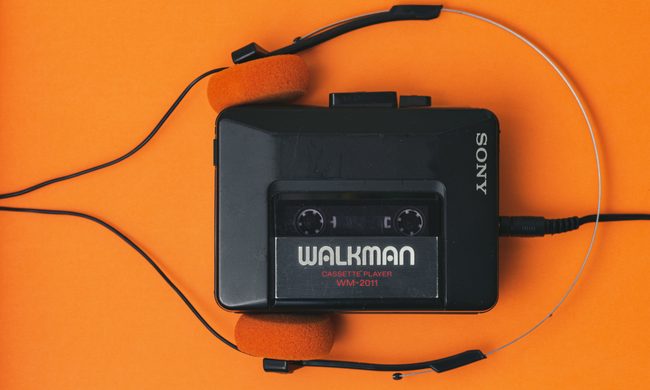
Sony Walkman WM2011

Every few months, another piece of tech that seems obsolete crawls out of a drawer and becomes cool again. The age of minimalism has revived the popularity of iPods among younger buyers. Dumbphones have become an escape hatch from endless notifications. Similarly, digital cameras are dangling from bags again. Physical media keeps attracting people who want something they can actually hold instead of another frustrating subscription.

All of this makes it the perfect time for Sony to bring back the classic Walkman, which was a phenomenon during the 80s and 90s. I would love one. Give me a compact cassette player, physical buttons, and wired headphones. Keep the apps, notifications, and algorithms that shape your taste of music. No more AI assistants or personalzied feeds, just you and your Walkman. There is only one problem though. Recreating the Walkman that people love and remember, would be far harder than putting an old design back into production.

Read more