If you used a Windows computer in the early 2010s, chances are you experienced Windows 8. Whether it was a good experience is another matter entirely, though. If you ask me, it was a bit of a disaster.
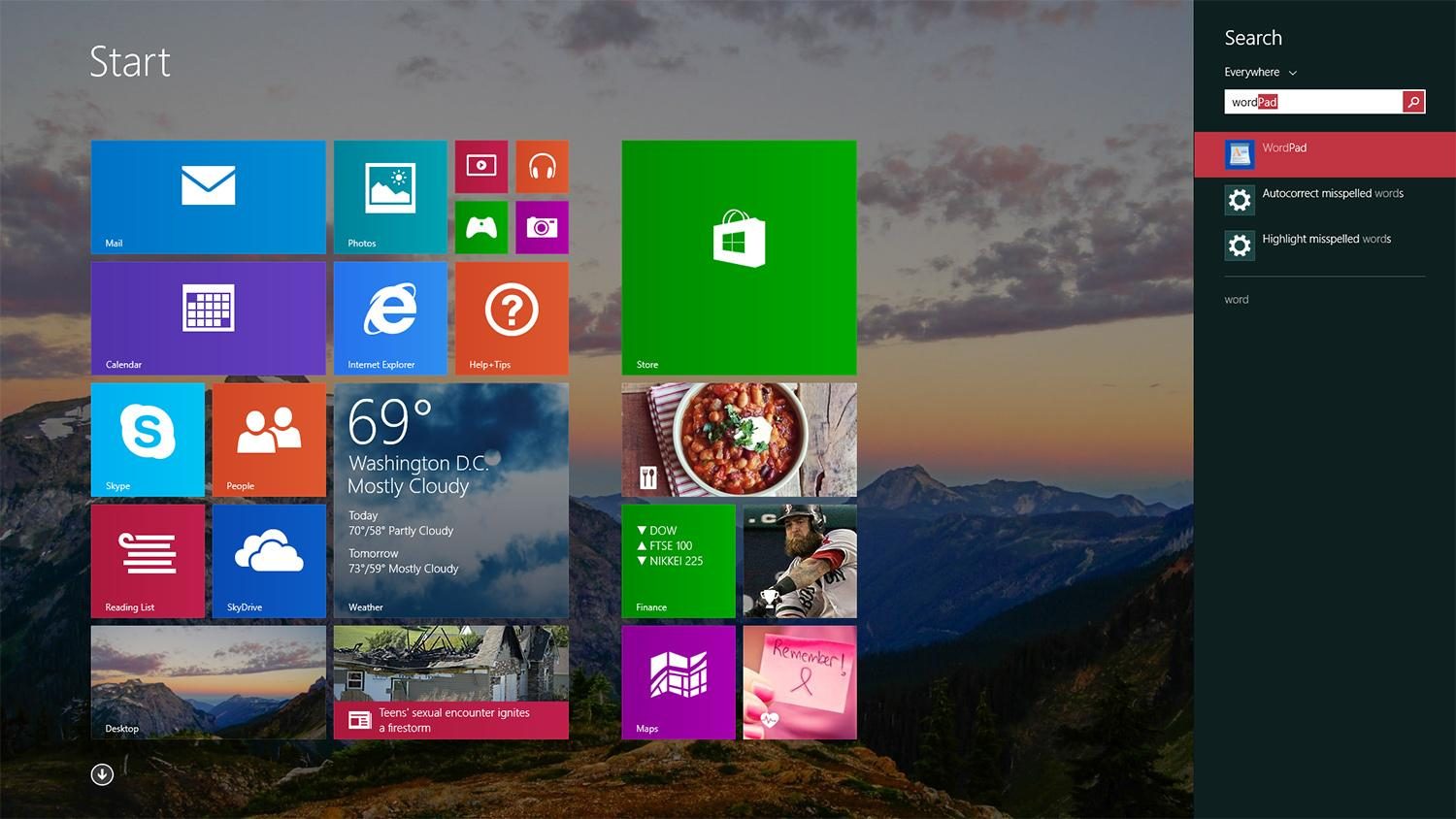
For me, updating to Windows 8 was an unexpected jumpscare. Maybe you had a similar experience; perhaps you just updated your computer one day to discover that the beloved Start Menu vanished without warning. In its place, you saw a full-screen tile interface that probably made you feel like you were using a phone rather than a desktop.
With one update, everything you knew about Windows was … gone.
Please, Microsoft, never again
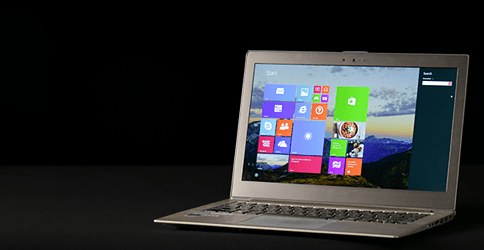
Users quickly expressed their frustration about the update and criticized the new layout, which was confusing and too focused on touchscreens. Many called it a step back for productivity, especially for power workers. I agree with that mindset, and because of that, I really hope Microsoft never resurrects some of these Windows 8 staples.
Tablet-like, overly busy interface
Hopefully, Microsoft won’t remove the Start Menu again or try to revive the tiled interface that defined Windows 8. Those tiles blinked, flipped, and refreshed constantly, all trying to get your attention, whether it was calendar updates, weather forecasts, or news headlines. It felt like Microsoft designed Windows 8 for swiping, not clicking, disrupting the flow for anyone using a traditional mouse and keyboard.
The experience wasn’t just strange, it was frustrating.
Metro apps
Another frustrating part of the Windows 8 experience was how tightly it sandboxed the Metro apps. Even though the Metro apps are gone in Windows 10 and 11, hopefully, Microsoft doesn’t try something like this again and claim it was to “enhance security for our Windows users.”
Why was this frustrating? For example, if you wanted to edit images, you had to import them into the app, even though they were already saved on your PC, creating pointless duplicates. While the process prevented apps from misbehaving, it was horrible for users with low storage. Apps couldn’t interact with each other since one was stuck in its little workspace. It seemed like Microsoft didn’t trust users to handle their software and took a heavy-handed approach.
Charms bar
Adding to the frustration of Windows 8 was the Charms bar, a hidden menu that always seemed to appear when you needed it the least. It would activate unintentionally when you moved your cursor to the corners of the screen or when swiping on a touchscreen, breaking your focus in the middle of tasks.
One Windows 8 user said the Charms bar drove him out of his mind since it would constantly pop up when adding descriptions and pictures, making a simple process time-consuming. That’s all in the past, but placing it somewhere less intrusive would have been great.
Fine, there were some good things, too
Looking back, not everything with Windows 8 was terrible. Microsoft introduced Fast Startup, a hybrid boot feature designed to reduce the boot time by logging you off while saving essential system files and drivers to a hibernation file. It was a lesson in what happens when a company tries something new, and that not every experiment pays off.
Microsoft’s push towards a touch-first design didn’t sit well with users since most still used desktops and laptops. The shift from the familiar desktop experience to a full-screen Metro app made it feel like you were using two different operating systems. Thankfully, Microsoft picked up on users’ frustration and tried to fix it as best as it could.
With the release of Windows 8.1, Microsoft brought back a Start Button (though not the full menu) and reintroduced a more familiar desktop experience. The update smoothed out some of the rough edges, but it was too late, and the damage was already done, with users eagerly waiting for something more familiar.
Let the past stay in the past
I’m not surprised that Microsoft reversed its direction with Windows 10. I’m also not surprised that it was a hit, following a less-than-loved release. Windows 10 and 11, both being solid operating systems, actually break a pattern for Microsoft; user reception varied between releases in the past.
Windows 7? Universally loved. Windows XP? Same. But Windows 8 and Windows Vista? Not so much.
Ultimately, Microsoft tried to chase a growing trend by adapting its PC OS to the smartphone era. It wasn’t wrong; smartphones only grew in popularity and are now much more common than PCs. But with such vastly different form factors, it’s best to let each have its own lane and stay there. That’s why I hope Microsoft never resurrects any of these Windows 8 features.