Apple’s macOS is a brilliant operating system, but there’s one thing it handles pretty poorly: audio. It’s such a fundamental part of any computing experience, yet it’s left me feeling disappointed, despite going through a ton of macOS updates over the years.
Sure, macOS has some audio controls, but they’re fairly basic. There are sliders for volume and left/right balance, options for which speakers to play sound effects out of … and not a huge amount more.
As well as that, everything except the actual volume level is hidden away in the System Settings app. You can mute the volume or turn it up and down using keyboard shortcuts, but every time you want to make more than just a small adjustment, you have to dig around in the settings. It’s not exactly optimal.

If you find yourself frequently adjusting the volume of your Mac — or you just want a bit more power over how input and output sounds are handled on your computer — this whole situation is far from satisfactory.
Luckily, I’ve found an app that fixes the audio on my Mac once and for all. It’s called SoundSource, and it’s developed by Rogue Amoeba, who also make other apps designed for audio nerds and tinkerers.
SoundSource gives you a level of control over your Mac’s audio that Apple could only dream of. And it does this all while stowing away neatly in your menu bar, where it’s both out of the way and just a click away when you need it.
Since I started using SoundSource, I’ve been amazed at how much easier it’s made managing my Mac’s audio output. It’s quickly become one of the best Mac apps around, and I install it on any new Mac I get. Simply put, I couldn’t do without it.
Power at your fingertips
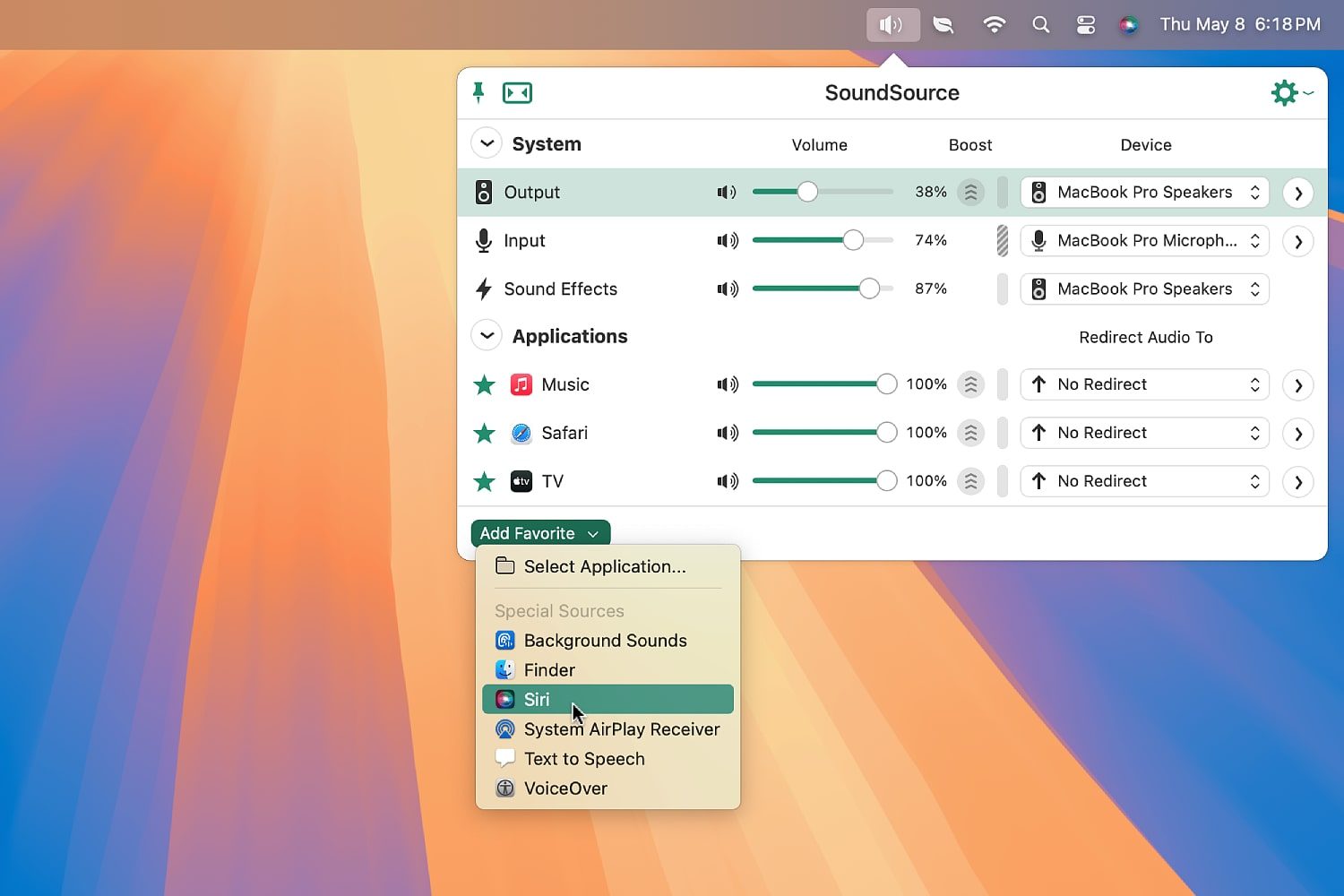
Let me explain how SoundSource works. Once it’s installed, click the app’s menu bar icon and you’ll see a pop-out window filled with various audio options. There are sliders for output, input and sound effects, letting you control (or mute) them all individually. That’s good if you’re watching a movie, for instance, and still want to be able to hear your Mac’s alerts, but without them drowning out the action on-screen.
You can also pick an output device for each option — like sending your music to a heavy-duty speaker set but keeping system sound effects on-device. Click the down arrow on the right-hand side and you’ll also find options for left/right balance, equalizers and effects. There’s plenty more power when you need to find it.
It doesn’t end there — one of SoundSource’s real strengths is how it works with apps. Choose an app from the Add Favorite button at the bottom of SoundSource’s window and it’ll be pinned in place every time you open SoundSource, giving you access to adjustments with a quick click.
Each app can be controlled independently of the overall output slider. That gives you a lot of power to rein in an overly loud app or boost the volume of a very quiet one without affecting overall system sound. An app’s output can also be sent to whichever speaker or output device you want — again, regardless of how you’ve set up the output and sound effect sections.
Sounds serene
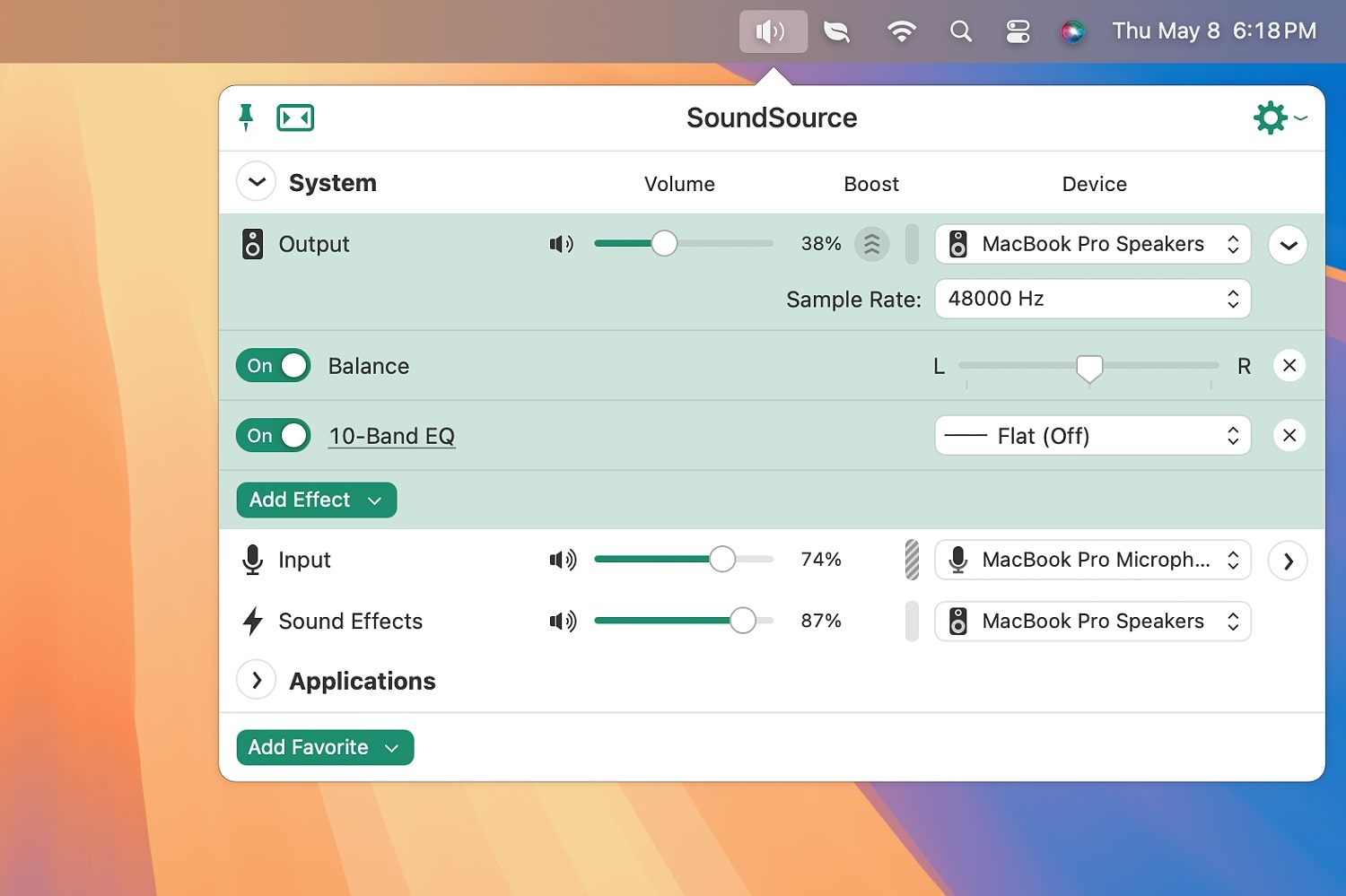
All this means that SoundSource really provides a lot of power for people who want to make their audio behave the way it should. It’s ideal for power users who aren’t content to sit by and let subpar audio rule their Mac.
Yet despite that, it’s not an intimidating app. All of its options are easy to understand and there’s no information overload, despite the ease with which that could happen. It displays just the options you need, all neatly presented and organized.
SoundSource has a free trial, but you’ll need to pay to unlock all of its functionality. Yet if you decide to do that, you just have to pay a one-off purchase, so there’s no recurring payment to worry about.
I’ve been so impressed by SoundSource that using a Mac without it feels strangely backward, as if even Apple’s default software isn’t up to scratch. That, surely, is a sign that SoundSource is doing something right.