
  1. Home
  2. Social Media
  3. Web
  4. Legacy Archives

Vine’s silent update adds awaited video embedding function

Add as a preferred source on Google
Vine App Icon
Image used with permission by copyright holder

Yes, it’s the news that every Vine user has been waiting for. In a new update today, Twitter rolled out an updated version of Vine that finally enables its users to embed Vine videos into tweets, Facebook updates, and just about everywhere else around the Web.

Prior to the update, we were using Vineit, a third party tool, which can only grab Vine’s via desktop browser. But now you can move in-house – and get embeddable Vine’s via mobile as well. 

Recommended Videos

Embedding a clip from the mobile app to the Web is a bit painful, however, but Vine is the only one with the mobile-to-Web capability right now. 
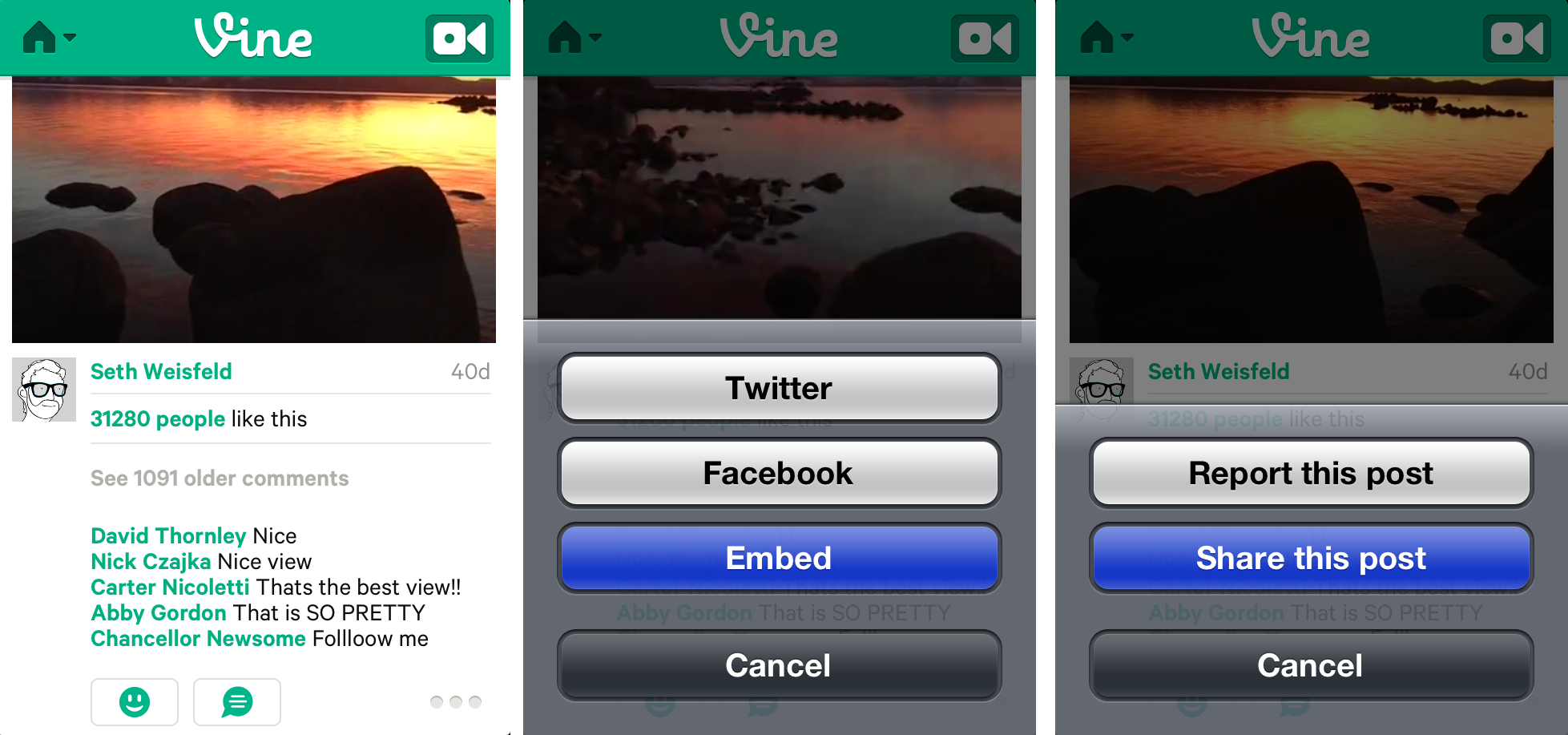
vine embed
Image used with permission by copyright holder

To embed a Vine video from the mobile app, tap on the three dots at the bottom right-hand side of the screen, which will open up the option to embed the video. Then tap on “Embed,” and then “Share this Post.”
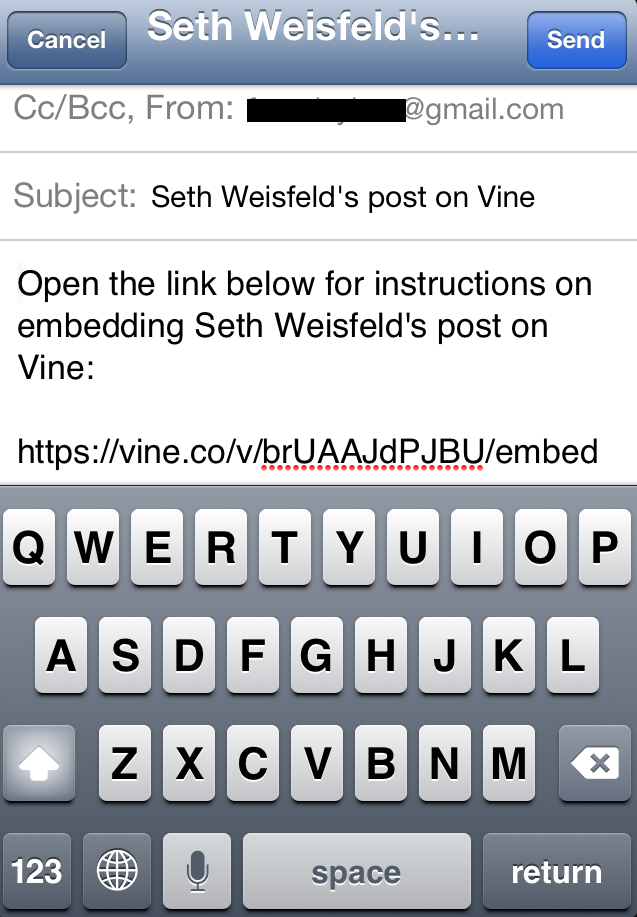
vine email
Image used with permission by copyright holder

Once you’ve done this your email client should have automatically opened up. You’ll have to type in your own email address to send yourself an automatically generated email that says “Open the link below for instructions on embedding [Vine user’s] post on Vine” and has the accompanying URL included below the text.

vine embed post page
Image used with permission by copyright holder

What’s convenient about this feature, compared to Vineit, is the fact that the look of the video is customizable in a user-friendly graphical user interface (GUI). You can choose how the Vine video is displayed, whether in “Simple” or “Postcard” form, and the size. The “Postcard” version displays the video within a white frame, along with the user’s name and Vine, timestamp, and Vine logo. “Simple” on the other hand is frameless and you have to hover your cursor over the video to check out the creator’s name and timestamp. At the very bottom you’ll find the embed code that you’ll need to copy and paste into wherever it is that you’re sharing the video.

Those of you with a little HTML know-how will immediately recognize that the video’s URL is simply embedded in an <iframe>, with the measurements and looks nested inside of the tag. So really you can customize the video however you wish.

If you’re looking to embed a Vine video directly from the Web app, you’ll have to scroll all the way to the bottom of the page to the “Embed” button. Or, if you know how URLs work, a simple trick if you prefer typing rather than moving your cursor, is to type in “/embed” (not including the quotes) next to the URL like so: https://vine.co/v/brUAAJdPJBU/embed.

And while you can share Vine’s to Facebook, you’re really just sharing a link. Vine’s still aren’t supported by the platform and won’t play. 

fb vine
Image used with permission by copyright holder
Francis Bea
Former Digital Trends Contributor
Francis got his first taste of the tech industry in a failed attempt at a startup during his time as a student at the…
Topics
Snapchat’s Spotlight algorithm now favors human-made videos over AI-generated ones
Snapchat is taking a firm stance against AI slop.
Snapchat-App-Store-open-on-iPhone

If you've been uploading fully AI-generated videos on Snapchat in hopes of earning rewards, it might be time to rethink your strategy. Snapchat has announced changes to Spotlight that prioritize authentic, original creativity over content created entirely by artificial intelligence. The company says its recommendation system will now favor videos made by real creators, while fully AI-generated submissions will no longer qualify for monetization.

So what's changing on Spotlight?

Read more
LinkedIn is crowdsourcing its fight against AI slop
The company is rolling out a new button that lets you flag posts that seem AI generated.
LinkedIn seems like AI slop button

LinkedIn has a serious AI slop problem, and it's now turning to its own users to help fix it. The platform is rolling out a new button that lets users flag posts they suspect were generated by AI. It plans to use that feedback to fine-tune the system that decides how much reach a post gets outside a user's own network, based on how AI-generated it appears.

The announcement comes shortly after an analysis by Pangram found that more than forty percent of long-form LinkedIn posts are fully AI-generated, and it suggests that the reach-trimming measures the company rolled out earlier this year haven't been enough on their own.

Read more
WhatsApp finally fixes one of its biggest storage headaches with this new cleanup tool
whatsapp-disappearing-messages-after-reading-timer

If your phone's storage keeps mysteriously shrinking, WhatsApp channels might be part of the reason. Photos, videos, voice notes, and other media shared by channels can pile up in the background, and until now, cleaning them out hasn't exactly been a pleasant experience. That's finally changing.

WhatsApp is rolling out a new storage cleanup tool for channel media, giving Android beta users a much simpler way to free up space without digging through endless files one by one. The feature was first spotted in development a couple of months ago, and it's now beginning to reach select beta testers through the latest WhatsApp beta for Android update.

Read more