  1. Home
  2. Computing
  3. Legacy Archives

Zendock removes cord clutter, gives MacBook owners organized bliss

Add as a preferred source on Google
zendock-pro_dt
Image used with permission by copyright holder

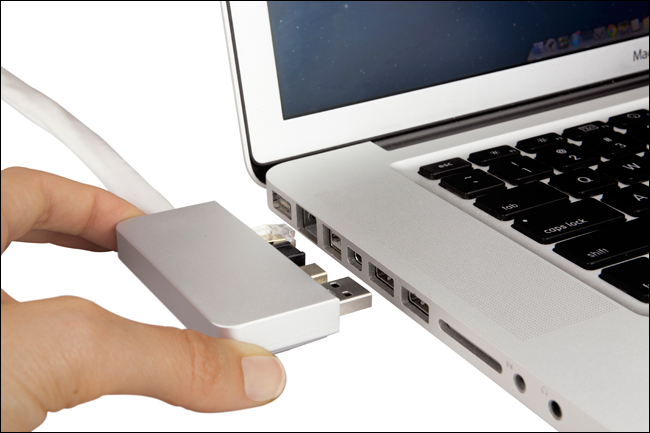
The irony of the MacBook Pro’s sharp, clean aluminum lines is that the instant you plug an external hard drive, wireless mouse dongle, extra monitor, and headphones into your machine, it looks like a tangled mess. Never mind that when you’re ready to head out with your laptop, you have to unplug all of those cords one by one. Sure, there are docking stations available for Macs, but most of them aren’t very pretty and take up a fair amount of desk space. A husband and wife entrepreneurial duo have come up with the Zendock by Zenboxx. It’s a new dock that not only looks nice when attached to your MacBook, but also controls cord clutter on your desk. 

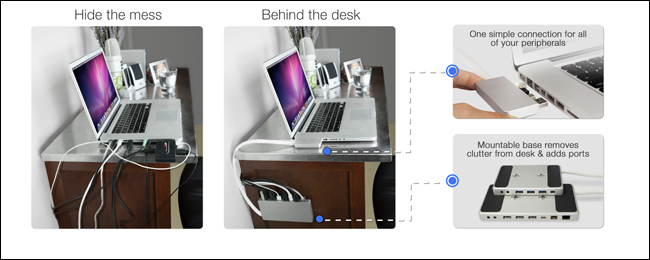
It’s a unique design for a dock that hardly looks like a dock at all. A small brushed aluminum piece with receivers for the power port, gigabit Ethernet port, Firewire 800 port, mini DisplayPort, and one USB port plug into one side of the MacBook Pro. That piece is connected to a discrete cord that is attached to the dock base, a wall-mountable box that replicates the laptop’s ports and adds a few others. The idea is that you only have to line up one plug when you’re ready to sit down at a desk with your MacBook, but it also eliminates a rat’s nest of cords that either sit on your desk or fall behind your desk the instant you try to grab one. Seriously, if we had a dime every time our power cord slipped between the wall and the desk, we could afford a new Retina MacBook Pro. 
zendock2_dt
Image used with permission by copyright holder

Speaking of Retina MacBook Pros, the Zenboxx will launch with a model to accomodate the newer Retina model as well as older MacBook Pros. The Retina model includes a Thunderbolt pass-through port on the laptop end of the dock so that there’s minimal loss of data transfer speeds. The dock base on the Zendock Retina model features three USB 3.0 ports, Mini DisplayPort, an optional gigabit Ethernet adaptor, and headphone and mic jacks. The Zendock Power model includes all of the above, but switches out the optional Ethernet adaptor for a permanent one and adds Firewire 800 to mimic the ports on the older MacBook Pro models.

Recommended Videos

Zenboxx plans on launching and shipping the Zendock as soon as possible, with an expected retail price of $179. However, the company has just started a Kickstarter campaign for the Zendock Power and the Zendock Retina with an early bird price of $99 for backers.

Meghan McDonough
Former Contributor
Meghan J. McDonough is a Chicago-based purveyor of consumer technology and music. She previously wrote for LAPTOP Magazine…
4 desk lamps I’d actually recommend for your back-to-school study setup
Good lighting won't do your homework, but it'll help you actually finish it.
desk lamp with white wall behind it

Back-to-school season means new notebooks, a planner you'll abandon by October, and way too many hours spent hunched over a desk lit by nothing but your laptop screen. If you've ever pulled an all-nighter or squinted through an assignment at 2 AM, you already know a good desk lamp isn't optional. It's survival gear.

I went through a bunch of options this year and picked four that actually earn a spot on your desk, whether you're working with a dorm-room budget or setting up a proper home office.

Read more
China’s Moonshot just handed developers a near-frontier AI model to download
Kimi K3 is now available to download, modify, and host independently
Art, Drawing, Plant

Moonshot AI has released the full weights for Kimi K3, giving developers the freedom to download, modify, fine-tune, and host the model themselves. The move comes shortly after K3’s debut, when Moonshot’s benchmarks placed it close to Claude Fable 5 and GPT-5.6 Sol, and even ahead in a handful of tests. K3 has 2.8 trillion parameters and a 1-million-token context window.

Downloading K3 is easy, but running it is not

Read more
Shopping for a Back-to-school laptop? These are the laptops I’d recommend
Whether it's lectures, late-night assignments, or streaming after class, these laptops are built to make the next few years a little easier.
Best laptops for back to school 2026 featuring Apple 2026 MacBook Neo

A laptop is probably the one purchase that'll have the biggest impact on the school year. It'll be there for lectures, late-night assignments, group projects, Netflix binges, and everything in between. The trick is finding one that fits both the workload and the budget. After narrowing down the options, these are the five laptops I'd actually recommend for Back-to-School, whether the priority is getting the most value, joining the Apple ecosystem, or investing in a machine that'll comfortably last through graduation.

Acer Chromebook Plus 515

Read more