  1. Home
  2. Computing
  3. Gaming
  4. Legacy Archives

Asus unveils Republic of Gamers G750 laptop with Thunderbolt, Nvidia GTX 765M GPU

Add as a preferred source on Google
Asus ROG G750 laptop5
Image used with permission by copyright holder

It’s a sweet time to be shopping for a brand new gaming laptop. With Razer, MSI, and Toshiba outing their top-of-the-line gaming machines, it’s time for Asus and its Republic of Gamers line to show ’em how it’s done.

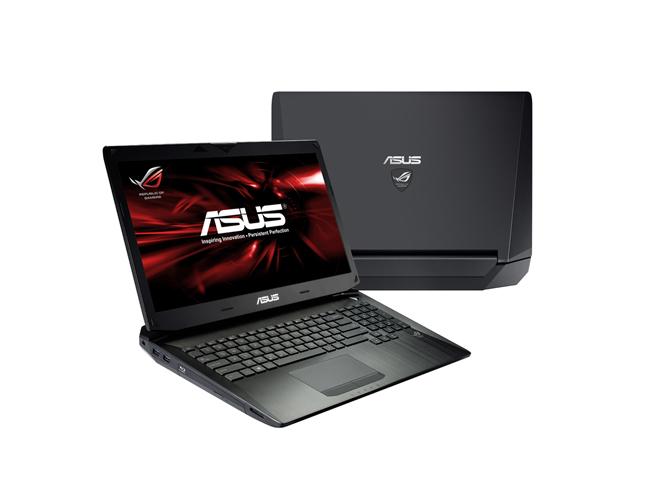
Earlier this week, Asus unleashed its latest RoG G750 laptop at Computex in Taiwan, available in three different configurations. Like other laptops in this category, the G750 is more a desktop replacement than an Ultrabook, with its 17.3-inch screen that tops out at 1920 x 1080 pixel resolution and a 120Hz refresh rate (the entry model has a lower-resolution 1600 x 900 display). It seems Asus is content to let competitors like the MSI GT60 3K Edition, which has a near-Retina 2880 x 1620 display, duke it out for cramming the most pixels into a display.Asus ROG G750 laptop

Recommended Videos

Instead, the G750 focuses on packing the best components available into a sexy package. All three variants (G750JW, G750GX, G750JH) use the same fourth-generation 3.40GHz Intel Core i7 (4700HQ) processor, have a max of 32GB RAM, as well as Nvidia GeForce GTX700M series discrete graphics, and GDDR5 video RAM. The laptop has dual rear vents and two fans pushing out the heat so you don’t have to worry about your G750 overheating from your 24/7 gaming.

If you take a tour around the laptop, you’ll notice it has a Thunderbolt port, which means it is capable of moving large media files at up to 10Gbps. To store your massive collection of games on solid-state drives, you can opt for the incredible dual-256GB-SSD, dual-128GB-SSD configuration that won’t be available until August. We wonder how much these options will cost.

At 1.9 inches thick (at its thickest point; slims down to 0.6 inches at its thinnest) and 9.9 pounds, the G750 is practically a phone book next to the 0.88-inch thin Razer Blade. That said, its bulkier chassis does have some benefits: its unique angular shape offers an ergonomic incline to its backlit keyboard and aluminum palm rest (pictured right). Its trackpad recognizes gesture controls to make navigating Windows 8 easy, and still offers two physical buttons for clicking.

The base configuration (G750JW) retails for $1,400 and comes with the Nvidia GeForce GTX765M and 2GB of VRAM, a 1.5TB standard hard drive, as well as a combo DVD and Blu-ray drive. It is available worldwide now.

[Updated on June 6 at 9:11pm ET: Corrected the thickness of the laptop to 1.9 inches at its thickest, and 0.6 inch at its thinnest.]

[Updated on June 11 at 10:30am ET: Replaced reference to the Toshiba Qosmio X75 with the MSI GT60 3K Edition.]


Gloria Sin
Former Contributor
Gloria’s tech journey really began when she was studying user centered design in university, and developed a love for…
Shopping for a Back-to-school laptop? These are the laptops I’d recommend
Whether it's lectures, late-night assignments, or streaming after class, these laptops are built to make the next few years a little easier.
Best laptops for back to school 2026 featuring Apple 2026 MacBook Neo

A laptop is probably the one purchase that'll have the biggest impact on the school year. It'll be there for lectures, late-night assignments, group projects, Netflix binges, and everything in between. The trick is finding one that fits both the workload and the budget. After narrowing down the options, these are the five laptops I'd actually recommend for Back-to-School, whether the priority is getting the most value, joining the Apple ecosystem, or investing in a machine that'll comfortably last through graduation.

Acer Chromebook Plus 515

Read more
These are the compact printers I’d actually recommend for back-to-school
From dorm room paperwork to instant selfie prints, there's a tiny printer for every need.
Computer Hardware, Electronics, Hardware

Everything is digital until the one professor who still wants a printed essay, or the lease you need to sign in ink, or the photo you want to stick on your dorm room’s wall. That's usually the exact moment you remember you don't own a printer anymore, and the nearest one is a library machine with a line out the door.

I looked at four compact printers that solve that problem without taking over your desk and breaking the bank. Two are built for documents, one is a proper all-in-one for actual home office work, and one has nothing to do with homework and everything to do with turning your camera roll into something you can hold.

Read more
Shopping for back-to-school? These are the webcam lights I’d actually turn on before a Zoom call
From a budget clip light to a proper desk setup, there's a webcam light here for every price.
Head, Person, Face

Between online classes, group project calls, and the occasional job interview over Zoom, your webcam will be doing a lot more heavy lifting in school than it ever did at home. The problem is that most laptop cameras are bad in low light, and a single overhead bulb or a window behind you turns every call into a game of "wait, can you see me okay?"

A good webcam light fixes that faster than moving your whole desk around. I picked five, starting with the most affordable and working up to the one that's genuinely overkill for a Zoom call but still worth knowing about.

Read more

