

It looks like Macs aren’t as impervious to computer viruses as we thought. According to Malwarebytes, cybercriminals are now targeting OS X devices with so-called ransomware – taking advantage of the fact that most Mac users feel safe and secure browsing the Web without running into a virus. After all, according to an ESET survey, in 2010, more than half of Americans thought PCs were “very” or “extremely” vulnerable to cybercrime attacks, whereas only 20 percent thought the same about Macs.
So, Mac users may be extra surprised when they see a “notice” from “the FBI” in their Safari browser. Known as ransomware, this type of malware restricts access to your computer, demanding users pay a ransom in order to remove the roadblock. Ransomware literally holds your computer hostage until you pay up.
According to the Internet Crime Complaint Center’s (IC3) 2012 Internet Crime Report, the names of various government agencies and high-ranking government officials are often used in spam attacks in an attempt to defraud consumers. In fact, the IC3 received about 47 of these complaints a day in 2012, with an average of about $141 lost per complaint. IC3 estimates that cybercriminals defrauded Americans of more than $4.6 million in 2012 alone, mostly by posing as the FBI or other government-related entities.
In the case of the OS X ransomware, victims will see a notice from the FBI that says ” you have been viewing or distributing prohibited Pornographic content. To unlock your computer and to avoid other legal consequences, you are obligated to pay a release fee of $300.” The whole thing stinks to high heavens, as the rest of the message goes on to say the victim must pay through GreenDot MoneyPak by buying a MoneyPak card at “any shop or gas station,” loading it with $300, and then entering the card’s code in your browser.
This form of ransomware usually pops up while searching for popular keywords and browsing popular sites. For example, Jerome Segura, senior security researcher at Malwarebytes, encountered the ransomware while searching for Taylor Swift on Bing images. Segura says that many people will actually pay the $300 since “the victim will feel they may have actually being doing something wrong and got caught and ashamed, will pay the ‘fine’”.
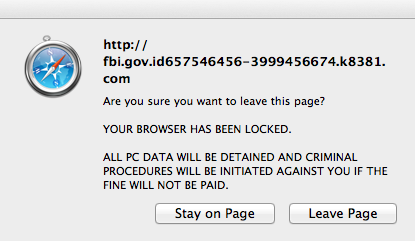 And, if you think you can just close your browser to get rid of the message, you’re wrong. It’s called ransomware for a reason. Even when you try repeatedly to close the page, you’ll get a “Leave Page” browser window that pops up and won’t allow you to click the “Leave Page” button. Your blood pressure will definitely be rising by this point. Force-quitting the application will only result in the ransomware page showing up the next time you open Safari. You can thank Safari’s “restore from crash” feature for that one.
But, before you take your laptop to the Geek Squad and presumably pay close to the amount these cyber criminals are asking you for, know that there is a way out. Thankfully, Malwarebytes describes it in detail – and it’s very simple. Here’s what to do:
- Click on the Safari menu button in the upper left-hand corner of your screen, and click “Reset Safari.”
- Select all the times in the menu, and then click the Reset button.
That’s it! Doing this should clear the ransomware from your Mac.
We hope you never have to do this. But in case you ever see a warning from the FBI pop up in your browser, do not send any money. It’s a scam that’s easy to escape.
You can watch the video below as well for more instruction.
[Photos via Malwarebytes]


