1. Home
  2. Computing
  3. Phones
  4. News

Chrome is testing a new feature that prevents websites from knowing exactly where you are

Chrome is testing a new feature that stops websites from knowing exactly where you are, giving Android users long-overdue control over their location data.

Add as a preferred source on Google
New AI Mode button on Chrome for iOS and Android.
Google

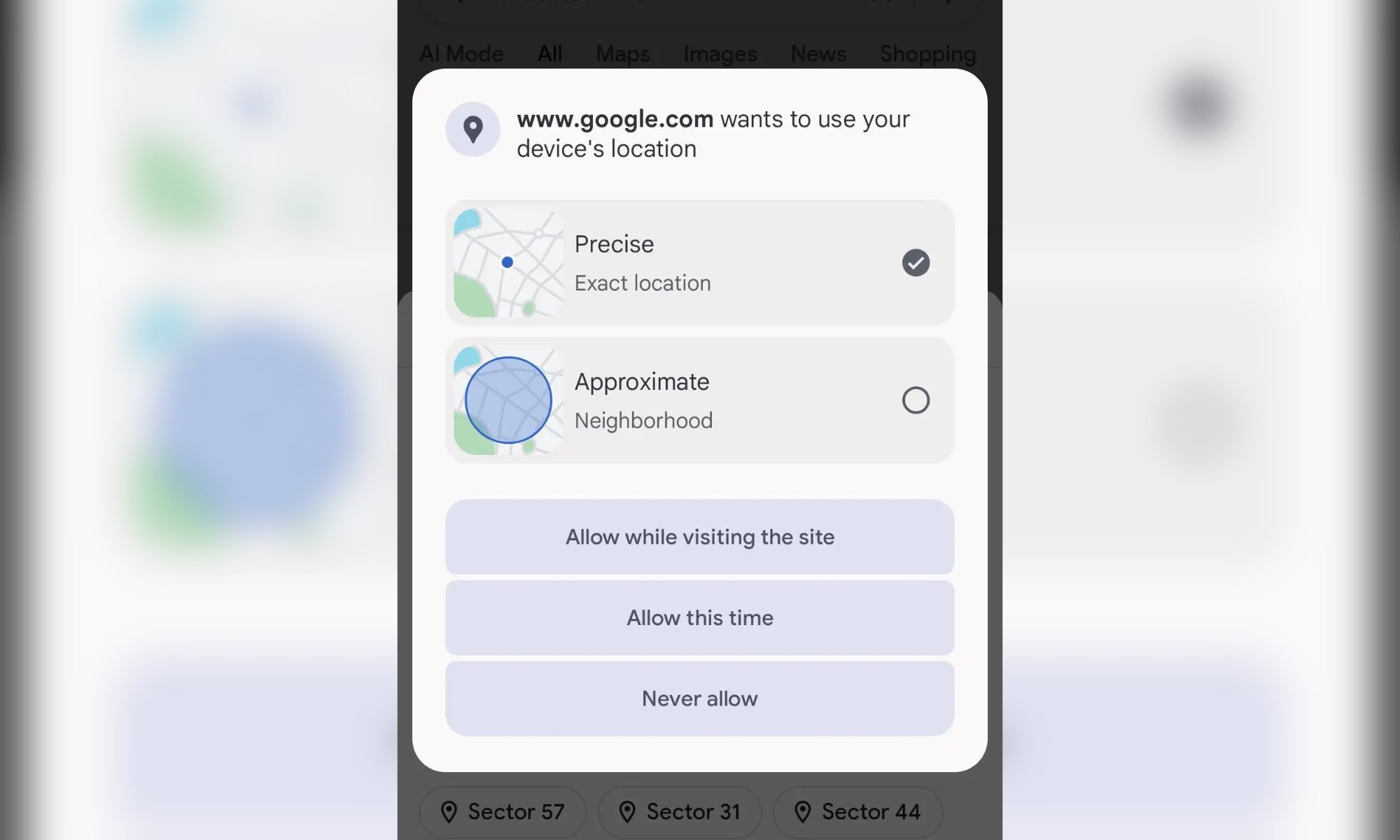
What’s happened? Google is testing a new approximate location toggle in Chrome for Android, seen in version 142.0.7444.171.

  • The feature lets a website access an approximate location, rather than the precise GPS-based location (via Android Authority).
  • The Chrome app itself still has precise location permission at the operating system level, but it doesn’t share it with the website.
  • This brings Chrome closer to Android’s app-level location model, which offers better user control over the location sharing rather than a one-size-fits-all permission.
Why is this important? Websites will no longer automatically gain access to precise GPS data, marking a major shift toward web-privacy parity with native apps.

  • It helps reduce unnecessary exposure of sensitive location information.
  • Although the update limits tracking, it still allows for essential location-based functionality.
  • This granular control could encourage more users to keep location access enabled rather than turning it off entirely.
Recommended Videos

Why should I care? You’ll be able to browse sites for weather, local news, and map previews, without revealing your exact location.

  • This reduces targeted tracking and hyper-localized advertising.
  • It cuts down on permission anxiety. Instead of choosing between sharing a precise location and nothing, you finally get a middle ground.
OK, what’s next? If testing goes well, Google should roll this out broadly, likely making it the default Chrome behavior on Android devices.

  • Other browsers may follow, creating a new privacy baseline in which approximate location becomes the norm for the mobile web.
  • Web developers will eventually need to design experiences that gracefully adapt to two different levels of location data accuracy.
Shikhar Mehrotra
For more than five years, Shikhar has consistently simplified developments in the field of consumer tech and presented them…
These are the compact printers I’d actually recommend for back-to-school
From dorm room paperwork to instant selfie prints, there's a tiny printer for every need.
Computer Hardware, Electronics, Hardware

Everything is digital until the one professor who still wants a printed essay, or the lease you need to sign in ink, or the photo you want to stick on your dorm room’s wall. That's usually the exact moment you remember you don't own a printer anymore, and the nearest one is a library machine with a line out the door.

I looked at four compact printers that solve that problem without taking over your desk and breaking the bank. Two are built for documents, one is a proper all-in-one for actual home office work, and one has nothing to do with homework and everything to do with turning your camera roll into something you can hold.

Read more
Shopping for back-to-school? These are the webcam lights I’d actually turn on before a Zoom call
From a budget clip light to a proper desk setup, there's a webcam light here for every price.
Head, Person, Face

Between online classes, group project calls, and the occasional job interview over Zoom, your webcam will be doing a lot more heavy lifting in school than it ever did at home. The problem is that most laptop cameras are bad in low light, and a single overhead bulb or a window behind you turns every call into a game of "wait, can you see me okay?"

A good webcam light fixes that faster than moving your whole desk around. I picked five, starting with the most affordable and working up to the one that's genuinely overkill for a Zoom call but still worth knowing about.

Read more
Google Chrome could soon let you translate pages right inside Reading Mode
However, not everyone's seeing it yet, even on Canary.
Google Chrome

Chrome's Reading Mode just got a new button tucked inside its settings menu. Google is quietly testing a translate option for the feature on Chrome Canary, the browser's experimental testing channel where new ideas show up long before they're ready for everyday use.

What does this new translate button actually do?

Read more