  1. Home
  2. Audio / Video
  3. News

YouTube Music can now turn your thoughts into a personalized playlist

Of course, AI is at play here. Unsurprisingly, you must have an active YouTube Premium or YouTube Music Premium subscription.

Add as a preferred source on Google
iPhone 15 Pro Max showing the YouTube Music app.
Bryan M. Wolfe / Digital Trends

Getting work done by simply describing is the hottest new trend. You can prompt an iOS app and publish it to the App Store with Replit. You can have Claude handle work files and make changes without even opening them. And then there are tools like ChatGPT and Gemini that can handle everything from Deep Research to making viral images and videos. The music streaming segment is aboard the AI train, as well.

Google has today announced that you can now simply describe your mood in natural language, and the built-in AI will create a playlist for you. The new AI playlist feature is already rolling out within the YouTube Music app on Android and iOS platforms. All you need to do is tap the “New” button that appears in the bottom-right corner of the Library page.

YouTube Premium and @YouTubeMusic Premium users can now instantly turn an idea, mood or genre into a personalized playlist using our new AI playlist feature 🎧

Here’s how to use it:

1. On Android & iOS, tap the “New” button in the Library tab of YouTube Music
2. Select “AI… pic.twitter.com/YR1GVCqwvu

— Updates From YouTube (@UpdatesFromYT) February 9, 2026

Once there, select the AI playlist option and simply describe your music mood. You can either choose voice or input, and once you’re done with the description, the AI will create a custom playlist within a few seconds. Unsurprisingly, this feature is locked behind a paywall, and you will need a YouTube Premium or YouTubeMusic Premium subscription to access it.

Recommended Videos

This won’t be the first attempt of its kind that blends streaming music with AI. Spotify also offers a tool called Prompted Playlist that lets you curate song libraries based on your mood or even building atop your listening history. The app also shows sample prompts created by its music editors and culture experts to get users started.

If the idea sounds appealing to you, ChatGPT also lets you link music streaming (among other services) to get work done. Officially known as ChatGPT Apps, all you need is to connect the accounts and then enter the natural language prompts to create a playlist without even opening the target music streaming app.

Nadeem Sarwar
Nadeem is the Managing Editor at Digital Trends.
TCL built a 22-speaker soundbar for turning living rooms into movie theaters, but it’s skipping the US
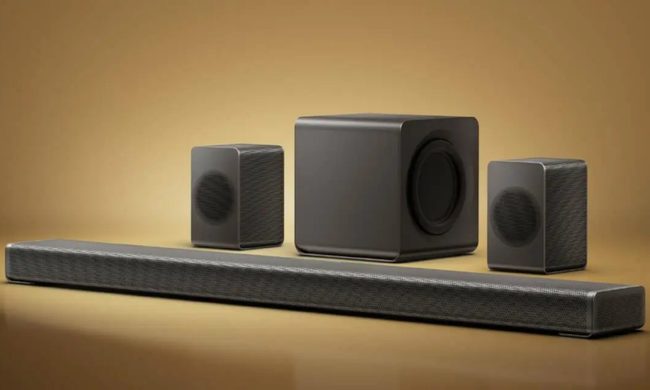
Here's everything inside TCL's new flagship Q95K soundbar, from its Bang & Olufsen tuning to its 360-degree sound tech.
Electronics, Speaker, Home Theater

I've used enough soundbars to know most "360-degree audio" claims are marketing fluff dressed up as innovation. TCL's new flagship might actually have the hardware to back that claim up for once.

The Q95K is TCL's new flagship soundbar. It's built around an 11.1.4 channel Hi-Fi architecture and tuned in collaboration with Bang & Olufsen. To me, it sounds like a serious attempt to compete with premium home theater setups.

Read more
Lenovo brings Bose-tuned Yoga headphones to the US and they don’t cost a fortune
Lenovo has a sub-$200 Bose-tuned headset for anyone glued to a Yoga laptop
Electronics, Headphones

Lenovo is entering the crowded noise-cancelling headphone market with a pair priced just a penny shy of $200. Called the Headphone Yoga PC Edition, they combine Bose-tuned audio, ANC, and a design built to complement the company’s Yoga laptops.

Initially announced at CES 2026, the Cosmic Blue version is now available directly from Lenovo in the US. The headphones are designed to complement Yoga PCs, although Bluetooth 5.3 and a 3.5mm input allow them to work with phones, tablets, and computers from other brands.

Read more
Stop joining group projects with a blurry laptop webcam and buy one of these instead
Your laptop webcam is sabotaging your first impression. These five can fix it
I'm holding my Logitech C920 1080p webcam in my hands.

The webcam built into your laptop might be good enough for a quick call with friends and family. But its shortcomings become much harder to ignore when you are presenting a semester project, interviewing for an internship, or maybe if you're planning to stream for fun.

Laptop cameras also tend to sit far too low, especially when the computer is placed directly on a desk. Meanwhile, a dedicated webcam lets you position the camera closer to eye level. This improves the framing and brings larger sensors, better microphones, and more effective low-light processing.

Read more
