  1. Home
  2. Computing
  3. Features

The best trick AI can pull is disappear into my gadgets instead of turning into a product

AI may finally become useful when it stops announcing itself and starts quietly fixing the annoying parts of everyday tech

Add as a preferred source on Google
Appliance, Blow Dryer, Device
Krishna Kumar / Unsplash

My wife recently woke up from a nightmare where AI had taken over human bodies. The likely culprit was less dramatic: Google Photos kept nudging her to “AI” herself when she only wanted to look at pictures of our cats.

That’s where a lot of people are with AI right now. Curious, tired, mildly creeped out, and increasingly annoyed when normal apps start acting like every action needs a software demo attached.

Recommended Videos

I get the tension. AI spent the last couple of years trying very hard to become a product. The better trick may be learning when to disappear.

The best AI gadget may not look like one

That’s why the most interesting examples right now often don’t look like AI gadgets at all. They look like ordinary devices that picked up a few new habits without demanding a new ritual.

Samsung’s Galaxy Buds4 can work with Galaxy AI features such as Interpreter and Live Translate when paired with compatible Galaxy devices, which turns the earbuds into the place where the feature shows up, rather than the product people are being asked to think about.

Apple is pushing a similar idea with Live Translation on AirPods, where the feature lives inside the earbud-and-iPhone ecosystem rather than a separate translation gadget.

Samsung’s Vision AI TVs use AI to tune picture and audio. Mercifully, the couch doesn’t need to become a chatbot terminal.

Google is doing its version with Pixel 10, where Gemini is built into the phone instead of sold as a separate pocket oracle.

That’s a better fit for people who aren’t trying to beta-test their toaster. They want the things they already bought to behave less stupidly.

Not every AI sticker means progress

The catch is that “AI inside everything” can also become the new “smart inside everything,” and that phrase has already committed enough crimes against kitchen counters. Some features are genuinely practical. Some are old automation wearing a shinier jacket. Some probably exist because a product box needed another marketing badge.

If AI helps a device do the thing it was already supposed to do with less fiddling, there’s at least a real job underneath the branding. If it creates a new panel, prompt, subscription, or setting to babysit, then it’s not progress. It’s another chore with better marketing.

Boring AI might be the useful kind

Consumer AI starts to make more sense when it stops arriving as another rectangle to charge, update, and eventually forget in a drawer. It works better as a layer inside products people already understand. That version is easier to understand because it does small, boring jobs well.

AI could follow the same path as older gadget features that used to sound futuristic like autofocus, noise cancellation, or image stabilization. At first, it gets marketed like wizardry, then it becomes expected. Eventually, people stop caring what made it work.

That doesn’t make the privacy questions disappear, and it definitely doesn’t excuse every dumb appliance with an AI sticker.

But it does suggest that AI’s best consumer future may be less loud than the industry wants. I don’t need another product fighting for my attention. I need the gadgets I already own to stop making simple things feel like tech support.

Paulo Vargas
Paulo Vargas is an English major turned reporter turned technical writer, with a career that has always circled back to…
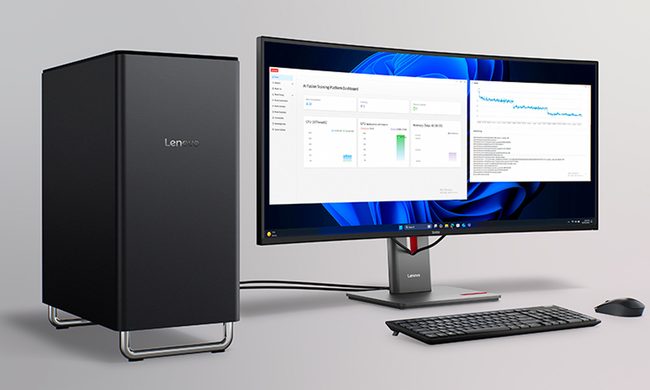
Lenovo’s next ThinkCenter desktop is ready to hit the shelves, but the price will make you blink twice
The ThinkCentre X is finally heading to the US with up to 256GB RAM, dual RTX 5060 Ti GPUs, and a price tag that rivals a used car.
Lenovo ThinkCentre X workstation with monitor

If the phrase "future-proof desktop" means never worrying about running out of RAM again, Lenovo may have just built the ultimate machine. The company is preparing to launch its new ThinkCentre X workstation desktop in the US after making it available in several international markets. Built for AI workloads, professional content creation, and demanding enterprise applications, the desktop can be configured with up to 256GB of DDR5 memory, Intel's latest Core Ultra 9 processor, and support for dual GeForce RTX 5060 Ti 16GB GPUs.

A workstation built for serious workloads

Read more
A metallic Hall effect keyboard and a 59g mouse are Lenovo’s latest upgrades for snazzy gaming setups
The Legion R7 RT75 keyboard and Y7MG mouse bring 8K polling to both sides of your gaming setup
Computer, Computer Hardware, Computer Keyboard

Magnetic gaming keyboards and lightweight mice are hardly unusual anymore, but Lenovo is trying to push both ideas a little further with its latest Legion peripherals. The new lineup includes the Legion R7 RT75 keyboard and Legion Y7MG mouse, and both support an 8,000Hz polling rate for players who want every input delivered to their PC as quickly as possible.

Of course, Lenovo has styled these peripherals to be as bold and eye-catching as possible without getting in the way of practicality. The keyboard has a hefty metallic design with translucent keycaps and RGB lighting. Compared to that, the mouse is more tame and traditional in design, but it also has an RGB strip that appears to belong on an alien spaceship. (via NotebookCheck)

Read more
Shopping for back-to-school? These are the budget laptops I’d actually recommend
From a $359 Chromebook to the cheapest way into macOS, these are the budget picks worth your money.
Computer, Electronics, Laptop

The back-to-school season often turns into a laptop, especially the budget ones that aren't too heavy on your wallet. Due to the ongoing memory crisis, most manufacturers have already bumped up their laptop prices, including Apple. However, that doesn't mean that I won't help you get a new machine. So, for this one, I spent time digging through spec sheets, customer ratings, and price tags, finding devices that don't just look cheap in an Amazon listing, but actually hold up. 

From a flexible touchscreen Chromebook to the least expensive way into macOS, these six laptops balance price and performance well. I'd hand any one of them to a student heading back to campus this fall, depending on what they need and what their priorities are. 

Read more

