
“The iClever Himbox HB01 system may be the most functional way to add both bluetooth audio streaming and hands-free calling to your car.”
- Simple controls and operation
- Helpful voice and tonal prompts
- Phone, Media, and Siri capabilities
- Call sound quality can be quiet
“Why you can trust Digital Trends – We have a 20-year history of testing, reviewing, and rating products, services and apps to help you make a sound buying decision. Find out more about how we test and score products.“
Out on the road today, the average car is generally around 10 years old. The rusty dinosaurs from the ’70s, ’80s, and even ’90s are dying out, but modern vehicles will fly past the 100,000 mile marker without slowing down. While the performance and reliability of your trusty transportation may be enough to keep you from buying new, there are some modern technologies you are living without. With the Himbox HB01 Bluetooth kit you can add hands-free calling and Bluetooth audio streaming to AUX-equipped machine. Could this be the $40 solution to keep the love alive between you and your older car?
Plugging In
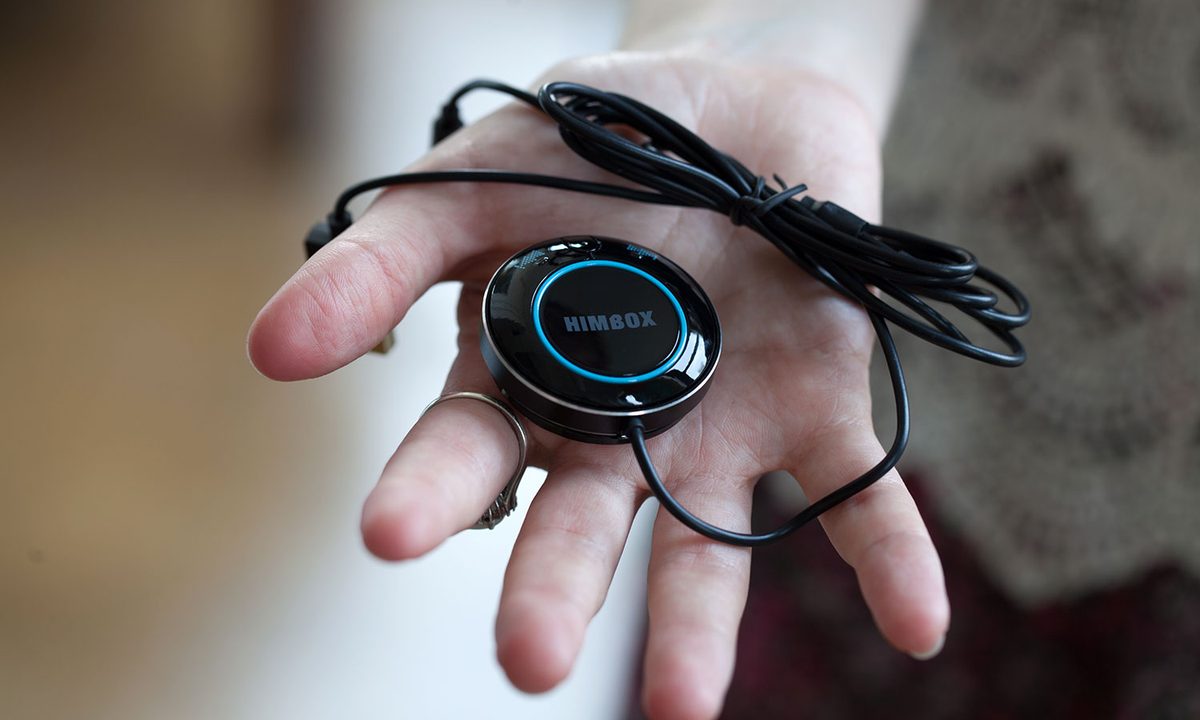
Out of the packaging, the system comes with a 12 volt car charging plug featuring dual USB ports – a 1 amp and 2 amp plug for charging your devices while the system is plugged in. One of the ports is where you will need to plug the USB cable for the Himbox Bluetooth controller disk and 3.5mm AUX connector. Measuring just over a foot, the cable should be long enough to span from the 12-volt charger in mosts cars to an area where the driver can mount the control disk.

Mounting the disk to a place where the driver can access the controls is easy with the magnetic mounting disk included with the Himbox HB01. The disk adheres to any part of your vehicle with 3M adhesive and allows you to magnetically attach the controller and remove it when needed.
Connect Your Device
With your car on and the system plugged in, the Himbox ring will flash blue lights as it is waits for your device to pair. On your phone or Bluetooth device you can search for “HB01” and attempt to connect. The system connected to both my iPhone 6 and Moto X (2014) without any issues and gives you a vocal prompt over the car stereo to let you know that a device is connected. Generally a device in this price range will only give you LED queues to let you know it is connected and the vocal sounds help give a more premium feel to the Himbox HB01.
You can even pair multiple devices if you or anyone else you share your car with wants to use the device seamlessly.
The controls on the device itself are fairly simple to understand and to navigate on the control disk. The disk features a large round center button that can be pressed for playing or pausing the current track on your device. Long pressing this button for 1-2 seconds will prompt Siri voice search on an iPhone device without any issues, Cortana on Windows Phone, and also bring up Google Voice Dialer on an Android. The device would open the full Google Now search only when the screen on my phone was already on once the button was pressed. This is common on many Bluetooth devices connecting to Android. The center button also answers a call when the device is ringing and can redial the last call when double pressing the device. The only other buttons are for skipping tracks back and forward with a single press and turning the volume up and down with a long press.
Driving With Himbox
Operation for use every day is rather simple once the device is plugged in and your phone is paired. You can even pair multiple devices if you or anyone else you share your car with wants to use the device seamlessly. When your vehicle stereo is in the “AUX” or auxiliary mode, you will hear the voice prompt to notify you that your Bluetooth paired device is connected and ready to stream media. You can then press the large play center play/pause button once the connection is made and the music on your device will play.

Using the HB01 to answer a call is easy as you simply press the large round button to answer once the phone is ringing. The voice quality is good coming from the incoming call, but sound quality can be faint on the other end depending on where you’ve placed the control disc that contains the microphone. In the 2005 Honda Element we used for the test, we had it originally mounted closer to the passenger side and moved it closer to the drive to improve call quality. Overall, the sound quality was as good as many of the newer in-car systems when the mic in an ideal position.
Conclusion
The iClever Himbox HB01 system may be the most functional way to add both Bluetooth audio streaming and hands-free calling to your older car. The AUX and 12 volt charging port on the Honda Element we tested the system in is not as ideal for hiding the cords and can seem cluttered. But for many, with the AUX port hidden in a glove compartment or center console, the Himbox HB01 will be a great hidden solution to connect your car to your phone. Feel free to ditch any aftermarket Bluetooth hands-free systems and separate Bluetooth audio dongles as the Himbox is the best combination to handle both worlds.
Highs
- Simple controls and operation
- Helpful voice and tonal prompts
- Phone, Media, and Siri capabilities
Lows
- Call sound quality can be quiet