Here’s a riddle: What does the pocket-sized Fiat 500 have in common with the tire-roasting Dodge Challenger Hellcat? It’s not a tight turning radius or a supercharged V8 engine. It’s the Uconnect infotainment system.
Both cars are manufactured by the same group, so their infotainment system is built using the same basic technology. Uconnect is found across the entire Fiat-Chrysler Automobiles (FCA) range, though it often features brand-specific displays, menus, and features. It’s one of the most intuitive systems on the market.
Further reading
Uconnect groups connectivity, entertainment, and navigation functions. It’s touchscreen-based, you don’t need to operate an awkward dial to navigate it, and it’s relatively easy to use. Here’s everything you need to know about it.
What does Uconnect do?
The touchscreen replaces the radio, so Uconnect’s most basic function is letting drivers choose the music they want to listen to. It takes a single tap to access the radio menu. From there, the driver can select a radio station, change to the AM band (yes, that’s still a thing!), or select a different media source. Options include Bluetooth audio streaming from a phone, an iPod, and SiriusXM satellite radio. Note that most of these actions can also be performed using buttons on the steering wheel and redundant buttons usually found on the center console.
Drivers can pair their Apple- or Android-powered smartphone to their cars via Uconnect. After completing a few basic steps, they’re able to make hands-free phone calls, send text messages thanks to cloud-based voice recognition technology, and access their list of contacts. The navigation function, which is often offered as an extra-cost option, provides turn-by-turn directions. Note that Uconnect annoyingly doesn’t let the driver enter a navigation destination if the car is moving. We know it’s for the sake of safety, but guess what? Most drivers who end up locked out of the navigation menu will pull their phone out right away, which is an even bigger and more dangerous distraction.


In some cars, the screen also lets users adjust the seats, change the climate control settings, and even dim the rear-view mirror. It’s also used to turn the 3G or 4G Wi-Fi hotspot on and off.
That is a robust feature set, but it doesn’t end there. Uconnect Access, a separate service for which owners must pay a monthly subscription fee, unlocks more. It gives motorists access to Yelp, puts them in contact with 24/7 roadside assistance, and generates a vehicle health report. It also notifies owners via text if their car’s alarm goes off, and it sends the vehicle’s location to the police if it’s stolen. The Send ‘n Go function is one of our favorites; it lets drivers send an address from their phone to their car. You can find a taco place on your couch, send the address to your car, and it will already be loaded in the navigation system by the time you start it up.
Uconnect Access’ smartphone app also makes it possible to remotely start the engine, lock or unlock the doors, and check the fuel level. In some models, including the Jeep Cherokee, Amazon Alexa compatibility lets owners talk to their car from the comfort of their home via their Echo device. “Amazon, start my Cherokee.”
The aforementioned features are fairly standard; you will find most of them on a Chrysler 300, a Jeep Renegade, and anything in between. Some versions of the software also boast brand- or model-specific software. For example, Dodge’s performance-oriented models (including the vaunted Challenger Hellcat) are available with an app named Performance Pages that provides information like the engine’s horsepower and torque output, the steering angle, the temperature and pressure of the oil, and the g-forces felt in the cabin in real time. Jeep, on the other hand, developed an app named Off-Road Pages for the Wrangler and the Gladiator that displays data like the status of the transfer case, whether or not the sway bars are connected, the altitude, and the angle of the slope the car is on.
What is Uconnect like to use?
Digital Trends has tested dozens of Uconnect-equipped cars since FCA released the software, and we’ve always been impressed by it. We named it the infotainment system of the year in 2015. It has evolved considerably since, but it remains a relatively simple and straightforward system to use. Clear, easy-to-recognize icons populate the home screen, and some versions of the software let the front passengers move tiles around with a drag-and-drop motion similar to that found on a smartphone. The menu bar located on the bottom of the screen also provides the driver with shortcuts to frequently used features, such as the radio, navigation, and climate control features.
Uconnect’s response time is relatively quick and it’s fast to load. Still, the screen’s resolution is beginning to look dated in some applications. It remains one of the more user-friendly infotainment systems on the market, though.
Which cars come with Uconnect?
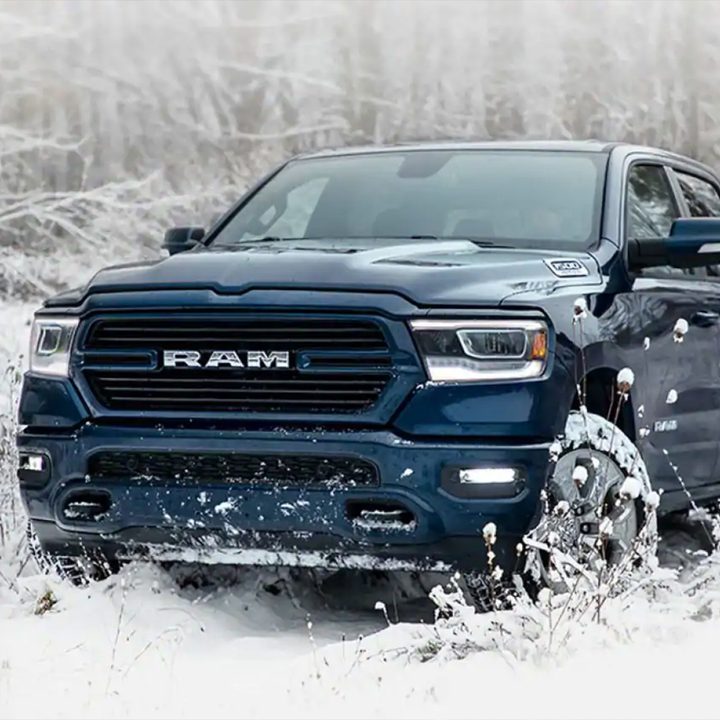
Nearly every new car from a brand operating under the Fiat-Chrysler Automobiles (FCA) umbrella comes with Uconnect. The list ranges from a tiny Fiat 500, which is leaving the American market, to the Dodge Challenger Hellcat. The list also includes the Jeep Wrangler, the Chrysler Pacifica, and the Ram 1500. The different screens in these various cars are equally diverse. The Fiat 500 comes standard with a 5.0-inch screen, while the 500X benefits from a 7.0-inch screen. Jeep’s Wrangler also offers a 7.0-inch screen. An 8.4-inch screen is available on many Dodge models, including the Challenger. The Ram, however, takes the size crown with the 12-inch screen that is available on top-end versions of its 1500, 2500, and 3500 pickups.
How can I keep Uconnect up to date?
There are two ways to keep Uconnect up to date. The first and most basic one requires a bit of work. Owners need to download the latest version of the software online, transfer the file to a USB stick, and load it onto their car via the USB port. They’ll need to upload the software by following the directions that appear on the car’s touchscreen. Alternatively, vehicles with built-in Uconnect Access or SiriusXM Guardian can receive over-the-air software updates. Note that the car needs to be located in the United States for this option. It also needs to be within the range of a usable cellular network for the function to work. FCA will contact owners via email to inform them that they’re about to receive an over-the-air software update.
What if I don’t like Uconnect?
Nearly every car, truck, and SUV equipped with Uconnect is compatible with Android Auto and Apple CarPlay. Download the free app, plug your phone into the USB port, and you’ll have a familiar interface at your fingertips.
Uconnect isn’t for everyone— we understand entirely. But before you jump to another option, we recommend thoroughly testing Uconnect’s extensive features. This service has emergency features, easy-to-use entertainment, and a navigable interface. While you can use a plug-in service like Apple or Android’s setup, this subscription is reliable, and it’s incredibly reactive and fluid.
With Uconnect, drivers can keep their hands on the wheel while still keeping important information and entertainment handy. Even with its entry-level features, you can play music through its onboard entertainment or even pair your phone’s navigation system with the car’s display. After connecting, you can listen to the navigation directions through your car’s speaker instead of having to check your phone to see your next turn. A 4G hotspot is also accessible if you’re using wireless networks.
The release of the fifth-generation of Uconnect will feature new upgrades, like wireless Android Auto and Apple CarPlay, a stronger visual display, and added processing power.