


“With a solid display panel, slim, attractive design and reasonable price, there’s little not to like about the practical HP 2310e.”
- Attractive, lightweight design
- Above-average brightness
- Powerful OSD
- Gloss screen catches glare
- No legacy VGA input
- Capacitive controls can be tricky at times
“Why you can trust Digital Trends – We have a 20-year history of testing, reviewing, and rating products, services and apps to help you make a sound buying decision. Find out more about how we test and score products.“
 Samsung. Apple. LG. All companies you might consider for a design-savvy monitor fit for the living room.
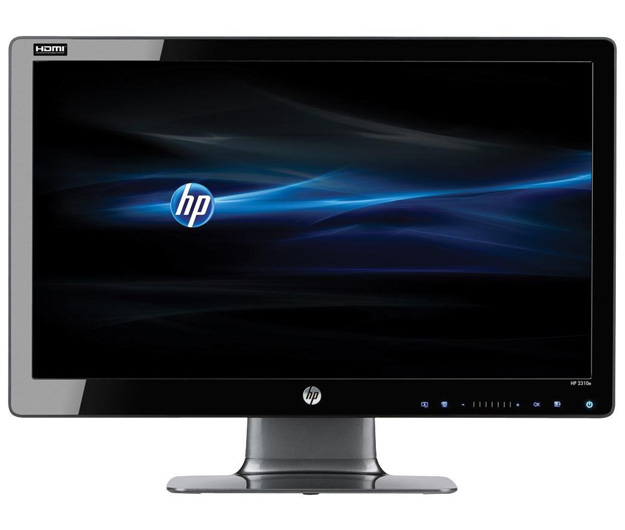
Now picture an HP monitor. If you’re envisioning a boxy black slab attached to some kind of industrial-grade metal arm, maybe situated in a beige cubicle at the DMV, you’re not alone. But no less misguided. While monitors still take a backseat to HP’s main business of, you know, the computers that power them, the company has made vast strides in design that now leave its desktop monitors looking downright desirable. Witness: The 2310, a 23-inch, 1080p monitor so thin and bright you’ll want to put it in the living room.
Features and specs
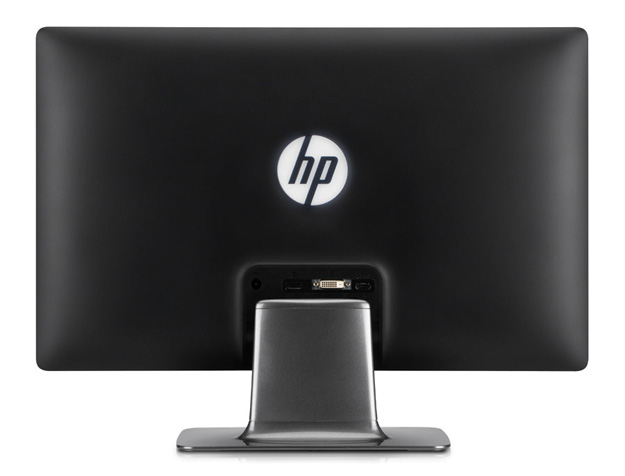
Although HP doesn’t go quite as far as Samsung’s unique translucent “touch of color” design, the slim, gloss-black frame and gunmetal base (in color only, it’s plastic) look sleek together. The skinny bezel bears a dime-sized HP logo, stripes that indicate where to press for the invisible capacative controls, and an aqua-blue power button, along with the model number scribed unobtrusively in the lower right corner. Flip it around back, though, and HP gets a little more aggressive in its branding with a glowing white HP logo the diameter of a pint glass. Unless you object to broadcasting the brand affiliation, it actually has a modern look that we grew to favor.
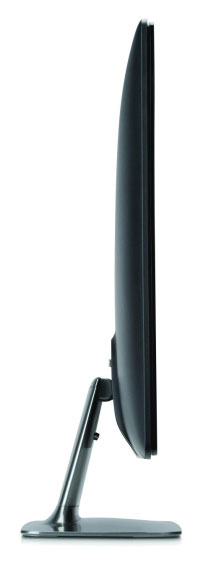
Thanks to its LED backlighting, 23-inch HP 2310e measures just over half an inch thick and weighs 9.5 pounds, making it one of the slimmer, lighter monitors you’ll find in this size class. It offers 250 nits of brightness, a fairly standard 5ms response time, and an 8,000,000:1 dynamic contrast ratio. Meaningless? Like a dynamic contrast ratios, sure, but as we’ll see in the performance section, it doesn’t disappoint.
 The stand on the 2310e doesn’t raise, lower or swivel, it just reclines about 10 degrees or so. It also lacks the VESA brackets that would allow it to work with aftermarket mounting solutions.
Around back, the 2310e offers HDMI, DVI and DisplayLink input, forgoing any analog options like VGA. To make the display as thin as possible, the monitor uses a brick power supply similar to a laptop’s, which plugs into the back as well. Although it will leave another ugly black box floating around under your desk, it also provides plenty of cable for situations where the monitor may be placed further from a power strip.
Interface
Capacative controls may be invisible, but we’ve run into enough kludgy implementations to make us miss the days of ugly old buttons. While not perfect, HP’s don’t fall into this trap.
Touching the short white strip of lines below the screen lights up six otherwise-invisible buttons, then acts as a control strip, scrolling through on-screen options as you drag your finger along it. While it works well for quickly shooting across half a dozen options, it’s also imprecise and difficult to land on the one you want. We ended up getting “close enough” then reverting to the plus and minus buttons to select the exact one. Some of the other icons can also be obtuse (What the heck does a monitor full of boxes with an arrow pointing to it represent?), but you’ll pick them up quickly enough.
Besides the usual tweaks for brightness, contrast and other display settings, the 2310e includes a bevy of options for monitor-specific functions like turning the front and rear LED lights off, power saving, and even adjusting the position of the on-screen display itself.
“Quick View” presets include movie, photo, gaming, text and of course, custom. Fortunately, choosing a preset doesn’t lock you out of any fine adjustments, so any of them can be tweaked to taste.
Performance
 Out the box, the text setting seemed to offer the most balanced, neutral image, with little tweaking. Thanks to a glossy screen and high brightness, the 2310e offers a lot of the initial “pop” that makes a monitor stand out when placed side-by-side among its peers. This makes browsing the Web and other activities with copious amounts of white and solid colors an impressive experience, but the weakness of the 2310 shines through in images with more nuance. While the monitor tiptoes around “crushing” blacks, it isn’t quite as nuanced on the opposite end of the spectrum. The brightest shades of grey tend to fall over into pure white, stripping some of the detail out of bright photos (think clouds and the like) and highlights in normal images (think the glitter on a sea of waves).
That said, the punchy brightness this monitor is capable of and inky blacks will still win it accolades among those who spend most of their time cruising the Web or sunk into spreadsheets.
Another redeeming factor turns out to be viewing angle. Although it uses a standard twisted nematic (TN) LCD panel, the 2310e exhibits excellent viewability from off angles, almost more in line with what we’ve come to expect from IPS panels. The only issue in bright rooms and offices may be the gloss, which turns the monitor into a black mirror when it’s off and interferes with viewing darker images.
At the standard 6500K preset, colors from the 2310e were accurate and required zero adjustment, while 9300K brought them to a predictably icy blue and sRGB settings favored a warmer look.
Despite the 2310e’s propensity to carry the brightest shades of grey a little too far toward white, it exhibited zero banding in gradients, producing smooth transitions across the color spectrum.
Conclusion
HP, we’re happy you’re sticking around with consumer products. As much as the company’s broad array of products can occasionally come across as bland and uninspired, models like the 2310e prove there’s still some zest to be found in its designs yet. With a solid display panel, slim, attractive design and reasonable price, there’s little not to like about the practical HP 2310e.
Highs
- Attractive, lightweight design
- Above-average brightness
- Powerful OSD
Lows
- Gloss screen catches glare
- No legacy VGA input
- Capacitive controls can be tricky at times


