

“HP touts the Rove as "the desktop that leaves the desk behind," but at nearly 12 pounds, we're not so sure about that. Still, its fantastic touch display and inventive hinge may be enough for it to compete with other all-in-one/tablet hybrids.”
- Lays down flat
- Beautiful screen
- Large and bulky
- Heavy
“Why you can trust Digital Trends – We have a 20-year history of testing, reviewing, and rating products, services and apps to help you make a sound buying decision. Find out more about how we test and score products.“
HP touts the Rove as “the desktop that leaves the desk behind,” but at nearly 12 pounds, we’re not so sure about that. Still, its fantastic touch display and inventive hinge may be enough for it to compete with other all-in-one/tablet hybrids.
Check out our review of the HP Envy Rove 20 all-in-one/tablet hybrid.
Sony did it. Dell did it. Acer did it. Now HP is doing it. The world of giant Windows 8 tablets just got bigger with the introduction of the HP Envy Rove, a 20-inch all-in-one PC set to go on sale in July. The Rove will get the benefit of Intel’s new 4th-generation Core processors as well as a battery to keep it going even when it’s not plugged in to the wall. Given the size, it’s not likely to be as portable as some of its competitors, though we expect it to be a fun family gaming platform.
Size matters
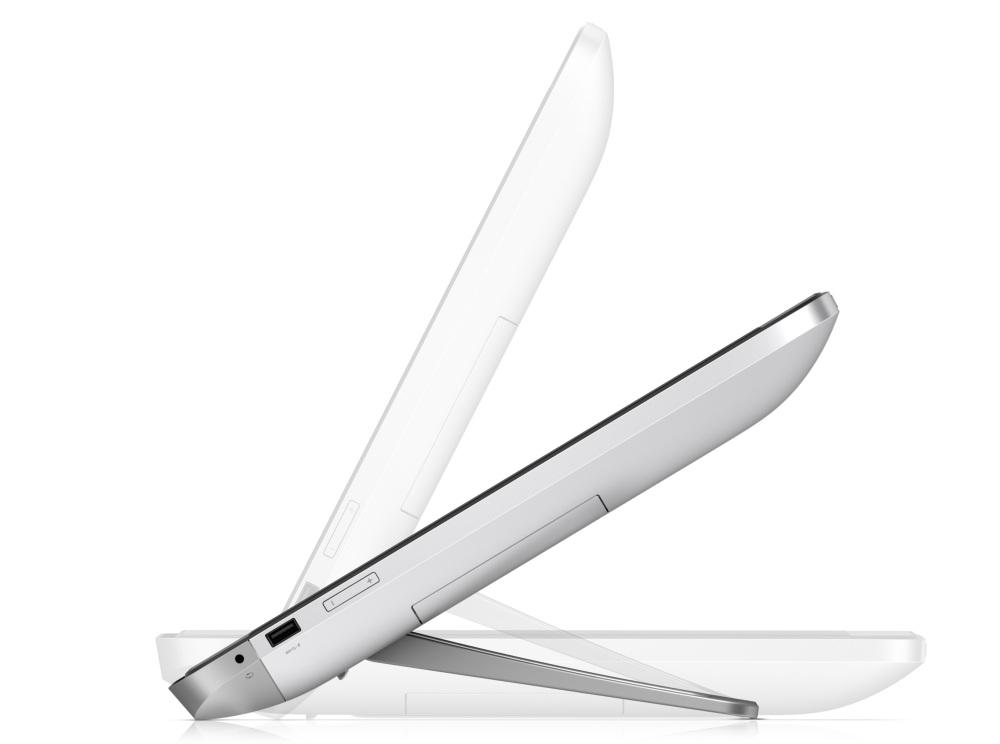
The Envy Rove is technically “portable.” It has a battery and you can move it, but it’s large, thick, and somewhat heavy at 11.86 pounds. You’re not going to want to move it around much. And unlike the Dell XPS 18, you probably won’t want to put it in your lap, either. No, where the Rove is most likely to find a great home is the tabletop, where it can easily switch between being a computer, a TV, and a virtual game board. The stand on the back is sturdy and will hold the Rove at almost any angle without moving, but it’s not hard to adjust. It tucks in flush with the back so you can lay the machine flat to play games.
Game time
Monopoly, Fingertapps JigsWar Puzzle, Fingertapps Musical Instruments, and Disney Fairies come pre-loaded, and we enjoyed trying them out. With the proliferation of big tablets and table PCs like the Lenovo Horizon, it won’t be long before more games of this type are available via the Windows Store. The Rove is well-equipped to handle them since the screen is bright and crisp with wide viewing angles (we were told 178 degrees) and 10-point touch. This is not the system to get if you’re a hard-core gamer because it won’t come with anything fancier than Intel’s integrated HD graphics. It’s strictly a casual/family games type of machine.
A cord cutter’s dream (in more than one way)
The 1,600 x 900 IPS LED screen is also excellent for watching video, and the inclusion of Beats Audio and pretty impressive built-in speakers makes it a nice multimedia hub. Load up Hulu, Netflix, Amazon, or any other streaming service and the Rove becomes a cord-cutter’s dream. The all-in-one desktop incorporates next-gen 802.11 ac Wi-Fi technology, so if you upgrade your home router for even faster speed, the Rove can keep pace. HP rates the battery at a little less than 4 hours off the charger, which is plenty of time for a game or a movie.
Other specs include three USB 3.0 ports, Intel Wireless Display (WiDi) technology, up to 1TB of internal storage, and a hybrid SSD/hard drive system (usually found in Ultrabooks) that should keep the Rove speedy while still giving you a ton of storage space.
Conclusion
The Rove isn’t the thinnest or lightest of this new breed of big tablets, but can it stand up to the competition? We think so. Ultra portability isn’t the main driver behind this type of all-in-one. No matter what, tablet all-in-ones like these are going to be heavy. The concept is more about flexibility. The Rove doesn’t have to only sit in the family room or the kitchen, it can go into the kids’ room on weekends or sit in the living room as a second screen while watching TV. It’s not going to get moved all the time every day, but, when you do have to move the thing, it won’t be a hassle.
The HP Rove will be available in July. Pricing has not been announced.


