  1. Home
  2. Computing
  3. News

Intel unveils ultra-small 5×5 board at IDF 2015

Add as a preferred source on Google

This week, Intel has been sharing some of its plans for the future at the 2015 edition of the Intel Developer Forum. The company offered up some more details on its much-anticipated line of Skylake processors, and now it’s unveiled a completely new product that’s currently in development.

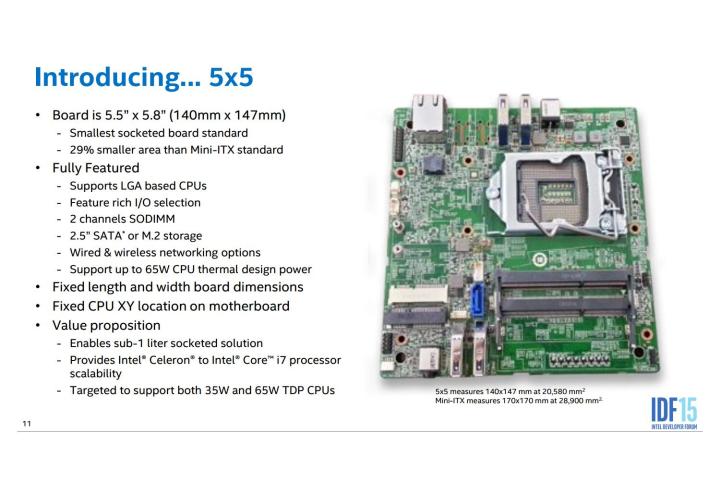
The 5×5 is being billed as the smallest board with a socketed CPU. At just 5.5 inches by 5.8 inches, it’s some 29% smaller in terms of area that the Mini-ITX standard.

Recommended Videos

Intel exhibited a prototype of the device alongside the NUC systems it brought to the CES 2015 back in January. However, back then it was without a name, suggesting that the project is reaching completion. The 5×5 likely won’t be a consumer product, instead being offered to device manufacturers to build systems around.

Offering Intel Core processors, M.2 or 2.5-inch SATA storage and support for wired or wireless connectivity, this board could take on a host of uses. The key to a product like this is flexibility, and that seems to be Intel’s priority in the design process.

We’re seeing an influx of small devices that need to built upon a fully-featured platform. It’s clear that Intel sees the value of micro devices based on projects like the Compute Stick, but a component like the 5×5 demonstrates that the company expects the industry to move in that direction also.

There’s no longer any one type of computer that seems like the norm — desktops, laptops and tablets all enjoy their own share of the market, and the lines between each are becoming increasingly blurred.

However, it seems that something even bigger — and yet, smaller — is on the way. Tech like this is a pre-requisite for such micro-devices to become a reality, and it will be very interesting indeed to see what sort of projects come to pass thanks to Intel’s 5×5.

Brad Jones
Brad is an English-born writer currently splitting his time between Edinburgh and Pennsylvania. You can find him on Twitter…
ChatGPT can imitate a cartoonist. Now it’s signing their name, too
OpenAI’s image generator has put real New Yorker cartoonists’ signatures on cartoons they didn’t draw, confusing readers about who made them
ChatGPT

Brendan Loper started hearing from people who thought he’d drawn a cartoon circulating online. His pen name was on it, but the image had been generated with ChatGPT.

Nieman Lab documented signatures belonging to more than 15 New Yorker contributors on AI-generated cartoons. Those names can give a reposted image a convincing credit line, even when the artist had no hand in making it.

Read more
Prime Big Deal Days sale ends tonight, and these are my 6 last-minute picks
Save up to 60% on tech from Apple, Sony, Google, Bose, and Ring before Prime Day ends.
Apple Watch SE 3 Google Pixel 11 and Bose QuietComfort headphones

Amazon’s Prime Big Deal Days sale ends tonight at 11:59 p.m. Pacific, leaving just a few hours to make those last-minute purchases. If you’ve been putting off a phone upgrade or waiting for an OLED TV discount, now is a good time to check your shortlist. I’ve picked six options covering everyday essentials and bigger upgrades, from Bose headphones to an M5 MacBook Air.

Sony Bravia 6 65-inch OLED TV - $1,298 (35% off)

Read more
Windows 11 is finally getting a useful battery widget for all your peripherals
Microsoft’s new Windows 11 battery widget is live for Insiders, but a broader release is still up in the air
ASUS Zenbook A14 Review Display 2

Microsoft had plenty to talk about today, including the announcement of the Surface Laptop Ultra and a major new Windows push around Hybrid Intelligence, expanded Copilot controls, and a redesigned Search experience. The quieter announcement may end up being more immediately useful for anyone juggling a laptop and several wireless accessories.

Windows 11 is getting a Battery Status widget that puts your PC and connected peripherals' battery levels in one place. Instead of checking your laptop in the taskbar and then digging through settings or separate apps for a mouse, keyboard, or headphones, you can see everything from the Widgets Board.

Read more