
When Apple’s WWDC 2014 developer conference kicked off the first week of June, the world got its first look at OS X Yosemite. As Apple execs took to the stage and rattled off the operating system’s new features and tools, it became increasingly clear how wholeheartedly it was embracing desktop computer users, instead of pushing them to the side as Microsoft has done since Windows 8’s release in Fall 2012.
Though Microsoft has attempted to repair its relationship with desktop PC users by adding a pseudo-Start menu and a dedicated power button (among other tweaks) to the tiled Modern UI in post-release updates, many remain unimpressed, according to usage statistics. According to Net Marketshare, Windows 8 and 8.1 adoption stands at roughly 12.5 percent as of last month, which is about half of Windows XP’s share (25.27 percent) and a quarter of Windows 7’s (50.06 percent). PC owners have said it loud and clear: They just don’t like Windows 8.
Instead of pushing desktop lovers away, Apple has mode moves to make life easier for those who reside in the world of traditional computing, and their mobile compatriots.
5. Leaving your phone in another room is no longer a nuisance
Who among us hasn’t made the mistake of leaving our phones on the other side of our homes when venturing to our computer desks? I often emit a groan of annoyance, because when I’m using my PC at home, I’m usually gaming. And when you’re playing online, you can’t just hit “Pause” and run to grab the phone. You have to wait until the match is over, or risk the wrath of other gaming geeks should your momentary absence result in a catastrophic defeat.
OS X Yosemite will allow you to both pick up and make phone calls from your Mac computer. So if you’re tethered to your Mac for whatever reason and need to stay put, you won’t have to deal with that helpless feeling of “Getting to Level 30 … too important, must … not get up to find phone!” You’ll be able to make phone calls from your Mac as well. Getting up is optional.
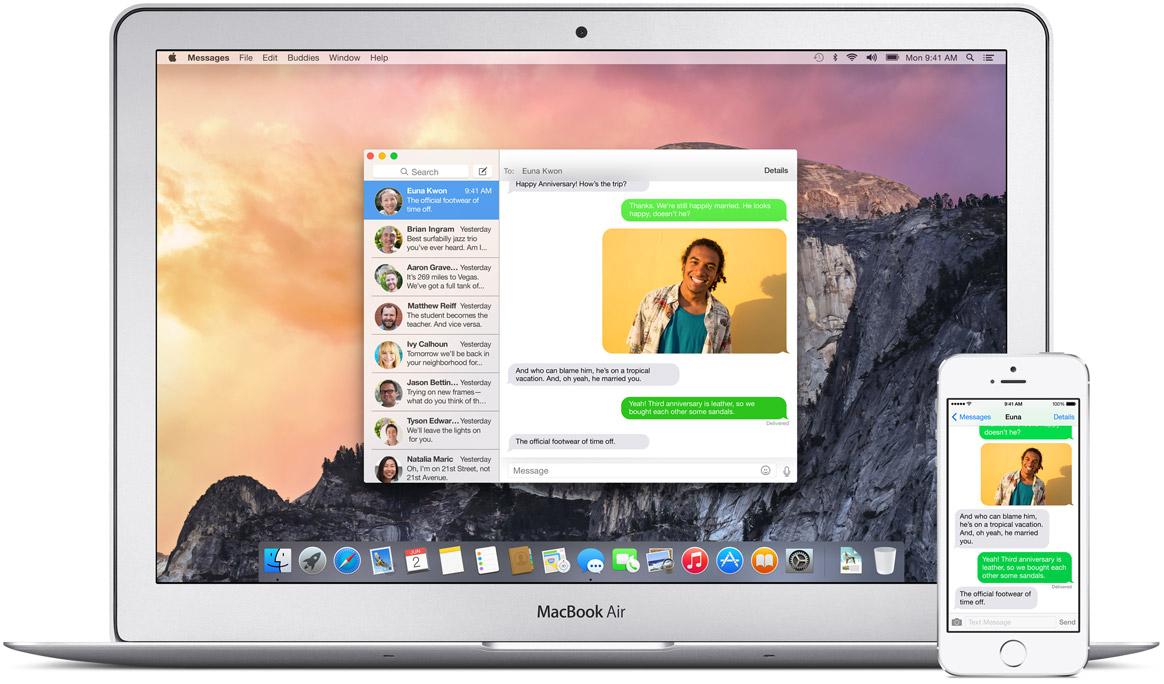
Forget baseball – the true great national pastime is laziness. OS X Yosemite realizes this.
4. With Spotlight, searching makes more sense
Some people are really good at keeping the stuff they have on their computers neat and organized. Not me. I’ve got photos in my documents folder, documents in my photos folder, and, well you get the point.
That’s why, when using Windows 8.1, I often find myself using the Search Charm to find things. Though its placement in the Modern UI (yes, I’m aware you can access it via the desktop, that’s not the point) makes using it a bit of a head-spinning experience, that doesn’t stop me from using Search. Still, I’ve often wished that Microsoft would seamlessly bake the Search Charm into the traditional desktop environment, instead of forcing you to interact with the mobile-esque side of the OS.
Apple’s new version of Spotlight is a breath of fresh air. Unlike the Search Charm, which pops out from the right side of the Windows 8 screen like a pedestrian trying to flag down a cab, Yosemite places Spotlight front and center, smack dab in the middle of your desktop. You can’t miss it, and it’s a big part of the overall Yosemite experience.
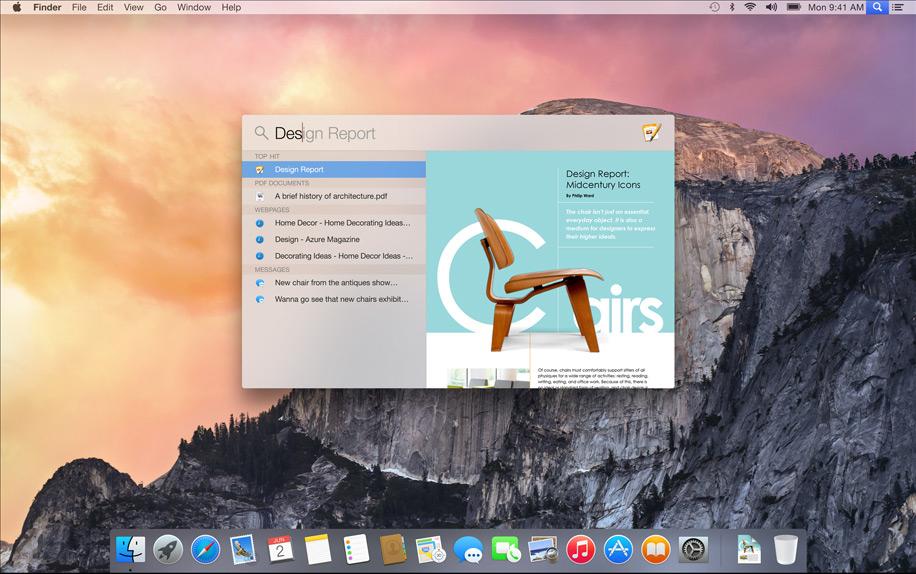
Then there are the content previews that Spotlight presents to you in search results. If you search for an app, you’ll get a description, a review rating, and a “More” link that will take you to the app’s full page. Looking for directions? You’ll get a Map preview, and buttons for directions to and from home. Movie showtimes? Check. Wikipedia integration with a preview snippet and a link to the full page? Spotlight has it. The Windows 8 Search Charm does suggest search results, but doesn’t have built-in previews like Spotlight.
There’s no reason why Microsoft couldn’t have done something similar, instead of pushing the Search Charm off to the side and clouding it in an overly mobile interface. That just doesn’t speak to desktop users.
3. With Yosemite, switching devices to finish tasks is simpler
PC users are often at their desks. When moving from your Mac to an iOS device (or vice versa), you’ll be able to pick up whatever task you were doing right where you left off when you switch to your other gear. Writing an email on your Mac but you want to move to the couch with your iPad? You’ll get a message on your iPad that tells you about your unfinished note, and lets you finish it. Windows has no such feature.
2. 5GB email attachments? Yes please!
Sharing large files with people has gotten a lot easier with the advent of cloud services like Dropbox and OneDrive (which used to be SkyDrive), but even email giants like Outlook and Gmail only allow attachment sizes of 25MB. Megabytes? Come on, that was fine during the age when the term mega was still relevant in computing, but we do almost everything by giga and tera these days. Unfortunately, the world of email attachments is still largely bound by megabytes.

Thankfully, with the new version of Mail in OS X Yosemite, you’ll be able to send attachments up to 5GB of size. Being able to send up to 5GB worth of attachments without having to log into another service streamlines the desktop experience in Yosemite.
1. It’s still free!
Not that we were expecting Apple to hike the price of OS X Yosemite after making OS X Mavericks free in October 2013, but it’s still worth noting that Windows’ biggest competitor is free. Meanwhile, a copy of Windows 8 costs roughly $100 on Newegg. Even Windows 7, despite the fact that it’s approaching five years of age, is the same price. That’s unacceptable, and this is coming from a guy who uses Windows 7 at home, and has been using Windows since Windows for Workgroups 3.11. That’s for all of you getting ready to cry “Apple fanboy!”
The fact is this. I’m not a Microsoft apologist or an Apple acolyte. I’m simply a consumer that likes good products, whether they’re made by Microsoft, Apple, Acme, or Stratton Oakmont, just like you. In the case of OS X Yosemite, instead of trying to shove a mobile-ish OS down our throats as Microsoft did with Windows 8, Apple is aiming to make life easier for us desktop folk.
As someone who’s about to head home to a Windows 7 PC, how can I not like that?



