

“The Roku 2 XS is a fabulous media streamer—for casual users, at least.”
- Brain-dead simple to set up
- Broad range of apps and services
- First Roku streamer to support games
- No DLNA support, so you can't stream content you own over your network
- Supports a very limited collection of audio and video file formats and codecs
- Can't mount disc images
“Why you can trust Digital Trends – We have a 20-year history of testing, reviewing, and rating products, services and apps to help you make a sound buying decision. Find out more about how we test and score products.“
Roku was first to market with a network streaming box capable of playing Netflix videos, and its product line remains the one we’d recommend to our non-techie friends and relatives. Our techie friends and relatives, on the other hand, know there are better media streamers on the market; but those devices—being more complex—are slightly more difficult to set up.
The Roku 2 XS sits atop Roku’s product line and delivers four features the less-expensive models don’t: a motion-control remote, a USB port, an Ethernet port (in addition to an integrated wireless Ethernet adapter), and a free copy of the game Angry Birds. But the XS is just as limited as the rest of the lineup in one respect: It can’t access music, movies, photos, or any other media stored on other devices on your network.
Features
If you’re a collector who buys music and movies on disc; rips, encodes, and stores the files on a server or NAS box; and files the discs away for safekeeping, you should ignore the Roku 2 XS, because the only way you’ll be able to play those files is to copy them to a USB thumbdrive (formatted as FAT16, FAT32, NTFS, or HFS+). The same goes for your digital photos (unless you want to upload them to your Facebook account first).
Roku is exceedingly stingy when it comes to supporting media codecs and file formats, too. You have a choice of two lossy codecs for music: AAC and MP3; the player can’t decode Apple Lossless, WMA Lossless, or FLAC. Video must be encoded as MP4 (h.264), with the option of using an MKV container. If you connect the box to your A/V receiver, it will pass through a Dolby Digital or DTS bit stream, but there’s no support for the high-definition soundtracks you’ll find in Blu-ray discs (Dolby TrueHD and DTS-HD Master Audio). Digital photos, meanwhile, must be in either JPG or PNG format. You can’t play music and display photos at the same time, so your slideshows will be silent.
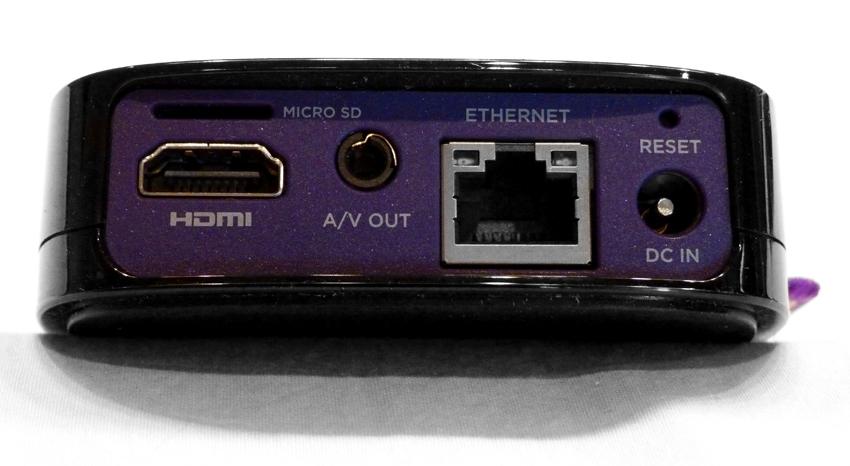
If you’ve shrugged your shoulders at each of those criticisms, you’ll probably like the Roku 2 XS a lot. As we said in the opener, the box is exceedingly easy to set up. (Although, contrary to Roku’s website pitch, you will need a PC, tablet, or smartphone to set up it and to add some services. You’ll also need to provide Roku with your credit card number, but you won’t be charged for anything unless your order a game or a pay-per-view movie). More importantly, the XS can deliver a broad range of media services (more than 200 channels). And more importantly than that, it delivers excellent video and audio quality when connected to your entertainment center with an HDMI cable (which is, unfortunately, not included).
Installation and Setup
In addition to buying an HDMI cable, you’ll need to go into the Roku’s settings menu to get the best quality the device is capable of delivering. While its video resolution tops out at 1080p, it arrives from the factory set to 720p. The box can stream 5.1-channel Dolby Digital soundtracks, but it arrives playing stereo. We changed both settings before connecting it to an Onkyo TX-NR709 A/V receiver and a 50-inch LG plasma HDTV (model 50PZ950) for this evaluation.
Several other popular media streamers cram every channel they support into their user interface, forcing you to page through a lot of stuff you might not care about to get to what you do want. Roku provides just a few apps in its UI by default, and asks you to add more through its Channel Store. Some of these installations involve a two-step process in which you add them on the Roku and then complete the transaction on a PC, tablet, or smartphone by logging into your Roku account and typing a code that’s displayed on your TV. The upside to this arrangement is that you see only the apps you want to use. Oddly enough, one of the channels you’ll need to add is required to make use of the Roku’s USB port.
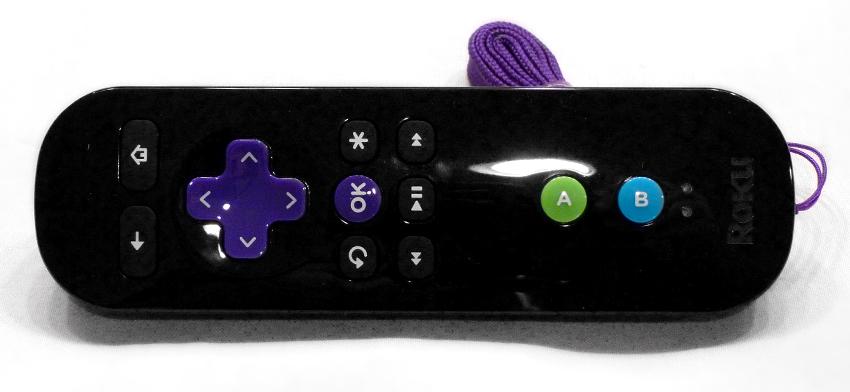
The Roku 2 XS’s motion-control remote makes the casual games that are available for this platform all the more fun (while Roku makes a big deal out of the fact that this model comes with a full version of Angry Birds for free, you’ll need to spend $4.99 to get the HD version). The remote communicates with the streamer via Bluetooth, instead of infrared, so there’s no line-of-sight requirement. And you can control the on-screen cursor — to slingshot an angry bird, for example — by waving the remote in the air (very much like the controller on Nintendo’s Wii). The remote has an indent on the back, into which our index finger fit very naturally, and its buttons delivered just the right amount of tactile feedback.
We’re disappointed that Roku didn’t include a dual-band (2.4- and 5GHz) Wi-Fi adapter inside the XS. If you live in an environment that’s crowded with other wireless routers operating on the 2.4GHz frequency band, and you’ve purchased a dual-band router to get around the problem, this device won’t be able to take advantage of it. In that case, you’ll doubly appreciate the presence of XS’s hard-wired Ethernet port (if you don’t want to string Cat5 cable, you might consider setting up a power-line network).
Conclusion
The Roku 2 XS is a fabulous media streamer — for casual users, at least. It’s extremely easy to set up and use, and it delivers most of the popular services, including Netflix, Pandora, and Facebook. It delivers HD video with surround sound, comes with a great remote control, and you can play at least a few casual games on it. Hardcore media aficionados, on the other hand, will be disappointed by the lack of DLNA support, the extremely shallow media format and codec support, and the inability to connect to a wireless router operating on the 5GHz frequency band.
Highs:
- Brain-dead simple to set up
- Broad range of apps and services
- First Roku streamer to support games
Lows:
- No DLNA support, so you can’t stream content you own over your network
- Supports a very limited collection of audio and video file formats and codecs
- Can’t mount disc images


