
At a press event on New York City, Research in Motion officially unveiled the BlackBerry Torch, rumored for weeks under the name BlackBerry 9800. Although the Torch doesn’t differ dramatically from previous high-end BlackBerry smartphone offerings, it will be the first BlackBerry device on the market to sport BlackBerry 6, a new version of RIM’s operating system that it hopes will help keep it ahead of consumer-friendly rivals like the Apple iPhone and the growing horde of Android devices. And, of course, the BlackBerry Torch features the full QWERTY keypad that BlackBerry users know and love.
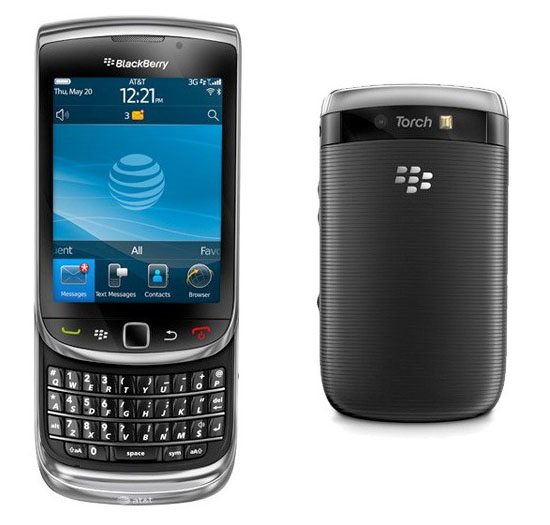
The BlackBerry Torch will go on sale from AT&T for $199 with a qualifying two-year service agreement.
“This is one of the most significant launches in RIM’s history and we are proud to introduce the new BlackBerry Torch and BlackBerry 6 together with AT&T,” said RIM president and co-CEO Mike Lazaridis, in a statement. “With a new user interface, new browser and new handset design, the highly anticipated BlackBerry Torch and BlackBerry 6 deliver integrated and uncompromising capabilities for consumers and business professionals that preserve the industry-leading strengths of the BlackBerry platform while adding exciting new dimensions.”

The BlackBerry Torch features a 3.2-inch 360 by 480 touchscreen display, a 35-key QWERTY keypad, a five megapixel camera with flash, integrated assisted GPS, 802.11n Wi-Fi and Bluetooth wireless networking, an optical trackpad for onscreen navigation, and 4 GB of onboard storage complemented by microSD/SDHD removable storage that handles up to an additional 32 GB. (The unit will ship with an 4 GB card, for a total of 8 GB of storage when new.) The BlackBerry Torch is a slider design: the QWERTY keypad slides out for messaging and email use when needed, but doesn’t take up space otherwise; when open, the phone measures about 4.4 inches. The BlackBerry Torch supports tri-Bad HSDPA and quad-band EDGE connectivity, with GSM voice service.
However, the main selling point of the BlackBerry Torch might be BlackBerry 6, a slicked up version of RIM’s mobile operating system that’s designed to help the platform compete better against the likes of Android and the iPhone. BlackBerry 6 features a redesigned interface with expanded messaging and social networking capabilities designed to appeal to consumers, as well as a new WebKit-based Web browser (with tabs!), universal search, and integrated YouTube and podcasting applications. BlackBerry 6 also features enhancements to basic MMS and SMS messaging, including a “reply all” for group messaging with up to 10 people, and the ability to embed location information within messages. The BlackBerry Torch will also have BlackBerry App World pre-installed, enabling users to expand their smartphone’s functionality through add-on applications—supported directly through carrier billing via AT&T.
BlackBerry 6 also support Wi-Fi media sync, a new feature that enables users to view their iTunes or Windows Media Player libraries, create and modify playlists, and select music for download—all via Wi-Fi and using the BlackBerry smartphone. As soon as the users get within range of their home Wi-Fi network (or tether via USB) the changes get synced up with iTunes or Windows Media Player.
Although BlackBerry 6 wil debut on the BlackBerry Torch, RIM anticipates upgrades will be available for several models, subject to carrier approval. Most like to get the nod for the BlackBerry 6 upgrade are the BlackBerry Bold 9700, BlackBerry Bold 9650, and BlackBerry Pearl 3G.


