  1. Home
  2. Phones
  3. Mobile
  4. News

Help provide the best transit data possible with the Moovit app

Add as a preferred source on Google

Feel like you know the streets of your city better than your navigation app does? Now there’s an app that lets you prove it. Meet transit app Moovit, whose latest Android update promises to “further empower users to contribute real-time transit information.” So if you see something, say something — in the Moovit app. Who knows? You may just be benefiting other travelers in your city

The newly-released Moovit version 4.13 for Android takes the app’s original crowdsourced data model to the next level. Whereas in previous iterations, only members of the Moovit Community program were able to edit the data within the app, these capabilities have now been opened to all. This, Moovit says, “allows transit riders to help others to have the most up-to-date transportation information so that the transit experience is better for all.”

Recommended Videos

Editable data includes station features, such as its location on the map, its name, and whether it’s closed (for now or for good). Extending all the way to which side of the street your destination is located, Moovit thinks that it has the most accurate information possible for your travel efficiency. The app will even tell you how clean or crowded an area is so that users have a comprehensive look of their journey before they even embark upon it.

“We’ve seen such amazing success with our Community program, with more than 65,000 people worldwide signing up to become editors or ambassadors to improve the quality of our data, that we decided to expand upon this fundamental idea of the Community,” said Yovav Meydad, Moovit VP of Products. “We’re now empowering all of our millions of users to make changes and improvements within the app. The more users that are involved in the process, the better the data in the app becomes, and the more people we’re able to help have smoother journeys on public transit.”

Included in the latest update is also the ability to submit photos of bus stops, station entrances, exits, and more, so that everyone knows exactly where they’re supposed to go. Edits will, of course, be moderated by existing Community editors and ambassadors to ensure accuracy. So if you’re looking to join the more than 40 million people using Moovit in 1,000 cities across 65 countries, this just may be the time to get involved.

Lulu Chang
Fascinated by the effects of technology on human interaction, Lulu believes that if her parents can use your new app…
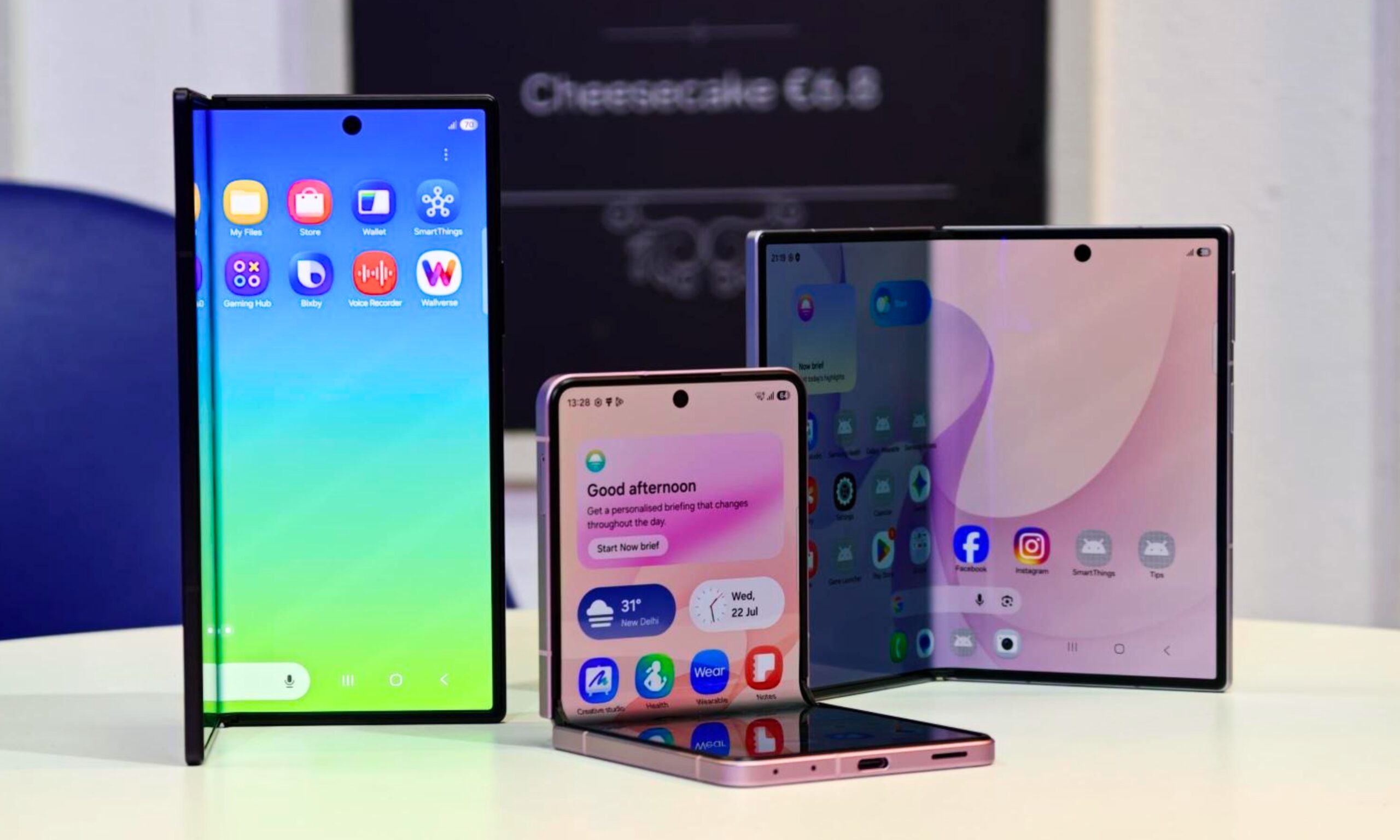
I’ve used foldable phones for years. Here’s how to pick the right one between the Galaxy Z Fold 8 and Flip 8
Samsung’s three new foldables solve very different problems
Galaxy foldables with its screen visible

After years of reviewing foldable smartphones, I have learned that choosing one involves much more than what looks pretty or how large you want. Book-style foldables are usually sold as productivity machines, while flip phones cater to people who value portability. Samsung’s latest lineup complicates that choice by introducing two very different book-style models alongside its familiar clamshell.

Most of their shared specifications fade into the background once you start using them. Their shapes and screens have a much greater impact on daily life. So here's how I'd make a decision when choosing between the new Galaxy Z Fold 8 Ultra, Galaxy Z Fold 8, and Galaxy Z Flip 8.

Read more
How to set up selfie video sign-in for your Google account
Your face can now serve as a way to get back into your Google account. Here's how to set it up.
Google account selfie sign in tutorial featured

Losing access to a Google account is rarely a quick fix, but Google has been actively working to make things easier. Last year, the company introduced a feature called Recovery Contacts that lets you designate a trusted friend or family member to verify your identity if you ever get locked out. Now, Google has introduced a new option, one that uses your face to get you back in instead of a phone call to a friend.

Like Recovery Contacts, the new selfie video authentication feature requires some setup before you can use your face to sign into your Google account. This involves recording the reference video that Google will use to verify your identity whenever you attempt to log in this way. Here's how to set up selfie video sign-in for your Google account.

Read more
Samsung stirred the wide foldable race, but I’m more excited for an upcoming exotic rival
Samsung went bold and wide, but Xiaomi's rumored Mix Fold 5 has my attention
Computer, Electronics, Tablet Computer

Samsung’s Galaxy Z Fold 8 brought a major redesign to the company's foldable lineup. We now have a shorter, almost passport-like body that opens into a 7.6-inch display with a more media-friendly 4:3 aspect ratio. This feels like a more natural fit than Samsung's squarer last-gen foldables. It also has a more portable 201 grams heft and a decent 4,800mAh battery capacity.

All of this makes it one of Samsung's most interesting foldables yet. However, an upcoming Xiaomi device may take the same wide-screen formula and blend it with a Chinese phone's typical madness.

Read more