1. Home
  2. Phones
  3. Mobile
  4. News

Android 16 could give your phone a big redesign

Add as a preferred source on Google
Someone holding the Google Pixel 9 with the screen on.
Joe Maring / Digital Trends

Google is set to release Android 15 to the general public soon, so attention is slowly turning to Android 16, which is expected to launch toward the end of next year. Android Authority recently discovered intriguing information about this update from the Android 15 QPR1 beta.

In the beta, the site discovered that Google plans a “complete redesign” for Android’s Notifications and Quick Settings panels. The current design dates back to Android 12 when Google introduced its Material You design language. It provides a uniform appearance, including the initial four Quick Setting tiles and the entire notifications panel.

Recommended Videos

In the Android 15 QPR1 beta, the Android Authority folks found a way to activate the new version of the Notifications and Quick Settings panels, which it believes is for the Android 16 release. This dual design makes sense when considering what other companies already do.
Android 16 rumor
Android Authority

Xiaomi says most users prefer separate panels for settings and notifications, which is why its HyperOS software provides this. Subsequently, Samsung and Oppo are rumored to be considering a similar look in future versions of One UI and ColorOS, respectively. Android Authority cites “online pushback” as the reason companies like Xiaomi and Samsung are either making or thinking about making these changes to Android’s Notifications and Quick Settings panels.

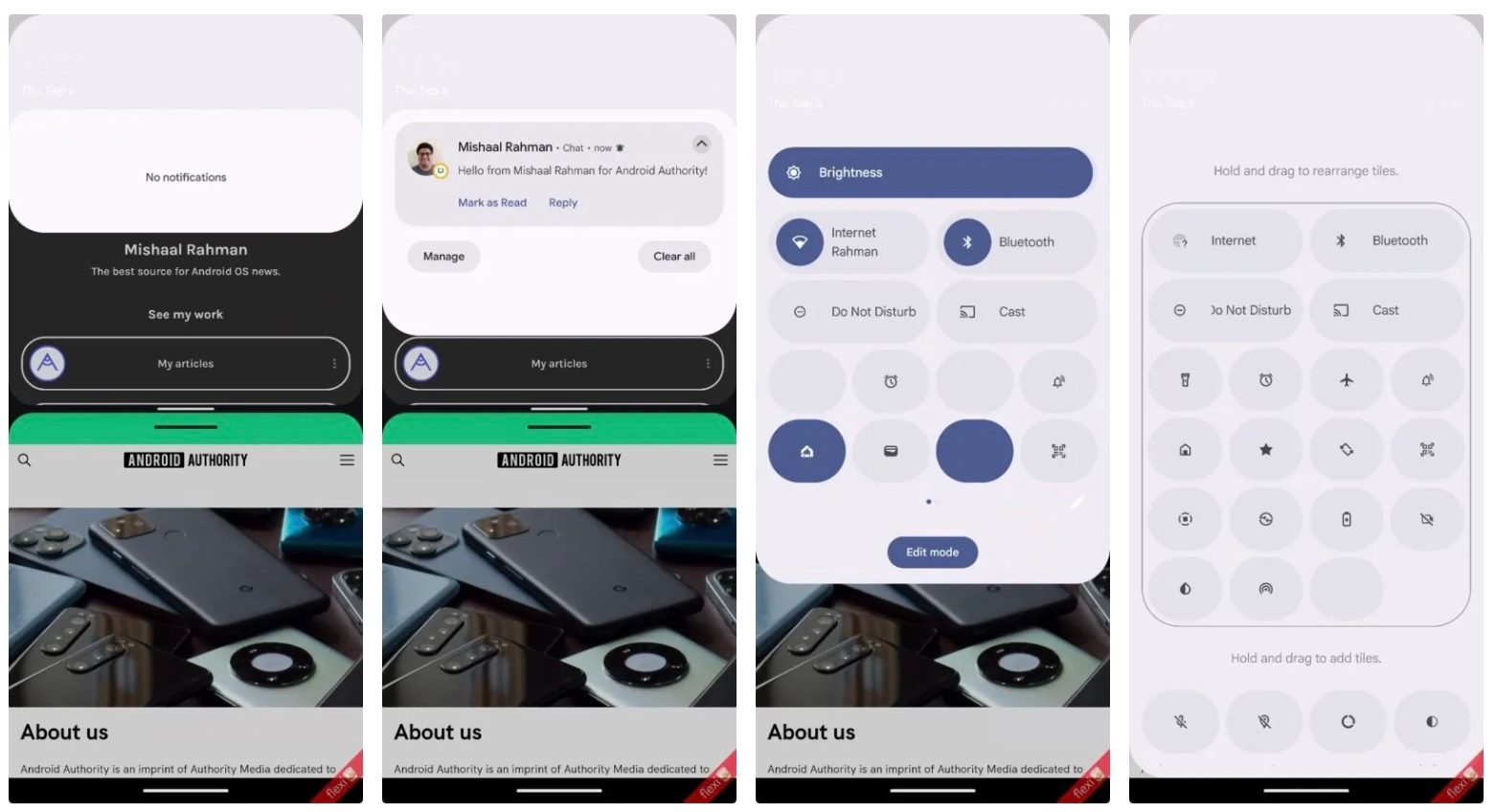
When testing the dual design, Android Authority explains that pulling down the status bar once still brings down the Notifications panel. However, it now only takes up about a quarter of the screen, not the entire screen. While you cannot see any Quick Settings tiles in the new Notifications dropdown, you can still access the app underneath the panel.

Furthermore, you no longer see the Quick Settings panel when pulling down the status bar a second time. Instead, you access the Quick Settings panel by pulling down the status bar with two fingers.

It explains: “This is the change that I expect will be the most controversial, as it requires you to put more effort into accessing your Quick Settings tiles.” Finally, after pulling the Quick Settings panel down in Android 16, you can swipe left or right to see all your tiles.

Here is a rough look at the new design:

Android 16 dual shade demo

Android Authority acknowledges that Google does not guarantee that It will implement such changes to Notifications and the Quick Settings panels in a future public version of Android 16. However, since partners appear to be making changes based on customer feedback, it would be wise for Google to consider doing so as well.

Bryan M. Wolfe
Former Mobile and A/V Freelancer
Bryan M. Wolfe has over a decade of experience as a technology writer. He writes about mobile.
Samsung Galaxy Z Flip 8: Everything we know about the upcoming clamshell folding phone
Of the three phones expected to arrive at Galaxy Unpacked, the Flip 8 is shaping up to be the most underwhelming.
Three Galaxy Z Flip 7 models next to each other

The Fold 8 Ultra could get a sharper display, a more powerful chipset, a new camera, and a larger battery. Samsung’s purported wider foldable, the Fold 8, is expected to solve the most common problem with tall-body, narrow cover screens by adopting a new aspect ratio. The Flip 8, on the other hand, could only debut with a new chip, and not a Snapdragon one. 

The Flip 7 wasn’t a bad clamshell by any measure. However, it's been one year, and the memory crisis has already hit the smartphone market hard. In a tricky cost-to-margin situation, the Flip 8 could end up getting a price hike without any major improvements, and that might not sit well with potential buyers.

Read more
Google Contacts borrows a handy iPhone trick to make sharing your number easier
google-contacts-app

Google is rolling out a small but useful update to the Contacts app on Android that makes it much easier to find and share your own contact details. Instead of digging through settings or creating a separate contact for yourself, you'll now see a dedicated 'Your Info' card at the very top of your contacts list.

The feature gives you quick access to your phone number, email addresses, and other personal details while also adding a faster way to share them with others. The update is arriving with Google Contacts version 4.83.13.940538822 and is rolling out widely (via 9to5Google).

Read more
Another Apple price hike just landed, this time on Apple One
Family and Premier Apple One subscribers will now pay $24 more each year.
Apple One

Apple has raised the monthly price of its Family and Premier Apple One bundles in the US. The Family plan now costs $27.95 per month, up from $25.95, while Premier has climbed from $37.95 to $39.95. Both plans are now $2 more expensive each month, adding another $24 to the annual bill. The Individual plan remains unchanged at $19.95 per month.

The increase arrives shortly after Apple raised subscription prices for Apple Music across its student, individual, and family plans. New AppleCare+ customers buying coverage for Macs and iPads have also been hit by higher prices recently.

Read more