  1. Home
  2. Phones
  3. Audio / Video
  4. Mobile
  5. Features

Hands-on with the Belkin iPhone Mount with MagSafe for Apple TV 4K

Add as a preferred source on Google

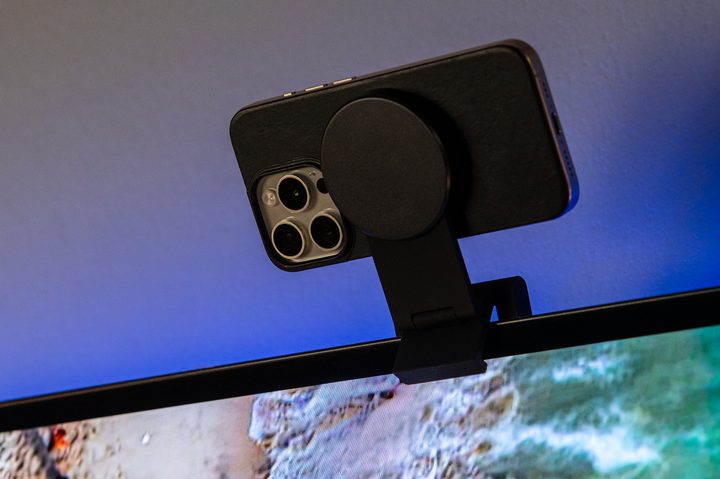
The Belkin iPhone Mount with MagSafe for Apple TV 4K.
The Belkin iPhone Mount with MagSafe for Apple TV 4K perched atop an extremely thin OLED television. Phil Nickinson / Digital Trends

The Belkin iPhone Mount with MagSafe for Apple TV 4K is one mouthful of an official name. What it does is much more simple. It is a mount for your iPhone to be used with an Apple TV 4K. And it has MagSafe to keep the phone in place. That’s it.

Recommended Videos

Perhaps the hardest part of this whole thing is knowing you can use your iPhone with Apple TV 4K. While Continuity Camera — that’s the oh-so-Apple name for the feature — has been around since late 2022 for using your iPhone as a webcam for a Mac, it wasn’t until tvOS 17 was introduced in September 2023 that we were able to use an iPhone with an Apple TV. And now you can use your iPhone in conjunction with apps like FaceTime, Webex, and Zoom to make video calls from your living room. Or, erm, your bedroom. Anywhere you have a TV and an Apple TV 4K.
Buy at Belkin
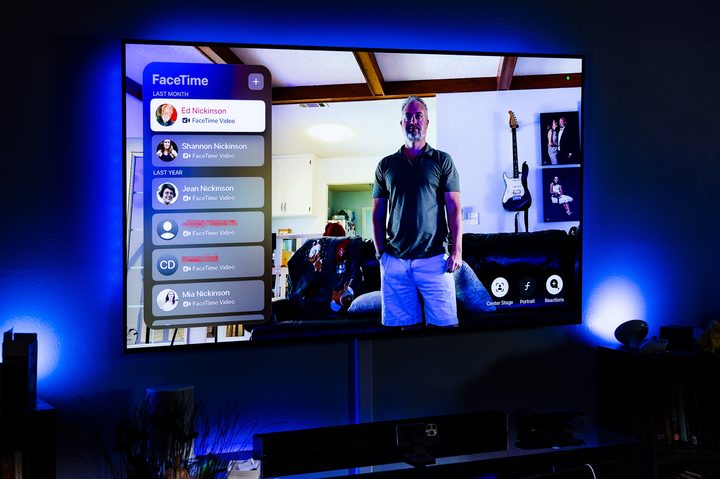
Phil Nickinson making a FaceTime call on Apple TV 4K.
FaceTime on Apple TV 4K makes those family video calls much more enjoyable. Phil Nickinson / Digital Trends

This maybe isn’t something you’ll do every day. But once you’ve sat on the couch with family for a video call, you’ll never want to pick up the phone to do so again. (Especially if a kid grabs hold of it, and the ensuing motion threatens to make everyone sick. If you know, you know. And it’s much more elegant than dragging out a full tripod.

The Belkin Mount, as we’ll call it from here on out, is a simple enough product. If you’ve ever perched a webcam or light atop a monitor, you’re basically doing the same thing here. Only there’s a bit more functionality built into this mount.

The mount itself is clad in that soft-touch rubber we all enjoy so much. Just know that it will pick up some dust and lint at some point. (Fortunately, that sort of thing never gets anywhere near the rear of a TV, right?) It comes already stowed flat and doesn’t really take up all that much room, just over 3 inches by 3 inches, with the puck extending slightly beyond the square base. It’s definitely compact enough to stash in a bag and take with you, should you need to. Or maybe tuck it away in a drawer when not in use.

Unfold the mount to actually use it. Belkin has cleverly designed the mount so you can use it on a media console — or “entertainment center,” or whatever you call the storage device below your TV that probably needs to be dusted and cleaned out. (Or you could potentially use it on a desk with your Mac. The name may say “Apple TV 4K,” but we won’t tell.) The base, folded flat, sits nicely, and you quickly see why it weighs as much as it does. (Almost 11 ounces.) The MagSafe puck has plenty of play to it so you can tilt your phone forward or back to get the perfect angle.
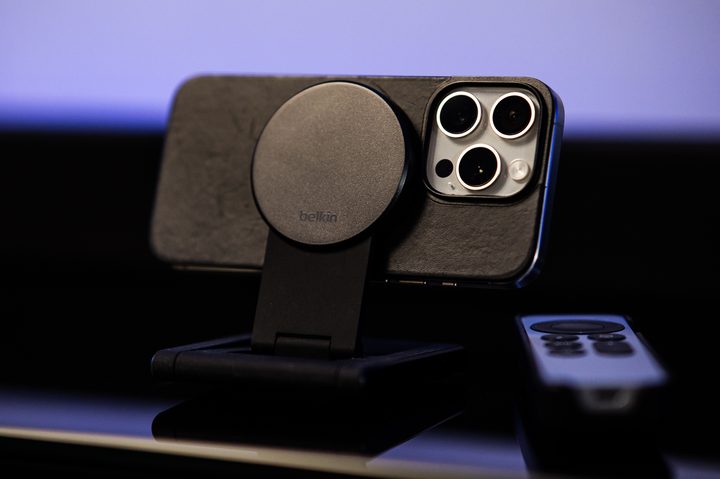
The Belkin iPhone Mount with MagSafe for Apple TV 4K in its stand mode.
The Belkin iPhone Mount with MagSafe for Apple TV 4K in its stand mode. Phil Nickinson / Digital Trends

You can also unfold the base and maneuver things so the mount will sit perched atop a TV. (There are some excellent diagrams included in the box to help with this.) Belkin says the mount will fit on TVs as thick as 4 inches and as thin as a half-inch. I was able to successfully get it atop my aging LG CX OLED TV, whose screen is maybe a quarter-inch thick. Just take your time and be careful — especially if you’re going to put your iPhone up at any sort of height. Maybe consider using the mount in stand mode instead, if you can.

And if you’re really hard-core, there’s a secondary mount by which you can affix the whole thing to a wall. (You’ll need to provide your own anchors and screws.)
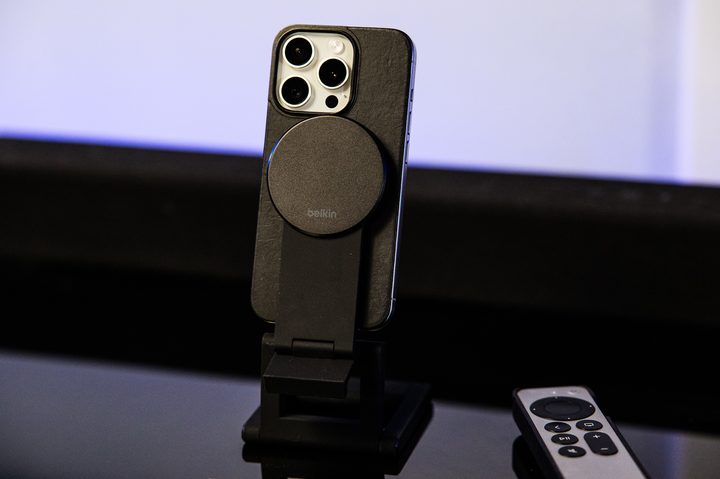
The Belkin iPhone Mount with MagSafe for Apple TV 4K also works in portrait mode.
The Belkin iPhone Mount with MagSafe for Apple TV 4K also works in portrait mode. Phil Nickinson / Digital Trends
Finally there’s the MagSafe bit. That’s the magnetic mechanism by which your iPhone — again, one that supports MagSafe, so that means iPhone 12 or newer — sticks to … things. With magnets. And it works fine here. The only thing you need to know upfront is that the side of the puck with the Belkin logo faces the same direction you want the rear camera to point. So the back of the camera will face you. The puck extends upward, too, so you can use the phone in the portrait orientation if you so desire. Or keep things horizontal like the olds do. Your call.

And that’s it. Everything works as intended. Note that there’s no power running through this mount. You could definitely use it as a way to hold your phone while it’s charging on a desk, which makes it that much more useful. But it’s not really meant to be a charging in that regard. (Nor will you get StandBy mode on your iPhone.)

This isn’t quite a must-have accessory. But if you know you’re going to be using your iPhone for Continuity Camera with your Apple TV 4K — or with a Mac — it’s definitely one worth looking into.

Phil Nickinson
Former Section Editor, Audio/Video
Phil spent the 2000s making newspapers with the Pensacola (Fla.) News Journal, the 2010s with Android Central and then the…
The Minimal Phone 2 looks dramatically better than the original, and I’m genuinely here for it
Plastic is out, metal is in, and Minimal Phone 2's renders suggest the digital detox phone concept finally has the hardware to match its ambition.
Electronics, Mobile Phone, Phone

I've been following the Minimal Phone since its initial crowdfunding days. The first iteration had the right idea trapped inside the wrong body, I’d say. Plastic build, no 5G, an underwhelming camera, and e-paper ghosting that frustrated early adopters; all these issues kept the phone from reaching a wider audience. 

Now, founder Armen Youssefian has posted what appears to be a 360-degree render of the Minimal Phone 2 on X, and from what I can see, the team has done its homework.

Read more
The EU says TikTok still isn’t doing enough to protect kids
Regulators say the platform's privacy settings don't go far enough under the Digital Services Act.
TikTok Creative Featured

The European Commission has accused TikTok of falling short on protecting minors, saying the platform's current account settings don't meet the child safety standards required under the Digital Services Act (DSA). The findings are preliminary, but if upheld, TikTok could face a fine of up to 6% of its global annual revenue.

Why the EU thinks TikTok isn't doing enough

Read more
Qualcomm is set to ratchet up chip prices in September, and your next gadget upgrade could bear the brunt
The price hike could touch every Snapdragon-powered device category.
The new Qualcomm Snadragon 8 Elite Gen 5

I want you to sit with this for a second. Qualcomm, the company whose Snapdragon chips sit inside your Android phone and tablet, your Windows laptop, your Meta smart glasses, your Galaxy Watch, and your wireless earbuds, reportedly sent a letter to every major customer telling them prices are going up by double digits. 

The price hike will be in effect from September 1, 2026, a recent Bloomberg report claims. Essentially, all the companies placing their chip orders after that will pay a higher price. 

Read more