Let's face it: Most of us don't call our own phones very often. If you're like most people, this means you probably don't know your own phone number off-hand, especially if you rarely give it out to people or haven't had it for long, such as after setting up a new account or changing your number after moving to a new town.
To make things even more complicated, many modern smartphones let you set up more than one line using an eSIM, which gives you more than one number to remember.
Thankfully, your smartphone has quite literally "got your number." Just like it helps you store the numbers for all of the important people in your life, it can also show you your own phone number — even if you haven't taken the time to enter it yourself. You may not know what your number is, but your iPhone or Android phone does, and it's easy to find once you know where to look.

How to find your phone number on an iPhone
While there are several places where your phone number may be stored in your iPhone, many of these places only show you the number you entered, which may not match your real phone number. For example, the Phone and Contacts apps have a "My Card" section at the top, but that just shows your contact card as created by you — it doesn't read the phone number that's actually assigned to your phone.
However, the easiest and most reliable place to find your iPhone's number is in the Settings app. The number here is read directly from your SIM/eSIM card. Here's where to look:
Step 1: Open the Settings app on your iPhone.

Step 2: Scroll down and select Phone.

Step 3: If you have only a single line, your number is shown beside "My Number."

Step 4: If you're using a dual SIM configuration with two lines set up, you'll need to select My Number instead, and then choose which of the two numbers you want to see.

How to find your phone number on an Android phone
The many different versions of Android and manufacturer-specific skins might make it harder to find your number on an Android smartphone. Like an iPhone, your number can appear in several differnet places, but few of those are guaranteed to show the actual number assigned to your SIM or eSIM card.
Some flavors of Android will show your number in network, carrier, or SIM settings, while others show it in the Phone app's settings instead. However, there's one spot where you should be able to find it consistently on all recent Android releases:
Step 1: Open the Settings app on your Android smartphone.

Step 2: Scroll down and select About phone. On some Android versions, this may be listed as About Device and it may also be tucked away under the System menu. If you're having trouble finding it, you can try entering it into the "Search settings" field at the top of the Settings app.
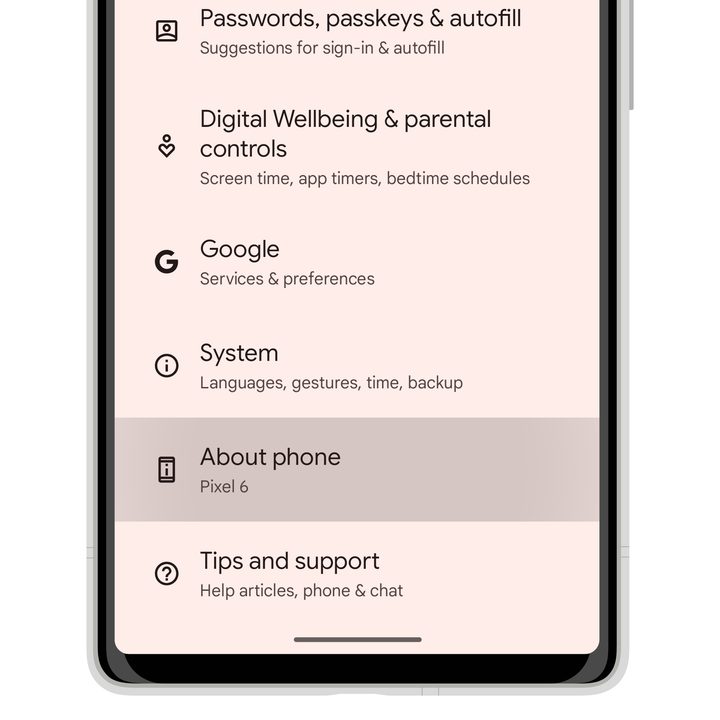
Step 3: Once you get there, you'll find your number shown below "Phone number" or "SIM status."
If you have more than one SIM or eSIM set up, you should see both numbers listed here.

Other methods to find your phone number
While the steps above should work on all modern smartphones running iOS or Android, there are a few other methods you can try if you're stuck:
- Phone a friend. This isn't just for game shows. Thanks to the magic of caller ID, anybody you phone should be able to see your number show up on their phone's display. Of course, they have to be subscribed to caller ID on their end, and you have to make sure your outgoing caller ID isn't blocked.
- Use a special code. Depending on your carrier, there may be a special number you can dial in your Phone app to find out what your number is. For example, T-Mobile subscribers can use #646# (#NUM#), while Vodafone users in the UK can enter *#100#. Sadly, not all carriers have special codes for this, and if you don't know yours, you'll have to call to find out, in which case you can just ask them what your phone number is.
- Use your carrier's mobile app. If you have an app like MyVerizon or the T-Mobile app installed, chances are pretty good your phone number will be listed there.