
“Why you can trust Digital Trends – We have a 20-year history of testing, reviewing, and rating products, services and apps to help you make a sound buying decision. Find out more about how we test and score products.“
Lenovo’s Yoga Book transforms the tablet into a lite laptop, notepad, and drawing slate with its innovative design.
Lenovo has never been one to shy away from off-the-wall ideas, with unique design elements that no one else would dare use. The Yoga Book, a 2-in-1 laptop and tablet with an innovative touch-sensitive keyboard that also doubles as a drawing slate, continues that proud legacy of crazy.
When it’s folded up, the Yoga Book looks like a 10-inch spiral notebook, but it folds out into a full computer using Lenovo’s signature 360-degree hinges, a staple of the Yoga line. It transforms back into a tablet or drawing slate with incredible ease. The device is super lightweight at 1.52 pounds and it’s only 0.38 inches thick, which is absurdly thin for a tablet alone, not to mention a tablet and a touch-sensitive slate. Android and Windows models will satisfy both tablet and PC fans.
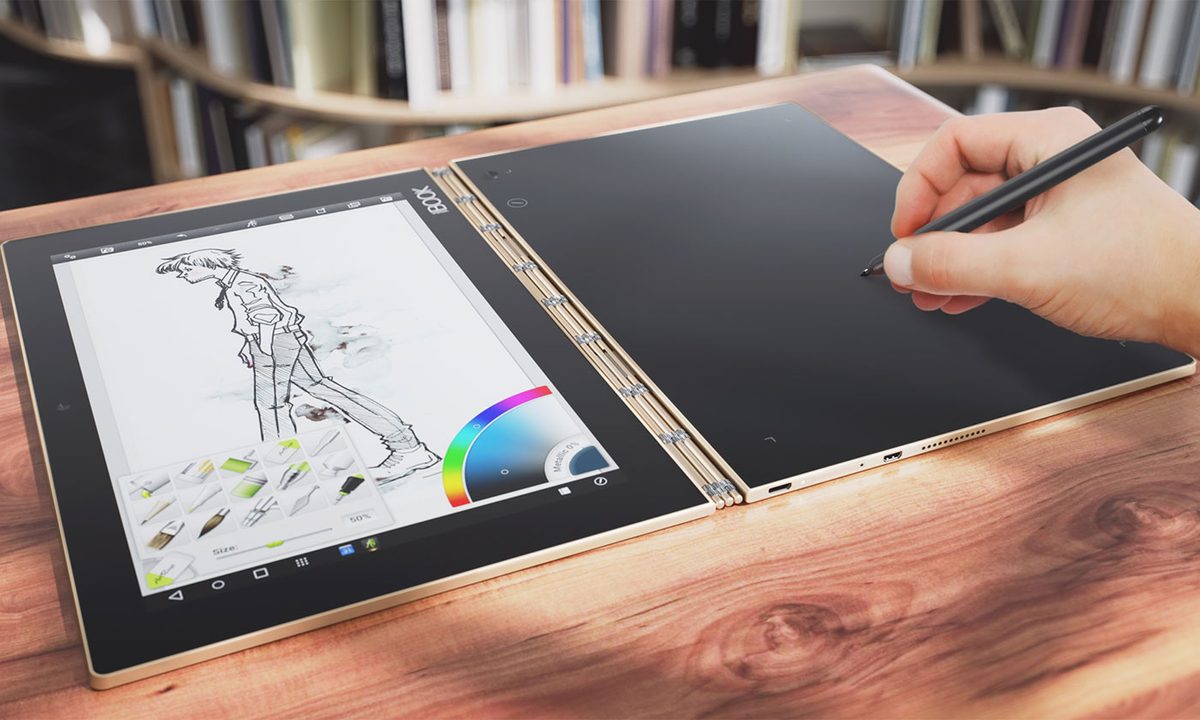
The Yoga Book has a 10.1-inch Full HD IPS screen with a 1,920 x 1,200-pixel resolution on one side, which offers AnyPen stylus support, so you can use any conductive object on the screen as a stylus. Of course, it comes with a stylus that doubles as a real pen with ink, so you shouldn’t have to use random objects as styli.
On the other side of the hinge, a capacitive touch panel with EMR Pen Technology acts as a drawing pad when it’s in pen mode, and a capacitive keyboard when you need to type. In keyboard mode, the flat surface illuminates with your typical QWERTY keys. Each key provides a bit of haptic feedback when you tap it while typing. Since there aren’t any physical keys, it feels like you’re typing on a smartphone or tablet screen. The keyboard function also offers autocorrect and predictive typing, just like a tablet or phone’s keyboard.
It takes some getting used to typing without physical keys, and it won’t be for everyone, but for anyone who only needs to type occasionally or doesn’t mind touch keyboards, it’s a nice thing to have. It saves you from having to buy a Bluetooth keyboard case for your tablet, at any rate.


When you’re done typing, you simply tap a button and turn it into a drawing slate. You can sketch on it just like you would on a Wacom tablet and see your creations mirrored on the screen in full color. It’s a fantastic experience for artists and an even better one for note-takers. Lenovo includes a magnetic pad of paper, which attaches to the slate, so you can fold it back just like a real notebook and take notes. The stylus also comes with ink cartridges that are easy to find at any office supply store, and you can use any paper you like. If you attach the paper pad to the slate, you’ll have both a digital and an analog copy of your notes.
It’s a very neat idea, and we can see students gravitating toward it as a portable, slim laptop alternative for on the go. The only question is if it will be powerful enough to be more than a neat tablet with some innovative extras.
Specs, software, and battery life expectancy
Lenovo decided to make both an Android and Windows version of the Yoga Book, so you can have your pick of operating system. Windows 10 looks and operates as it always does, but Android 6.0 Marshmallow has a light veneer of Lenovo’s user interface on top. Lenovo has been moving closer to stock Android in recent years, so it’s less cumbersome than it used to be. There are a few extra apps, including Lenovo’s Notes app, which incorporates well with the notepad and drawing slate functions of the tablet. That app isn’t available on the Windows version, but you can use OneNote, of course.
The Yoga Book is truly unique and unlike any other product Lenovo has ever made.
The processing power isn’t exactly top-of-the-line, but it should be serviceable. There’s an Intel Atom x5-Z8550 Processor (2M Cache, Quad-Core, Up to 2.4 GHz) inside the Yoga Book along with 4GB of LPDDR3 RAM. Lenovo packed 64GB of storage into the device, which is expandable via a MicroSD card up to 128GB. That should be more than enough for most users.
In case you want to be that person taking photos with a tablet, there’s an 8-megapixel camera on the back and a 2-megapixel camera on the front for video calls and the occasional selfie.
An 8,500mAh battery inside the Yoga Book, should last up to 15 hours on Android and 13 hours on Windows. That’s decent battery life for a device this slim in profile and it should keep you going through a solid work day.
Pricing and availability
Lenovo didn’t announce pricing or availability at the time of writing, but did say that the Windows version would cost slightly more than the Android Yoga Book. Every Yoga Book comes with the pen, three ink cartridge refills, and a notebook that attaches magnetically to the touch-sensitive slate. In a day and age when companies consistently charge extra for accessories, it’s refreshing to see a device that comes with nifty extras.
IFA 2016: Mophie’s new charging station, external battery packs keep devices powered
The Yoga Book is truly unique and unlike any other product Lenovo’s made so far. We watched its evolution from a rough concept into a polished product and we’re excited to test it out further. We’ll keep you updated with pricing and availability as we learn more, and stay tuned for a full review.
Highs
- Super slim, sleek design
- Hinge allows for 360-degree rotation
- Nifty stylus and pen support
- Innovative touch-sensitive keyboard doubles as a drawing slate
- Both Windows and Android versions available
Lows
- Touch sensitive keyboard takes getting used to
- Atom processors aren’t so speedy
- Unknown pricing