Navigating the world of online dating can be tricky — even with the best dating apps readily at your disposal. With the number of horror stories based on matches gone wrong, feeling safe while looking for a partner online can sometimes feel like a fantasy, especially for those who have already had bad experiences.
Luckily, Tinder has stepped up its safety features with Incognito Mode, along with a handful of other great additions that ultimately aim to make users feel much safer as they try to find partners. Here’s everything you need to know about Tinder’s Incognito Mode and the other safety features available in the app.
What is Tinder Incognito Mode?
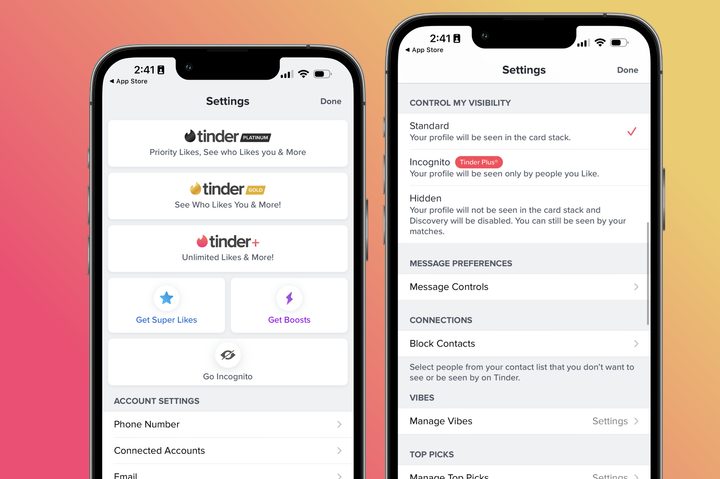
Tinder’s Incognito Mode is a setting that can be turned on to help people use the app with more privacy. When turned on, a person’s profile won’t be recommended to anyone that they haven’t swiped right on first. This means that you’ll only be visible to those that you’ve “approved” of, allowing you to better personalize who you’re being seen by. This is a great feature for anyone looking to take things at their own pace without being recommended to everyone on the app.
Previously, Tinder had a feature that allowed users to completely hide their profiles from being seen by anyone else. Incognito Mode is an evolution of that feature that aims to offer similar privacy but with better-matching results.
How to use Tinder Incognito Mode
The one major drawback to Tinder’s Incognito Mode is that it isn’t available to everyone — just Tinder Plus, Gold, and Premium subscribers. While it does make sense to reserve the app’s best features for its premium subscribers, it’s certainly disappointing that a safety feature like Incognito Mode is only available to users who pay up.
If you do have Tinder Plus, Gold, or Premium, turning the feature on is simple. Open the app, select your profile, and then head into the settings menu. Scroll down until you find a tab that says Go Incognito under the My Visibility heading and select it. You’ll see a pop-up that asks you to confirm that you want to use the mode so confirm that you do.
Once Incognito Mode is activated, you’re free to keep using the app as usual, swiping on profiles and messaging as you would normally. The only difference you may notice as you use Tinder is that you may have fewer matches since you’re restricting your visibility.
Why Tinder Incognito Mode is so important
Incognito Mode is a big step forward for Tinder users’ safety. Just like IRL dating, online dating can be a scary place, especially if you don’t know who’s able to view your profile. With Incognito Mode activated, users are able to personally choose who they allow to see their page by swiping right on them. This added level of security makes Tinder a much more thoughtful app that reassures users that they’re safe while searching for a partner.
Other Tinder privacy features
In addition to the new Incognito Mode, Tinder also has a block feature and something called Long Press Reporting. Blocking someone is as simple as it is on social media sites, giving users the ability to restrict access to certain accounts. This is great for anyone trying to avoid exes or other people that they’d just rather not see on their dating apps.
Long Press Reporting reduces the steps it takes to report a Tinder user’s behavior. With the feature, users can simply tap and hold on a message that they find inappropriate and report the sender directly through the chat menu.
While Incognito Mode is only available to people paying for Tinder, both the Block Account and Long Press Reporting features are available for free for all account holders.