  1. Home
  2. Social Media
  3. Legacy Archives

Twitter launches new design for Web, iOS, and Android

Add as a preferred source on Google
Twitter-redesign-2
Image used with permission by copyright holder

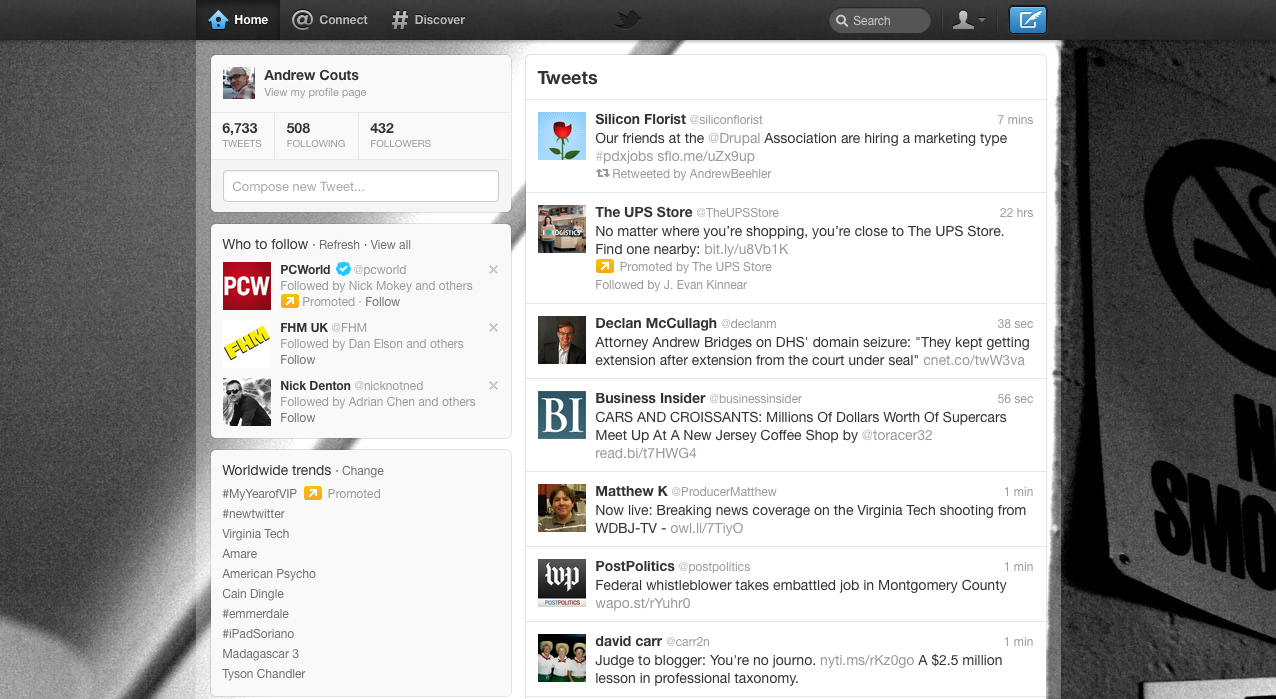
Twitter announced today a major design overhaul of its Web platform, as well as its mobile apps for iPhone and Android. The TweetDeck client, owned by Twitter, will also be redesigned to match the look of the other platforms. The design changes, which will be rolled out over the next several weeks, include a renovation of user profiles and the dashboard.

As part of the design changes, Twitter has added three new navigation buttons: Home, Connect and Discover. Home takes users to their dashboard, where they can read incoming tweets. Connect shows you all tweets that mention you, retweets of your tweets and tweets of yours that others have favorited. And Discover, which shows you stories, photos, videos, follow recommendations, and trending hashtags based upon your location, language and who you follow.

Recommended Videos

With the new Twitter dashboard design, Tweets will now appear on the right side of the screen, and take up less of the page than they did with the previous design. The new tweet box will now appear in the same box, now located on the left, which houses you profile picture, and your follow, followers and lists stats. A new Tweet button also appears in the toolbar at the top of the page, making it easier to post a new tweet, even if you aren’t on your dashboard.

The mobile app has the Home, Connect and Discover buttons, as well as a Me button, which shows your profile picture and stats, as well as access to your direct messages and settings.

The website design is currently being rolled out to all users, so you may have to wait a while to see the changes. The redesigned iPhone (iTunes link) and Android (Android Market link) are available right now.

Check out the new design in this video below:

Andrew Couts
Features Editor for Digital Trends, Andrew Couts covers a wide swath of consumer technology topics, with particular focus on…
I picked 6 Amazon Prime Day deals to make your home office more comfortable
Give your workspace a much-needed upgrade without paying full price.
best-ergonomic-chair-standing-desk-prime-day-deal-2026

Prime Day is a good excuse to finally upgrade the home office setup where you spend most of the day working. I’ve rounded up six ergonomic office chairs and standing desks that can make your workspace more comfortable, flexible, and productive. Whether you need better support or more room to move, these deals cover different budgets.

Flexispot ErgoX Ergonomic Office Chair - $250 (29% off)

Read more
Instagram may soon let you lurk on profiles without leaving a trace
Instagram may finally solve your biggest fear of accidentally liking an old post.
Instagram on an iPhone.

Have you ever scrolled through someone's profile and accidentally liked a photo from four years ago? Instagram may be working on a way to stop that.

Leaker and reverse engineer Alessandro Paluzzi posted on X on Oct. 3 about a read-only mode the app appears to be developing. The feature would essentially turn profile browsing into spectator mode, removing several ways to interact with an account.

Read more
X is apparently cooking up a cheaper verified badge, more Grok AI subscriptions are also on the table
X’s next subscription shake-up could put Grok in nearly every tier
Social Media

X (formerly Twitter) could be planning another overhaul, and this time, Grok might be moving to more subscription tiers. SpaceXAI is considering combining X and Grok into a new four-tier subscription structure, according to an internal document viewed by Bloomberg.

The proposed lineup would stretch from a free option with tighter Grok usage limits all the way to a $100-per-month Ultra plan aimed at power users. A new $8-per-month Lite plan is in the works, which could include access to Grok, a blue verified checkmark, and fewer ads on X.

Read more