  1. Home
  2. Tablets
  3. Mobile
  4. News

Galaxy AI is now available for these other Samsung phones

Add as a preferred source on Google
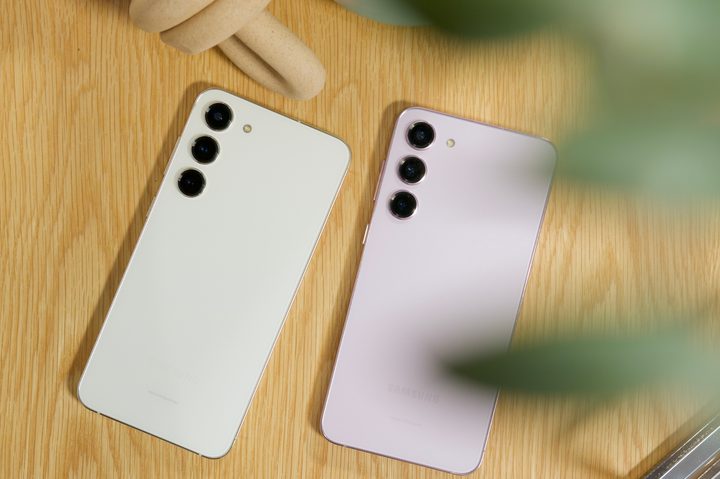
A white Samsung Galaxy S23 next to a pink Samsung Galaxy S23 Plus.
Joe Maring / Digital Trends

In January, Samsung introduced its Galaxy AI features alongside its Galaxy S24 series of smartphones. Since then, if you’ve wanted to use Galaxy AI, you’ve needed a Galaxy S24, Galaxy S24 Plus, or Galaxy S24 Ultra. That’s about to change.

Samsung just announced that it’s about to bring those Galaxy AI features to a lot more devices, meaning you’ll soon be able to use Galaxy AI even if you don’t have a Galaxy S24.

Recommended Videos

Beginning on March 28, Samsung will start rolling out its One UI 6.1 update — which includes all of the Galaxy AI features — to the following devices:

  • Samsung Galaxy S23, S23 Plus, and S23 Ultra
  • Samsung Galaxy S23 FE
  • Samsung Galaxy Z Fold 5
  • Samsung Galaxy Z Flip 5

Additionally, Samsung says One UI 6.1 will also be available for the Galaxy Tab S9 Ultra, Tab S9 Plus, and Tab S9 (specifically the Wi-Fi versions) starting “this week.”

As a quick refresher, Galaxy AI consists of a few different AI-powered features. Leading the charge is Google’s Circle to Search feature, which allows you to circle/scribble anything on your screen to instantly do a Google Search for it. It’s quick, convenient, and surprisingly useful.

A person holding the Samsung Galaxy S24 Ultra using the Circle to Search feature.
Circle to Search Andy Boxall / Digital Trends

Also included are translation tools to get real-time translations/transcripts of phone calls and in-person conversations, powerful AI photo editing tools, and summarization tools for voice recordings and notes. There’s also a feature that tries to use AI to adjust the tone of your typing, though we’d recommend staying away from that one. Everything else, though, is worth checking out.

Samsung has previously confirmed that its Galaxy AI features will be free until the end of 2025 — suggesting that they will cost money at some point. Samsung hasn’t said how much you’ll have to pay for Galaxy AI or when in 2026 it’ll start charging you, so you have a good long while before you need to worry about that.

If you have any of the above phones or tablets, keep your eyes out for One UI 6.1 and all of its Galaxy AI goodness coming soon.

Joe Maring
Joe Maring has been the Section Editor of Digital Trends' Mobile team since June 2022. He leads a team of 13 writers and…
Apple’s new child safety tools are now available with better controls for screen time, web access, and harmful content
Parents can now start child accounts with a smaller set of approved apps and add more access later
Apple child safety features revealed at WWDC 2026

Apple first previewed a new set of child safety features at WWDC in June, and parents can now start using them with iOS 27, iPadOS 27, and macOS 27. The update gives families more control over which apps children can access, what websites they can visit, who they can communicate with, and how much time they spend in certain app categories.

Apple is also changing Screen Time to make those controls easier to manage. Parents get a clearer view of device usage, quicker access to restrictions, and age-based guidance for setting limits across categories such as Games, Social Media, and Entertainment.

Read more
How to reset an iPad: soft restart, force restart, and factory reset
From a quick reboot to a full wipe, here's every reset trick your iPad actually needs.
iPad Pro on table

Even the best hardware from Apple isn't immune to glitches. iPhones, iPads, and MacBooks are known to run for years without issues, but every so often, your iPad needs a reset to get back on track.

The good news is that resetting an iPad is one of the easiest things you can do on any Apple device. It takes just a few minutes and doesn't require any tech expertise. That said, there are three very different types of resets, and mixing them up can cause more problems than it solves. You don't want to wipe your entire iPad when all you needed was a quick restart.

Read more
Lenovo’s $1000 flagship Android tablet packs everything you’ll ever need
A 4K screen, giant battery, and keyboard in the box? Lenovo’s new tablet goes all out
The Yoga Tab Plus Gen 2 Featured

Lenovo’s latest high-end tablet is finally available in the US, and the company has jam-packed it with hardware that makes it versatile enough for all kinds of work. The Yoga Tab Plus Gen 2, first unveiled at IFA 2026, is now on sale for $999.99 with 12GB of RAM and 256GB of storage.

For that price, you get a 13-inch 4K display, a 12,700mAh battery, and Qualcomm’s Snapdragon 8 Elite processor. More importantly for anyone hoping to do some actual work on it, Lenovo includes the All-in-One Clamshell Keyboard and Tab Pen Pro 2 in the package.

Read more