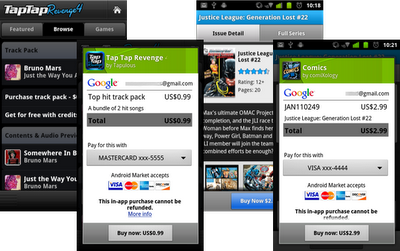
 You were promised in-app purchases and now you have in-app purchases. Last week, Google launched the developer testing phase for the long-promised featured that would allow Android app developers to offer microtransactions via a storefront built directly into their creations. The announcement also included word that we would see an official launch of the new functionality this week, presumably before the month closes at the end of tomorrow since Google had previously promised to add the functionality to Android apps before the end of the first quarter.
Well mission accomplished, and just under the wire too. Android Developer Ecosystem guy Eric Chu confirmed the news in a brief post on the Android Developer’s Blog. “Today, we’re pleased to announce the launch of Android Market In-app Billing to developers and users,” he writes. “As an Android developer, you will now be able to publish apps that use In-app Billing and your users can make purchases from within your apps.”
Simple stuff when you get right down to it. Apple‘s legion of iOS device-powered users have had access to that functionality for some time, and it has proven itself to be a great way for developers to add value to their releases and for app consumers to minimize any headaches in taking advantage of that added value.
Chu confirms that a number of Android Market apps are already equipped to offer in-app purchases, including “Tap Tap Revenge by Disney Mobile; Comics by ComiXology; Gun Bros, Deer Hunter Challenge HD, and WSOP3 by Glu Mobile; and Dungeon Defenders: FW Deluxe by Trendy Entertainment.” He also provides a set of links that developers can take advantage of — this is the Android Developer’s Blog we’re talking about — as they outfit their apps with the new feature.
Editors' Recommendations
- How to find your phone number on iPhone or Android
- How to view Instagram without an account
- The most common Skype problems and how to fix them
- How to find your lost phone (tips for iPhone and Android)
- The 6 best tablets for kids in 2024