Way back in the ancient year of 2003, newsstands overflowed with tech magazines proclaiming that it would be the Year of the Tablet. Microsoft made a big deal of the touch capabilities of Windows and computer makers pumped out a slew of laptops with displays that swiveled around, converting into tablets. Thing is, that touch revolution didn’t revolutionize much of anything. Windows continued to be kind of crappy for touchscreens, the “tablets” manufacturers made rarely appealed to normal people, and Microsoft didn’t make many bold leaps forward.
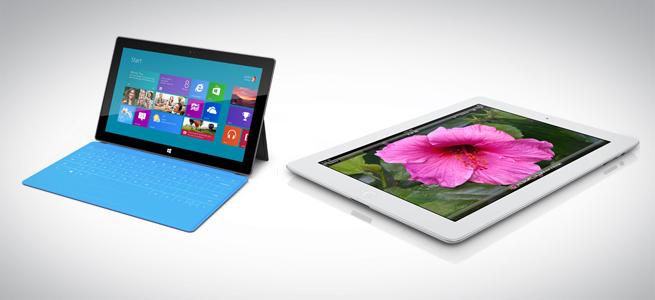
Fast forward to 2010 and the debut of the iPad. In the months leading up to its debut, a flurry of activity in the tablet market (fueled by rumors) produced a few slates of interest. The iPad still wowed us all. It took a couple of years, but Microsoft finally answered Apple’s challenge with the Surface tablets. Running a touch-friendly operating system that works as well on a normal computer or a tablet (or so the company says), the Surface Pro is the kind of tablet the market was waiting for, in theory. But on close inspection and comparison, which of these tablets is best suited to your needs?
(Editor’s Note: We’ve had a few readers complain that comparing Surface Pro to iPad isn’t fair. We disagree, and believe there are individuals who may be debating between these two devices. But please check out our Surface RT vs. iPad vs. Nexus 10 piece if you’re strictly looking for an ARM-based tablet.)
Screen
The first thing you look at on a tablet is the screen. There are a lot of numbers we can throw at you to highlight difference between the iPad and the Surface Pro, but numbers don’t tell the whole story. Putting them side by side, you probably won’t be able to tell which one is more pixel dense or has the higher resolution. What you might notice more is that the Surface Pro has a wider screen than the iPad. This means bar-less widescreen HD video watching. With the iPad’s aspect ratio you can fit more text on the screen in landscape mode than you can on the Surface, meaning less scrolling, but your videos will shrink a little, or have their sides chopped off like an old-school television. The Surface’s display is really bright, which makes the screen pop. However, it’s not as vibrant as the iPad and the colors aren’t as rich. Text is crisp on both.
Though they both have great HD screens, the iPad’s display is higher quality.
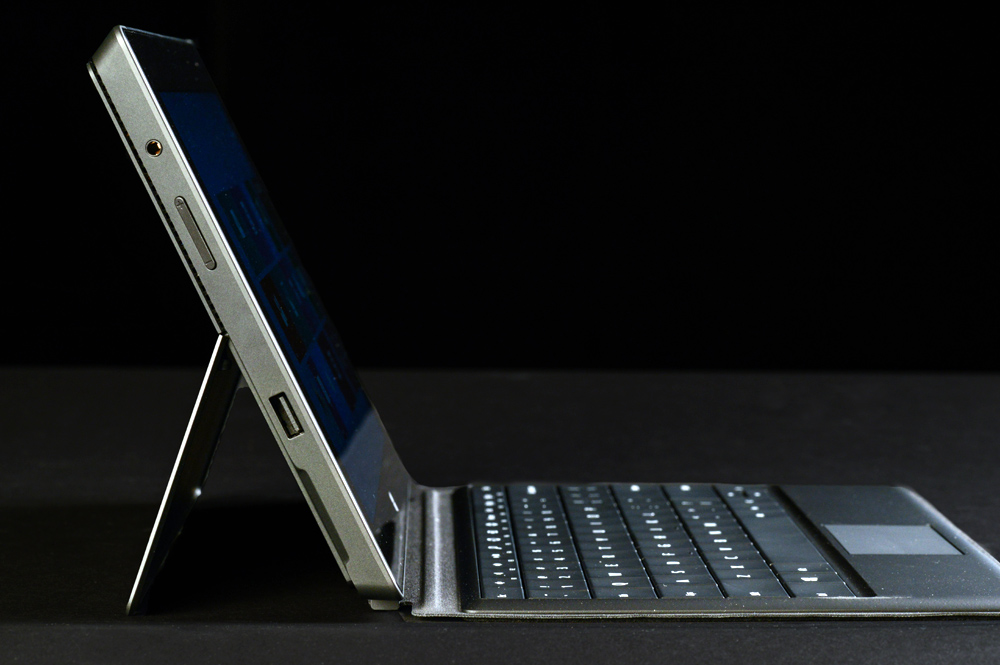
Touch performance on both is about the same. The Surface Pro does pack an extra feature though: stylus compatibility. The tablet comes with an active digitizer pen with WACOM technology. This offers more accuracy than a capacitive stylus that can be used on any touchscreen. It also helps with palm rejection – the Surface Pro will ignore the hand resting on the screen if you use the stylus to draw, mark up documents, and take notes. Given Windows 8′s desktop legacy apps, it’s also useful for navigating non-touch friendly menus and icons. Sadly, you’ll probably lose the pen because there’s no slot to store it on the tablet.
Design
Both the iPad and Surface Pro are good-looking tablets for different reasons. More important is how they each feel in the hand.
The Surface Pro’s design is attractive and the build quality high, but the ergonomics are problematic. To start, the edges have a tendency to dig into hands the longer you use it thanks to the relatively hefty 2-pound weight. The default orientation is landscape, so the button placement is designed with that in mind. Once you turn the tablet to different orientations, the buttons start to get in the way. Plus, using the Surface in portrait is more awkward than doing so on the iPad, partly because of the 16:9 aspect ratio. The tablet is longer and the balance can feel off when holding it on the bottom edge.
The iPad’s default orientation is portrait and, though wide in comparison, balances well in the hand, even when typing. The aluminum back isn’t warm or soft, but the tablet is comfortable to hold. The back tapers just enough, the edges aren’t too sharp or biting, and the 1.4-pound weight is light enough to not tire an arm out too quickly.
Productivity

Chances are if you’re trying to decide between the Surface Pro and the iPad you’re doing so because you want a tablet that can do more than just play games and videos.
A robust ecosystem of apps sprung up around the iPad even before Apple revealed it to the world. Owners have their choice of dozens of office suites, text editors, photo editors, video editors, and many more in the App Store. And the hardware inside the iPad can handle a lot. Though apps are getting better with every month, the iPad’s limitations make getting work done difficult. The lack of universal file explorer, the inability of all apps to talk to each other and share files, and a complete lack of multitasking can make getting simple things done a frustrating experience.
The iPad’s sole, proprietary port is also a hindrance. In order to connect a camera, memory card, USB flash drive or cord, you need an adapter.
Apple’s baby can be a good productivity partner with some help. A mountain of wireless keyboards and mice exist in the iPad hardware ecosystem, plus third-party styluses and docks that extend the tablet’s usefulness. And if your productivity needs are simple, the available tools make it possible to edit and create without having to touch a real computer.
Microsoft’s Surface Pro is a real computer. It takes the form of a tablet yet doesn’t suffer from the same restrictions of the form factor. Since it runs full Windows 8, you can run any program that works with Windows 7 or Vista. You won’t run into compatibility issues with files, messed up formatting, and limited tools. Windows 8′s touch friendly interface replicates some of the iPad’s issues. Stick to Desktop mode and you get the same interface (almost) as Windows 7, including the easy multitasking and window switching.
The full-size USB 3.0 port means you don’t have to buy an extra adapter to connect peripherals. You may want to invest in a USB dock or splitter, though.
The included stylus is a big boost to productivity, as are the two keyboard covers made specifically to go with it. You have your choice of a smart cover/keyboard without mechanical keys or one with them and a touchpad. The touchpad is less than ideal and you’re better off just using the touchscreen. The keyboard offers a decent typing experience without adding too much bulk to the proceedings.
Apps and Games
In the mobile tablet world, the iPad usually has the advantage over other tablets due to the sheer number of apps made specifically for the platform and the robust media options available. However, just as with the last category, the Surface Pro has the advantage of being a real computer in tablet shape. That means owners aren’t limited to what’s available in one App Store and content restrictions are far less of a problem.
The Surface’s Pro’s big weakness is that programs running in Desktop mode aren’t made for the touch-first experience
Almost anything you want to do on a tablet you can do on a PC, and most apps just replicate existing Windows programs/functions already available. However, using desktop apps can be a hassle. They aren’t always touch friendly.
The Surface’s Pro’s big weakness is that programs running in Desktop mode aren’t made for the touch-first experience, and it can be frustrating to navigate them with just a finger. Sure, you can break out the stylus or a mouse. That’s an extra thing to carry around and worry about (especially since there’s no internal port for he stylus). Programs don’t always scale correctly on the Surface Pro, and the experience isn’t always ideal. Still, the ability to load almost any Windows program is a powerful one.
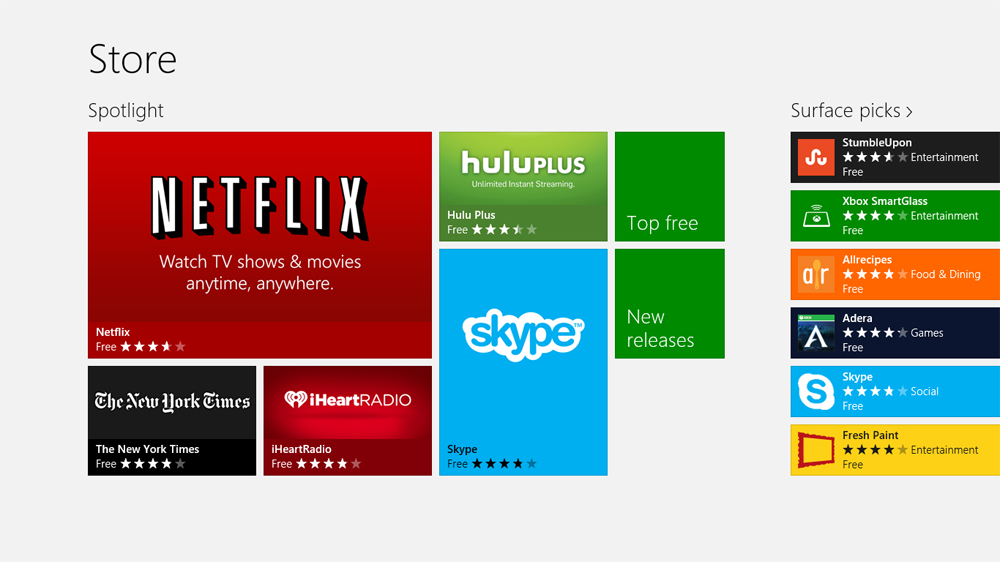
Games are an issue unto themselves. The Surface has Ultrabook internals, and Intel’s integrated graphics are fine for casual games. Anything more complex requires escalating sacrifices in quality. Many games for the iPad are casual, but some more complex titles utilize the tablet’s graphics power to deliver an exceptional experience. Again, iPad’s games will always run. With Surface, it’s more of a crapshoot.
Music and Movies
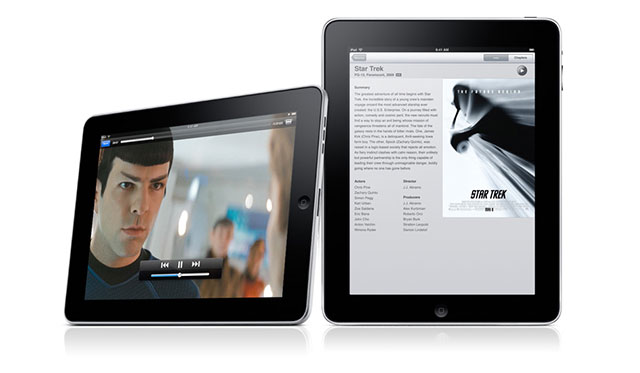
The Surface Pro returns to flat out dominance here. The iPad is a great media machine thanks to the vast iTunes catalog and the number of apps for playing music and video and reading books and magazines. Pretty much every source for media the iPad can access is available for the Surface Pro, too. You can even run iTunes on it if you want.
Windows PCs can access Hulu without a special app (or needing to pay for Hulu Plus), Amazon’s video catalog, even Google Play media. Thanks to Flash, Web media is accessible with little to no fuss. You can even read books from your Nook or Kindle account. Want to load your own video or music? You probably don’t have to worry about codecs or incompatibility. Double click and it plays.
At the same time, iPad has apps that will replicate most functionality, sometimes more effectively than the Web, and certainly more cleanly.
Performance
This one is tougher to compare since the iPad and the Surface Pro run on different types of processors. Both are capable of smooth and speedy performance. The iPad is top among ARM-based machines. The Surface Pro runs like an Ultrabook since it utilizes the same processor.
One thing worth noting: that Intel Core i5 processor and the other components get awfully hot when you push the Surface with intense tasks like 3D gaming. The iPad doesn’t have the same heat issues (thanks to the cool, efficient chip inside).
Battery Life
The efficient ARM-based chip inside the iPad helps it to last for over 10 of normal use, including watching a lot of video. This is the tablet you want with you on the trans-Atlantic flight. The Surface Pro will last about 7 hours, max. This might be due, in part, to the Intel chip inside, but the biggest culprit is a relatively small battery.
Storage
The iPad comes in four different storage capacities: 16, 32, 64, and 128GB. The Surface Pro comes in two: 64 and 128GB. If you’re going for the Surface Pro, you should opt for the 128GB version. The 64GB version’s SSD is almost completely filled before you take it out of the box, leaving around 13GB for your programs, media, and documents. Not a lot, even if the Surface is a secondary device. You won’t get to fill up every last megabyte on the iPad, either, though iOS and pre-loaded apps take up less of the overall percentage of the memory, even down at 16GB.
Price
The iPad starts at $500 for the 16GB version and goes up to $700 and $800 for the 64GB and 128GB models, respectively.
The Surface Pro costs $900 for the 64GB and $1000 for the 128GB. This price includes the stylus but not the keyboard cover.
Conclusion
Is the Surface Pro worth the $200 premium over the iPad? That really depends on your needs.
The Surface is a tablet computer, a full-fledged PC in slate form. On the productivity front, it rules. And if media is your thing, there’s way less hassle involved in dealing with a Windows machine. However, there’s no getting over the heat issues, the ergonomic missteps, the poor battery life, and the need to buy a thousand dollar machine in order to have enough space for your stuff.
The iPad may not have access to every program or every media content source, but it’s hooked up with enough. The more comfortable design and better display coupled with long battery life a great performance make it a great tablet choice. Yes, it’s not as good on productivity as the Surface, and it shouldn’t be your first choice for a work-only slate. As a companion to a laptop or desktop, it gives owners some flexibility in both work and play.


Another “Apple orientated” review. The iPad’s not in the same league as the Surface Pro. Compare it to the Surface RT. That one’s in the same iPad league.
You’re kidding right? What makes the Surface Pro better? Ditch the Surface Pro and get an ultra-book. The Surface Pro is a terrible tablet.
Out of context. Not saying it’s better or worse. This is about comparing an ARM based tablet with a x86 based tablet. Not the same league.
Gotcha. So what could you compare the Surface Pro to?
Don’t you think the average consumer will not know any better? Hopefully an informed salesmen tells them to look at the Surface RT (which I agree with you is a better comparison)
I would compare it to other similar machines, like the Dell XPS 12 or the Asus Transformer Book TX300CA, or even the Acer ICONIA W7.
I’ll have them add a note to the article saying a better comparison is the iPad Vs. RT and that this article is here for those (hopefully few) that still want to compare the Pro to an iPad. Sound good?
Thanks for the feedback!
Sounds more impartial :)
You’re welcome :D
Whether you want to compare it to the iPad or not, the bottom line is that this is now one of a few top tablets that people are going to be looking at when they are tablet shopping. And assuming someone isn’t strictly looking at Windows devices, they will most definitely be considering an iPad. I’d argue that in a lot of, if not most, major ways, the iPad is very comparable to the Surface Pro (and Surface RT).
You can’t compare it to any one thing because it’s a convergent device. It’s like the very first smartphone coming out and people are comparing it to only a feature phone, or only a camera, or only a PDA, or only a gaming device. It disrupts all these markets.
That Pro converges tablets, ultrabooks, and WACOM peripherals. With its second screen capabilities, it also converges small form factor PC’s. Its convergence seems to be lost on a lot of people.
You speak like tablets cannot be or should not be and for work! I have been using the surface for programming as well as media consumption. If i am being objective, I love my gorgeous iPad , but not for work, unfortunately. It (iPad) is very limited and Not a device for a pro. Surface on the other hand is awesome.
I couldn’t agree with you more Don. The Surface Pro would be fine for work, where the iPad would not IMO.
Surface is is a great tablet! fast and speed with pen input, as well as FLEXIBILITY to run desktop application as well as ANDROID apps.
it also has its own kick stand (without needing a cover), superior Type keyboard cover option, better gaming options. 5 hours is fine for a tablet.
Compare it to a MacBook pro or air its better than those 2 laptops/ultrabooks
In what regards?
I was wondering why this was compared to an IPad rather than the Google Chromebook or something similar, the Pixel.
Compared because they’re both tablets. And doing this piece doesn’t preclude us from comparing the Pro to an ultrabook or laptop. Still, there are people who will be making a decision between these two products, even if they’re not in the same league.
My 3 year old loves my wife’s IPad, I design with Adobe and make money with my surface pro. Leave the toys to the children.
I love my iPad but I’m not a child Brian. :)
I just don’t need to use Adobe. I use it as a tablet, not a desktop replacement. There is nothing wrong with that.
I use my Ultra-book for real work.
with a surface pro,
1. it’ll replace both your ultrabook and your ipad
2. cost less when compared to buying an ipad + ultrabook.
3. data integration. you no longer have to transfer from one to another.
4. lighter than carrying both.
A Surface Pro is not replacing my Ultrabook. It doesn’t have enough storage for me and is a pain in the butt to type on while sitting. Let alone on a plane ride.
Cool concept, but its not a laptop replacement for every one.
Horrible example on why the surface pro will never replace your Ultrabook. As we move to smaller, more accessible “mini” storage devices, storage should be of very little concern. Not just cloud storage, but SD (with usb adapters even), USB drives, and yes portable storage drives. If your work requires more than 64gb from an SD card, then clearly you’re dealing with (video, images, photoshop documents?) that require a high peformance desktop rather than any ultrabook or tablet for that matter..
You’re just making an assumption. SSD’s have come down in price, as have SD prices. It’s inexcusable for a thousand dollar device to have small storage size. I do not want to carry around a bunch of SD cards. Plus, SD cards cost extra money. For $1000, I should it should have a decent hard drive in it.
it has the SAME storage as mac air, an ultrabook.
its not a laptop replacement, its an ultrabook + tablet replacement.
I was able to type with it sitting on my laptop at 60wpm. you are blatenly lying
I just don’t believe you :)
Prove to me I am wrong.
The Surface Pro has very little storage on it unless you depend on sd cards and cloud storage. The 128gb only has 80gb free.
The Surface Pro supports a mini SDXC card i.e. this will allow an additional terabyte of storage. Try doing that with an IPad. Oh,I forgot you can purchase Cloud storage space with an IPad. Good luck!
you idiot! it supports sdxc card up to 2tb. also , usb3.0 give you ability to add any external hard drive to the system.
If comparing the Surface Pro to the iPad it’s silly, it’s only because so few consumers will give the Surface a second thought before buying the iPad.
actually, people are dissing ipad for android tablets.
Another asshole writer with another asshole article. Totally distortion of facts.
(if the author is female, I apologize and take that word off. otherwise I stand behind my words)
And why is the writer a jerk?
You did read the Editor’s note right?
“(Editor’s Note: We’ve had a few readers complain that comparing Surface Pro to iPad isn’t fair. We disagree, and believe there are individuals who may be debating between these two devices. But please check out our Surface RT vs. iPad vs. Nexus 10 piece if you’re strictly looking for an ARM-based tablet.)”
Editor is an idiot. so many typos.
1. surface pro has tons more APPLICATIONS vs ipad has 0
2. surface pro runs Android apps vs ipad has 0
3. much faster than ipad
4. 5 hour is enough. no one spend >6 hours / day on their tablet.
5. surface pro has much better gaming.
6. surface pro has MUCH better Type keyboard that doubles as a cover, with USB it doesn’t need tons of adapters etc as an ipad.
YOU ARE AN IDIOT COMPARING AN IPAD TO SURFACE PRO, TRUE IDIOT. ITS LIKE YOU ARE COMPARING AN IPAD TO A MACBOOK AIR AND YOU PREFER AN IPAD. YOU FAT IDIOT!!
Beggerking, the fact that you need to insult people by calling them Idiot and Fat indicates to me that perhaps you need to calm down about an article that is about a device and not (I swear to you) your child or something. This is not worth screaming obscenities over, truly. You make some compelling points, which I am happy to discuss. Once you calm down.
yet you cannot refute any of my 6 points.
because all my points are TRUE.
Definitely not like comparing a Mac Air to an iPad, but these days you could do that too. People are making tough decisions on whether they need a desktop computer at all. I think I’d rather game on the iPad.
So what are the facts? enlighten me. :)
Yes, why am I an asshole? And what facts did I distort?
can you do another review compare an ipad to a macbook air please.
There were some distorted facts, for one you are unable to compare the hard drives as the surface is not a flash hard drive so transfer rates are much faster. The amount of ram, allows users to use multiple apps at once unlike the ipad. Hinting at things like you will loose the stylus and will have to carry mouse etc are misleading and pointed at irresponsibility of user. As a tablet the use of the pen should have been emphasized more, taking notes is almost impossible on ipad where the surface is better than in my notebook. Also I have yet to find any app games that do not work. If you are referring to games that are made for windows like battlefield etc than you cant even compare those type of games to ipad games (mac computers can barely run those). The overall tone was very directed toward the ipad. I am a fan of apple and many of my devices are theirs. Like most writers today who have flawed views of windows 8 and it’s abilities. The fact that bluestacks has made an emulator that runs all of android apps on windows opens up a future (only in early development but many apps do work well.)
thespacebeast,
I did not attempt to compare the performance of the internal storage on either tablet, I only mentioned the sizes.
I did address multitasking in the piece. Please look again.
Mentioning that you might lose the stylus is misleading? No. It’s really not. It’s a concern when there’s no place for the stylus. They’re easily lost. This is why companies like Lenovo and Samsung make a port to store them. And how is mentioning that you might need a mouse in the non-touch-friendly areas misleading or calling users irresponsible?
Taking notes is not impossible on the iPad. I’ve done it. It’s not the very best experience, but it’s also not totally terrible. I also prefer a digitized stylus. And I mention it more than once and in a positive light.
As for gaming, the app games are fine. I did mention more heavy-duty games when talking about the limitations. There are some very graphics-rich and intricate games for iPad that are made FOR the iPad that work better than some graphics-rich games for Windows, which do better with better graphics cards.
And mentioning software in development that may, in the future, open things up is nice and all, but it is not about what is available now that most people will know about or care about.
Thanks for your comment!
No one should be calling you names. I’ll back you up on loosing styluses.
Taking notes on the iPad is very easy. If you have an app with hand writing recognition, its even easier. We use iPads in our school system, the kids take notes. The teachers and aides do too. They are widely used in hospitals and many other businesses. Take a look at Apple’s page on the iPad in business for a few examples. That being said, I was surprised when I was just in the hospital this past week. The nurses and doctors took notes on iPads. They also showed me a presentation? for lack of a better word, showing the part of my body that is injured, how it should work, and what was wrong with me. That’s hard to put into words without being too specific. The nurses also sent messages right to the doctor when I had a question or if something was wrong. Prior to this they used a device, I don’t know which, where they said I have to email the doctor.
If you want a true comparison, I recommend that the author get rid of there laptop and desktop and use their IPad to do all of their work on for a week. They will not get anything accomplished. The IPad is for surfing the web and watching movies. Many reviewers talk about the Surface Pro being over priced, what about the IPad? There are many devices sold for several hundred dollars less than the IPad that you can watch movies on and surf the web on. By the way, I owned the IPad for a year and have sold it. The Surface Pro is a bargain. You get a tablet and a laptop. I saved myself several hundred dollars by buying this device. I highly recommend it!!!!
But you are only comparing the two as if the iPad is being used as a desktop replacement, which you are with the Surface Pro. How about comparing the Surface Pro as if it’s being used as a tablet? Which a lot of people will be doing.
Ian, I think you’re looking at it only from the tablet angle. Which is fine for a direct comparison, however it leaves out the part where the Surface Pro appears to do much better as a laptop or desktop replacement.
Put another way: If I have to sit on a plane for 8 hours and all I want to do is play games and watch movies, the iPad is probably the better choice. If I’m going out of town for a weekend getaway and want to get some work done, it would seem that the Surface is the better choice, especially for those who want to use it for drawing.
If you haven’t already, I would encourage you to read Gabe’s review of the Pro over at Ctrl-Alt-Del.
I hear ya, and I don’t disagree at all. I think the comparison here was accurate. I just don’t think most people read the whole article, they saw the title and decided to debate based on that.
Our review is pretty fair as well:http://www.digitaltrends.com/tablet-reviews/microsoft-surface-pro-review/
Personally, I am not a fan of the Pro. I would simply get an ultrabook. I cannot use a tablet in a work situation on my lap.
Might’ve just been the title then, but surely you can understand how it’s a bit off-putting to people who paid a lot more for the Pro and who are using its extra capabilities.
I think your basic assertion that they’re not too different is correct as far as tablet-mode goes, but then the Pro gives you additional options. Of course, these options come at a price, namely shorter battery life and a hefty price tag.
Thing is, this article is for people who haven’t yet bought either and are deciding, not an article to prove that people who’ve already bought either are right or wrong. If you made the decision to buy the Pro, I assume you did that after thinking about what your needs are and whether it would fulfill those needs. That’s all we’re trying to do, make sure people think about why they want a tablet and let them know which one will do what they want.
Did you miss the part where I said that the Surface Pro is far better for productivity? I think you might have. Look for the header “Productivity”. I think it addresses what you do here.
Ian has a point, though. Looking at the Surface Pro as a Tablet is as important as looking at the iPad as a productivity machine. At this price, why should I buy the Surface Pro instead of a laptop? Looking at why people want tablets instead of laptops and then looking at how well the Surface Pro lives up to those desires is important.
I do not think you can call the Surface a tablet or a laptop. It is both. The ultimate question is which device is the better device? Not which is the better tablet or laptop. The IPad will not do half the things that the Surface Pro will do. Yes, I do think that the Surface Pro is far better at productivity and is at least comparable at handling simple tasks such as email, movies and web surfing.
As far as battery life, they are both about the same. The new IPad, I just sold, battery only lasted 5 or 6 hours at full brightness and took almost the same amount of time to charge. As fare as weight, the Surface Pro is only half a pound heavier than the IPad. If you compare the price of the 128g IPad and the 128g Surface Pro, they are very close; however, with the Surface Pro you are getting a full blown computer for just about the same price as the 128g IPad. It is critical to compare both devices based on productivity and basic functions such as emailing, movie watching and surfing the web. When you compare the devices side by side, the Surface Pro is hands down the superior device.
The Surface Pro is not a laptop, it’s a tablet. And with either of the keyboards, it’s hard to use it in a lap in a way that a laptop is not. Therefore, it’s fair to judge it as a tablet.
Also, from this comment it reads like you didn’t read the piece at all. The comparisons you say we should make? Were made. In the piece. I promise.
There are a good number of reporters and people who have actually done this and do use the iPad as a full-time device. It’s definitely not perfect yet, but trying to use Surface as a main device will leave many people just as frustrated.
I owned and iPad for 2 years, and recently purchased the Surface Pro, and have been very pleased with the Surface. I did love my iPad, but using it for doing any real work on was difficult, so I purchased a Macbook Air. I ended up taking both with me everywhere I went. I recently sold my Air and my iPad and have been using the Surface Pro exclusively. It is not a perfect device and I wish it was a little lighter and had longer battery life, but it is very good and useful device. I am able to do the things I did on both my iPad and Air on one device which is great. I am excited for the future of Windows hybrids.
Well said.
Well, some folks do get really riled up if certain important facts are omitted (albeit, unintentionally)and can get a bit hyper as people are wont to be passionate about things they really care about. I don’t warrant such name-calling at all.
You might want to get your facts regarding apps, updated:
1. Windows 8 desktop “legacy” apps (emphasis added):
Applications for PCs, including those on the latest platform, Windows 8 (as well as its widely popular precursor, Windows 7) are by no means “legacy”. They constitute the vast majority of productivity applications, power apps for a significant proportion of computer users.
Also, with BlueStack (http://www.bluestacks.com/) you can run Android apps on Windows 8 (most of the ones I checked work fine). And on last check, Android has a larger number of Apps than iOS.
2. A lot of hardcore games do run fine on the Surface on medium settings. Everything from Portal 2, Diablo III and a lot of other games. This is not something that the iPad or for that matter ANY non-Windows based tablet can do presently.
3. The pen that comes with the Surface can be secured magnetically to the side of the device.
4. The oft-touted storage issues are also misleading (refer http://www.zdnet.com/surface-pro-versus-macbook-air-whos-being-dishonest-with-storage-space-7000011009/)
Please get your facts accurate to improve the usefulness of this article.
There are more points but these are what I’ve got time to highlight for now.
Thanks for your comment.
If you take a look at our review of the Surface Pro, we talk about the available space we saw on our own review unit. It’s not about what Microsoft is telling people but what we experienced.
And having a place to connect the stylus on the side is not, but not sufficient. Again, in our review we point out that the stylus is easily knocked off and when charging, there’s no place for it.
So far, I’m not finding any inaccurate facts.
You mention our use of Legacy apps as a negative, but seem to have skipped over the section where I pretty much said what you said about Windows programs. We don’t disagree there.
As to the gaming, I defer to the more hardcore gamers on our staff as to whether they would rather play games on the Surface Pro or the iPad. There are plenty of games that run, technically, but will you want to play them at the graphics quality available with the framerates the Surface Pro can achieve? We have said the same thing about most ultrabooks that we said about the Surface. You’re not going to have the best experience on it.
I see less of an issue with incorrect facts and more that your perception of my attitude toward the Surface Pro colors how you feel about the article itself. Many seem to feel I’m anti-Surface. My feeling toward it is pretty similar to the person who reviewed it, and I haven’t said anything vastly different here. So, do you disagree with the review as well? Or is it just that you object to any comparison against the iPad?
These comparisons are silly. Comparing a Surface Pro to and ipad is like comparing a Heavy duty Truck to a compact car. Sure the car is cheaper and will get things done for you to an extent but the Truck will do the heavier lifting while getting worse gas mileage. That a good enough analogy for everyone? Can we put this to rest now?
The big difference is, AT LEAST desktop programs run on surface pro. Where ipad fails at that NONE of the desktop (Mac OS) programs runs on it.
your review is FAIL!
You are trolling at this point. Feel free to move on to another site.
As a former IT guy and currently wrapping up medical school, Ive seen and done just about everything related to technology in medical school. Tablets, ipads, wacom, dragon, whs and just about any other significant device. Patient charting on a webpage or simple doodles in an app doesnt really count. Nor does viewing labs on the floors or icu because ipad rarely works with hospital computer systems that cost millions of dollars and rarely change (epic).
“Taking notes” is very subjective and difficult to do with an ipad. Ive seen people barely pass courses after trying to use ipads for notetaking.
*Evernote,etc – outlining is atrocious and an exercise in controlling your frustration. Its fine for doodling and small sketches but you’ll spend hrs cleaning up your work on a desktop.
*Onenote – amazingly powerful and the benchmark, but MS has no reason to make it a killer app for ipad.
*Presentions – ipad is fine to view, but forget about creating anything worthwhile. Same with all other Office documents – ipad is fine to view, but Numbers, Keynote, all all of the other attempts to integrate are pathetic.
*Kindle, goodreader – multicolor highlighting, killer app for all devices.
Same with Dropbox.
For me, the ipad’s fast, small, powerful and can view 70-80% of what I need to see, and do 50% what I need.Its power is it’s convenience and pervasiveness.
The surface rt/pro is fast, small, powerful and can view 95% of what I need, and do 70% what I need. Flash, office, IE and secure webpages, even my Windows Home Server has 3tb that I can finally access even with the RT. You can finally accomplish fundamental tasks like sending an email attachment, create a spreadsheet or presentation, and read from a thumb drive. Cellular, gps, battery and slightly rectangular form would help tremendously.
But MS didnt get it perfect yet – if it did, there wouldnt be so many Ipad vs Surface reviews. I would have also ditched my ipad/netbook combo when going to work or traveling.
Finally a respectable answer on here. The iPad and Surface Pro are not everything to everyone. Both products have their shortcomings when pushed to their limits.
I also agree with this assessment. It’s all about what you need to do and which is the better tool to get those things done. In some cases, it’s the Surface Pro.
@Ian Bell, if you think the Surface Pro is a terrible tablet, you haven’t been using one long. I own a touchpad and the newest ipad. Since purchasing the Surface, the other two are gathering dust (noted the touchpad became a bedside device working primarily as an alarm clock quite some time ago). My Pro lasts all day on a single charge with the normal usage (normal=what I used Ipad for plus mobile computing). Granted, the one time I ran off of battery continuously while working on a presentation, it only lasted 5 hours. But that was VERY intensive work. I have no problem using it one handed. I do understand that weight is relative to the person using it, but I do not see myself as a particularly fit person – and have no problems working off of it as a handheld tablet. I much prefer holding it over my ipad.
To be clear, I was not expecting to replace my ipad with the Surface. After the original reviews, I purchased it with a single use in mind (using it on counsel table during trials) – but quickly learned the initial reviews were WAY off.
The Surface Pro supports a mini SDXC card i.e. this will allow an additional terabyte of storage. Try doing that with an IPad. Oh, I forgot you can purchase Cloud storage space with an IPad. Good luck!
Sorry, but for a thousand bucks, the Surface Pro should have more storage IMO.
I’d like more storage but that SDXC (64 GB max atm, not a tera) and USB3 help compensate for it. Plus the SSD they throw in there is top of the line blazing fast.
In the end you’re paying a premium to access the x86 ecosystem on a first of its kind convergent device. Storage is limited but you’re not walled in like on an iPad so you can work around it.
would sims3 work on the surface pro?
From a Pilot’s view, Ipad… That is all.