Before the advent of cable, every TV channel was free. Sure, there weren’t all that many channels, and technically they were paid for by commercials, but once you bought a TV, you didn’t have to spend a cent to watch whatever was available in your area. Oh, how things have changed.
Over-the-air (OTA) TV still exists, but most people aren’t watching it exclusively, or even at all. Chances are if you own a TV you subscribe to something, whether it’s cable, satellite, a live TV streaming service like Sling TV or DirecTV Now, or on-demand services like Netflix or Hulu. You probably subscribe to more than one, and prices are going up all the time.
It’s easy to let these services fall into the background alongside your other monthly bills, but how much do you actually need them? That’s what I wanted to find out. I decided that, for one month — May 2018, to be specific — I would cancel all my subscriptions and see what it was like to get by with only what you can watch for free.
The experiment
Before the experiment, I subscribed to Netflix, Hulu, and a live TV streaming service — this last one varied often, as I like to float between services to keep up on the latest features. The last service I had been using was PlayStation Vue, but I’ve also used Sling TV, DirecTV Now, and Hulu with Live TV recently. As an Amazon Prime subscriber, I also had access to Prime Video, but for the month of the experiment, I deleted the app.
I didn’t find myself missing the services I’d been subscribed to for years nearly as much as I thought I would.
To dive as deep as possible, I also added a few other restrictions. Despite having an OTA antenna, I decided not to use it. I also never reached into my movie collection. My goal was to watch what was provided by free and legal streaming services. This means I also never dove into legal gray areas like Kodi (at least, what most people use Kodi for) or Terrarium TV. Now let’s move on to what I did use.
There are a bunch of services out there, and we’ve covered a lot of them before, especially when it comes to movies. Because I was looking to watch from the comfort of my couch and not staring at a computer screen, I chose Crackle and Tubi for my main sources of on-demand content. For live TV, or at least an approximation of it, I looked to Pluto TV, which we’ve already taken an in-depth look at. Finally, I also watched the occasional YouTube video from a few creators I subscribe to but didn’t really use this as a replacement for anything.
The results
About two weeks into my month-long experiment, it was already clear that I didn’t find myself missing the services I’d been subscribed to for years nearly as much as I thought I would. That said, as the month progressed, I encountered both positives and negatives, some of them unexpected.
The good
The first positive is pretty obvious: The money you save. My old bundles of subscriptions stacked up to roughly $80 to $100 per month. Cutting this down to absolutely nothing gave me a little extra spending money, but if you were to do this even half of the year, that is some major cash back in your pocket. This wasn’t really the point of the experiment, but it was a welcome bonus.
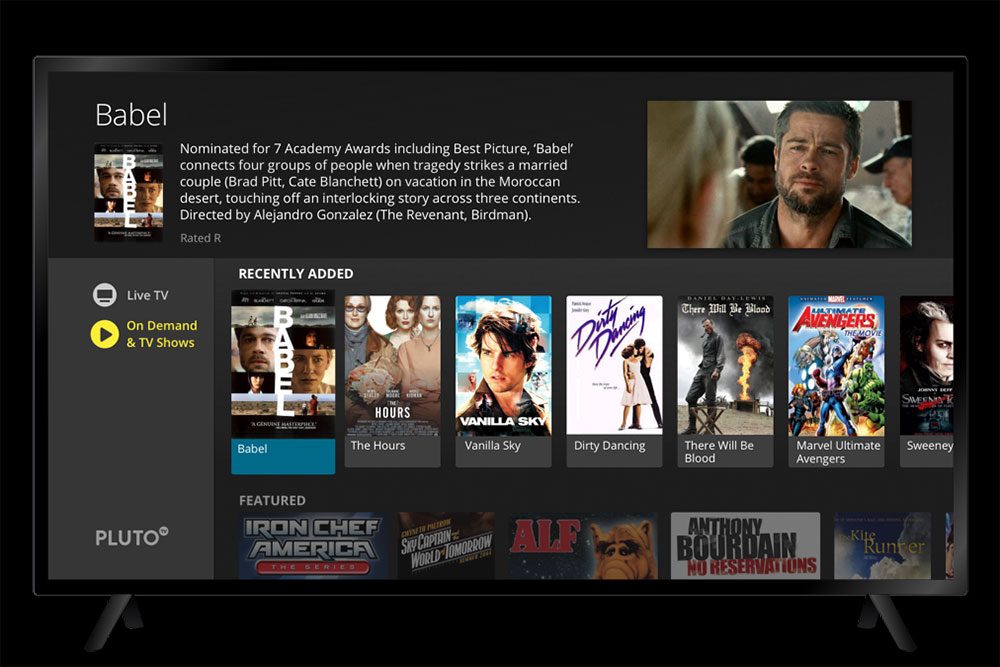
Another positive is just how much content is out there and available to watch for free. During the month-long period, I watched several interesting documentaries, a handful of movies (including some really bad ones), and a whole lot of British sitcoms. This wasn’t even skimming the surface of what was available, but it was enough for me.
If you wanted to go even further and install every possible free streaming service, you would find even more to watch, but eventually, you would start to notice that a lot of these services are offering up the same content.
The bad
If you’re only using one service, it may seem like there is a ton of content — and there is, especially considering it’s free — but you hit a point of diminishing returns when you start adding more services, only to find out they offer a lot of similar stuff. Many of the same movies and TV shows seem to pop up on every free streaming service.
You might find you weren’t using some services all that much in the first place.
This goes doubly so when it comes to Pluto TV, the live TV service. At the start of the month, looking through the available channels, it seemed like an incredible amount of things to watch. But as I watched them, I noticed that a lot of the same episodes of a given show seemed to air again, week after week. For me, live TV is mostly a background thing, but if you’re actively watching a lot, this could start to become an annoyance.
Then, of course, there are commercials. Yes, they’re there but compared to watching an hour of cable TV, you’re either getting the same amount or less, depending on what service you’re watching. The fact that I didn’t even think to include them when this article was first published shows just how little I was bothered by commercials.
You don’t need what you think you need
When I first started this experiment, I figured that at the end of the month, I would have something worth writing about and then I would renew my usual subscriptions. That didn’t happen.
Instead, my overall view of streaming services changed. Instead of looking at them like cable, where you sign up and then you have it all the time, I look at them as options, for a time and place. It turns out that what is available for free serves a lot of my needs, and when I want to see a movie or TV show, it’s easy enough to either buy or rent the movie and buy episodes of the TV show once they’re available.

If a show comes out on Netflix or Hulu, it’s easy to pay for a month or two, then cancel again once I’ve finished the series.
Following up
This article was originally published on June 17, 2018, and as I am writing this it’s early August of the same year. I began the “experiment” in May, and I haven’t gone back to using a live TV streaming service yet. I also don’t currently have a subscription to an on-demand streaming service. That’s not to say I stuck to entirely free services.
When the second season of GLOW hit on Netflix, I subscribed to the service, then canceled my subscription once I had made my way through the season. As mentioned above, I subscribe to Amazon Prime, so I’ve reinstalled the Prime Video app, but I’ve only opened and used it a handful of times.
Things might be different for you. But if you find yourself wondering why you’re spending so much money on streaming services you barely have time to watch, it might be worth canceling some or all of them. Give it some time, then add them back as necessary. You might find you weren’t using some services all that much in the first place.