1. Home
  2. Phones
  3. Android
  4. Apple
  5. Mobile
  6. Photography
  7. Social Media
  8. Evergreens

How to hide your active status on Instagram

Add as a preferred source on Google
Image used with permission by copyright holder

Love using Instagram, but also love your privacy? Earlier this year, Instagram added Activity labels, allowing followers and people you direct message to see the last time you were on the social media platform. Now, there’s a green dot to further indicate when you are online.

The label states how long it has been since the profile has been active, such as, “Active 2 hours ago” or “Active 5 minutes ago,” and the green dot appears next to profile pictures when users are online. Instagram Direct messages also have “seen” and “typing” activity updates in chat threads. It’s quite similar to Facebook Messenger.
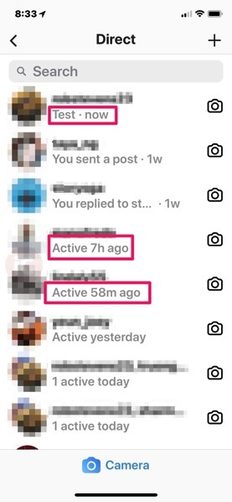
Instagram Activity Status

Recommended Videos

Business profiles, in particular, can benefit from an activity monitor that shows they are on and ready to chat with potential customers who have questions. You may also want your friends or fans to know that you are active at certain times of the day so they know when to expect new posts, or so they know they can chat with you.

But for many others, this is a big nuisance. They don’t want to broadcast when they are on Instagram because it gets in the way of their privacy, their job, or how hard they are avoiding their ex. Fortunately, you can turn the feature off. Here’s how to hide your active status on Instagram.

Turning off your activity status

Image used with permission by copyright holder

Step 1: Head to your Profile Icon. You can find this on the bottom right corner of your Instagram window. Select it.

Step 2: Now you’ll be at your profile page, where you can see the basic stats about your Instagram profile. Head to the upper right edge of the screen to select Settings. On Android phones, this looks like three vertical dots. On iOS, it’s a gear icon.
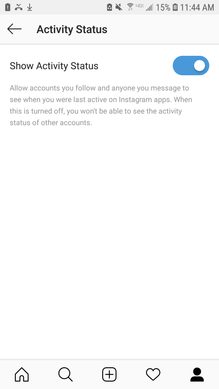
Android Instagram
Image used with permission by copyright holder

Step 3: Scroll down until you find the Privacy and Security section. Here, select the option that says Activity Status. This will show a toggle labeled “Show Activity Status.” By default, this is typically switched on. Toggle it off, and you’re done.

Important notes

With the activity status button toggled off, your activity status will never appear to anyone else on Instagram. But that means you will not be able to see anyone else’s activity status, either, so you’re also blinding yourself with this change.

If you’re truly annoyed by the status feature, you probably don’t mind skipping out on it altogether. But if the time comes when you really want to see the status of another profile, you can always go back and briefly flip the Show Activity Status back on so you can check on a friend, client, or other profile quickly before turning it back off.

On a final note, if you look through Instagram’s settings, you’ll notice plenty of additional security features you can enable. That includes comment controls, how photos of you are treated, two-factor authentication to prevent hacking, removing followers, and more. If you are truly worried about being stalked on Instagram or love your privacy, it’s worthwhile going through these features and enabling those that help out.


Tyler Lacoma
If it can be streamed, voice-activated, made better with an app, or beaten by mashing buttons, Tyler's into it. When he's not…
America’s 250th anniversary time capsule includes an iPhone 17 Pro Max
Your iPhone could become a museum piece sooner than you think
iPhone 17 Pro Max

The United States has sealed a massive time capsule to mark its 250th anniversary, and among the dozens of artifacts chosen to represent modern America is one item almost everyone today would recognize: an iPhone 17 Pro Max.

The stainless steel capsule, weighing roughly 900 pounds (about 400kg), was buried in Philadelphia as part of the country's semiquincentennial celebrations. It is scheduled to remain sealed for the next 250 years, with plans to open it in 2276 during America's 500th anniversary celebrations.

Read more
Apple’s foldable iPhone may arrive this fall, but good luck getting your hands on one
Apple’s foldable iPhone hype may run straight into a launch shortage
Electronics, Mobile Phone, Phone

Apple’s first foldable iPhone may have a repeat of the iPhone X moment this fall. A new report from industry analyst Ming-Chi Kuo suggests that the rumored iPhone Ultra (foldable iPhone) could be announced alongside the iPhone 18 Pro and iPhone 18 Pro Max, but preorders and sales may arrive later because early production is expected to be extremely limited.

Kuo says Apple may build around 7 million to 8 million foldable iPhones in the second half of 2026. The problem is timing. Only 0.5 million to 1 million units are expected to be ready in the third quarter, which is when Apple usually prepares for its September iPhone launch. The iPhone 18 Pro and Pro Max, by comparison, are expected to have around 20 million to 22 million units ready in the same period.

Read more
The iPhone 18 Pro Max battery upgrade now looks all but confirmed
A new certification listing reveals bigger battery numbers for the iPhone 18 Pro Max
Apple iPhone 17 Pro White

Apple is expected to launch three new iPhones this fall, including the iPhone 18 Pro, iPhone 18 Pro Max, and the rumored foldable iPhone Ultra. The iPhone 18 Pro Max was recently tipped to get a major battery boost, with one leak claiming a 5,235mAh battery for the physical SIM model and a 5,425mAh battery for the eSIM-only version.

Now, China’s 3C certification database (via Digital Chat Station) appears to show the actual battery capacities for both the iPhone 18 Pro and iPhone 18 Pro Max. Interestingly, the Pro Max numbers listed there are even larger than the earlier leak suggested.

Read more