  1. Home
  2. Computing
  3. News

Microsoft Teams to integrate Headspace and Focus mode to help meeting anxiety

Add as a preferred source on Google

You’re likely spending more time in online meetings, and it can be quite a stressful experience. Microsoft is here to help with some new updates to the Viva Insights experience in Teams that should be coming later this month.

The first of those updates is a Headspace integration. It is designed to help decrease stress and stay focused after meetings. Coming at the end of June, you will be able to check through a list of guided meditations and mindfulness exercises from Headspace in Viva Insights in Teams. You can do things like jot down what you are feeling, relax before a presentation, or even disconnect from work before heading off for the evening.
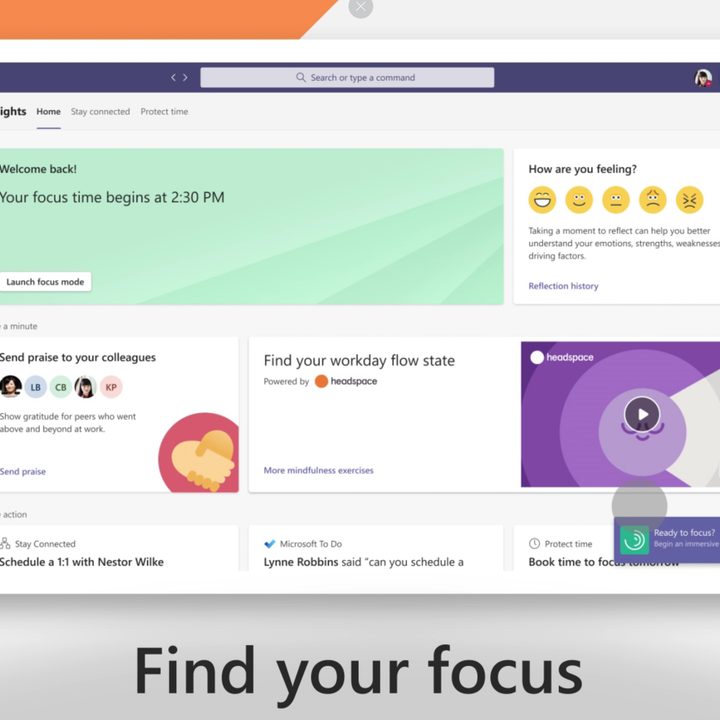
A dashboard showing Focus Mode and Headspace integration in Viva Insights in Microsoft Teams.
Microsoft

The second new addition is Focus mode. This feature in Viva Insights with Headspace is designed to help you schedule a daily focus time through Teams. It even comes complete with music, and timers. Microsoft says it is also working to also port some of those features into the Viva Insights app itself, with the goal of helping you make progress on important tasks in regular intervals, with breaks planned in between.

Recommended Videos

Other than Focus Mode and the integration with Headspace, Microsoft is also planning on rolling out some updates for Viva Insights that will help you create a stronger boundary between work and personal time. Later in this year, you’ll be able to use Viva Insights in Teams to set a specific time to silence mobile notifications from both Outlook and Teams, outside of your working hours. There even will be some statistics on how well you are disconnecting.

The features are all part of Microsoft’s initiative to support what it calls the hybrid workforce — the mix of those in a company who are working from home, as well as in person.  The company notes that weekly meeting time in Teams has doubled since the start of the pandemic. Additionally, in a study of over 31,000 people in 31 countries, Microsoft says over half of the respondents reported feeling overworked.

Features in Viva Insights, the ability to pin and reply to specific messages in Teams desktop, and a “Front Row” feature in Teams Rooms all seek out to solve those pains. Microsoft also hopes it can build new ways for people to connect and collaborate from wherever they are working.

Arif Bacchus
Arif Bacchus is a native New Yorker and a fan of all things technology. Arif works as a freelance writer at Digital Trends…
YouTube’s AI-powered search is rolling out in the US to find videos based on situations you describe
Ask YouTube can find videos based on the situation or idea you describe
youtube ai search feature

YouTube users in the U.S. are getting a new way to search for videos on the web. The company has started rolling out Ask YouTube, its conversational AI search experience, beyond the Premium-only test announced at Google I/O 2026.

Instead of entering a few keywords and scrolling through a standard list of results, users can ask YouTube a complete question. The feature is designed for broader searches where the exact video, channel, or topic may not already be clear.

Read more
Meta’s detection tool fails to identify photos generated by its own Muse Image AI
Meta has created an invisible watermarking tool called Content Seal that is embedded in all images generated by the Muse Image AI.
Meta AI identification tool.

Earlier this week, Meta announced two new AI products, namely, Muse Image and Muse Video. As the name suggests, these are generative AI tools for making photos and video clips using natural language text prompts. Soon after their rollout commenced, these tools sparked controversy because Meta had automatically opted in Instagram users, allowing others to use their publicly posted media and convert them into remixed AI content. But it appears that Meta courted another loss on its side of the court.

What's the problem?

Read more
Your Google AI Studio apps can finally have polished, presentable web links
AI Studio web apps can now use personalized subdomains
google ai studio logos

Google AI Studio has made building a web app surprisingly easy. You can describe what you want, refine the design through prompts, and publish the result without setting up a traditional development environment. An awkward point of friction comes after deployment, when the finished app still has to live behind a long, forgettable Cloud Run link.

Google is now cleaning up that final step. AI Studio lets you assign a deployed web app a personalized address under the “ai.studio” domain, such as “your-app-name.ai.studio.” A recognizable URL should make the project look more presentable in a portfolio, client demo, social post, or internal project page.

Read more