  1. Home
  2. Computing
  3. News

Gmail is getting a major visual change, but you can opt out

Add as a preferred source on Google

Gmail has a new look, which brings together Chat, Meet, and other Google apps in a single navigation pane for easier access. The new look is rolling out to a wider audience starting today, but if you don’t like it, you can easily revert back to classic Gmail.

First announced in January, the new Gmail layout is different from the classic layout since it eliminates the need to use different tabs for various Google apps. These get combined into one area in a list view at the top left of the screen, removing it from underneath your inboxes. You can specify which apps you want to include in the new view, or keep to a Gmail-only configuration. This is intended to help you get work done faster, but switching back to the old style is made easy, too.
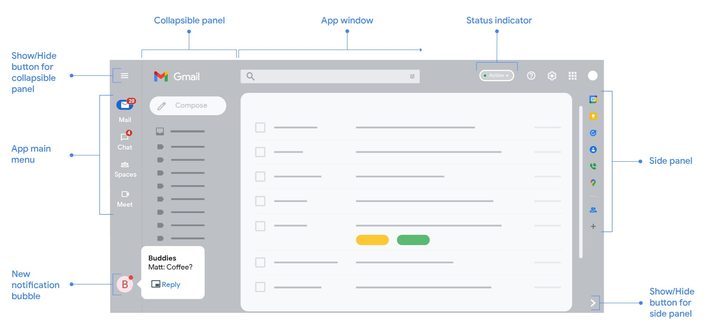
The new Gmail experience
Google

You might be switched to this new view automatically and have it on by default. So, to switch back to the old view, go to the top-right of the screen and choose Settings, and then under Quick Settings choose the Go back to the original Gmail view option. You can then click the Reload button in the new window.

Recommended Videos

More Gmail tips and tricks

In addition to the technical side of the redesign, Google also added a bit of a visual overhaul, too. The navigation bar features a material called “Material You.” This is Google’s new design language, present across Android, ChromeOS, and many other Google apps. It is a fresh color, different from the plain white in classic Gmail, and is a modern take on Google’s original Material Design from 2014.

Google officially calls this new Gmail look “integrated Gmail layout,” but it is important to note that it is still in the process of slowly rolling out. That means there’s a chance you might not even be seeing it right now as Google wants to carefully monitor feedback on the new look and feel of Gmail. You can check out the full details on this new experience on Google’s support page, which explains how chat bubbles, notifications, and other aspects of the new experience work.

Arif Bacchus
Arif Bacchus is a native New Yorker and a fan of all things technology. Arif works as a freelance writer at Digital Trends…
YouTube’s AI-powered search is rolling out in the US to find videos based on situations you describe
Ask YouTube can find videos based on the situation or idea you describe
youtube ai search feature

YouTube users in the U.S. are getting a new way to search for videos on the web. The company has started rolling out Ask YouTube, its conversational AI search experience, beyond the Premium-only test announced at Google I/O 2026.

Instead of entering a few keywords and scrolling through a standard list of results, users can ask YouTube a complete question. The feature is designed for broader searches where the exact video, channel, or topic may not already be clear.

Read more
Meta’s detection tool fails to identify photos generated by its own Muse Image AI
Meta has created an invisible watermarking tool called Content Seal that is embedded in all images generated by the Muse Image AI.
Meta AI identification tool.

Earlier this week, Meta announced two new AI products, namely, Muse Image and Muse Video. As the name suggests, these are generative AI tools for making photos and video clips using natural language text prompts. Soon after their rollout commenced, these tools sparked controversy because Meta had automatically opted in Instagram users, allowing others to use their publicly posted media and convert them into remixed AI content. But it appears that Meta courted another loss on its side of the court.

What's the problem?

Read more
Your Google AI Studio apps can finally have polished, presentable web links
AI Studio web apps can now use personalized subdomains
google ai studio logos

Google AI Studio has made building a web app surprisingly easy. You can describe what you want, refine the design through prompts, and publish the result without setting up a traditional development environment. An awkward point of friction comes after deployment, when the finished app still has to live behind a long, forgettable Cloud Run link.

Google is now cleaning up that final step. AI Studio lets you assign a deployed web app a personalized address under the “ai.studio” domain, such as “your-app-name.ai.studio.” A recognizable URL should make the project look more presentable in a portfolio, client demo, social post, or internal project page.

Read more