
 Twitter recently rolled out its new Activity stream, a feature that annotates your activity as well as the activity of accounts you interact with often. It scoops up the favorites, follows, and retweets of people you follow.
Sound familiar? It’s basically a Twitterized rip-off of the Facebook News Feed—but worse-looking. The Activity stream is a glorified avenue for getting you to follow new accounts, but it’s replacing the categories users formerly had at their disposal: immediate access to @ mentions and retweets. Now you can find those features filed under the Activity stream and your designated username channel, but there’s one more step in the process.
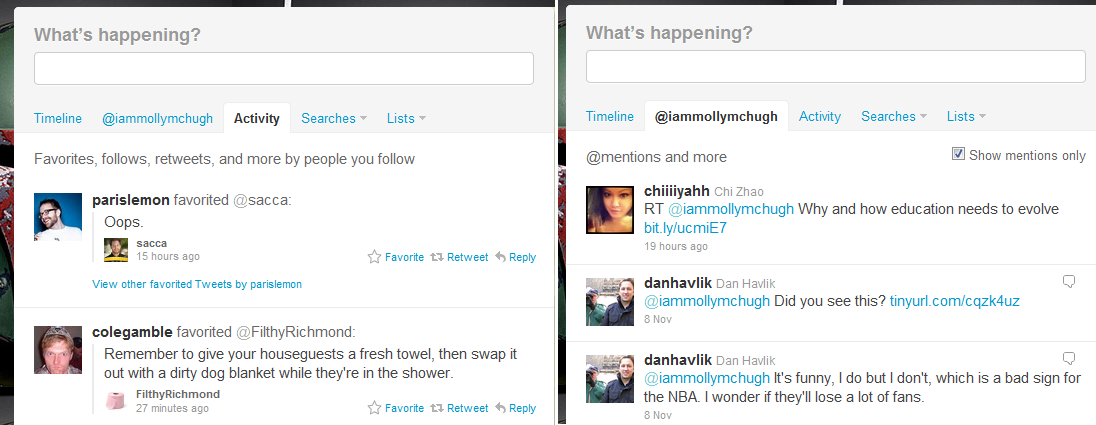 This might seem like a relatively small update, and maybe even one that doesn’t warrant commentary, but the Activity stream denies everything Twitter is—or was. It reinforces anti-Twitter arguments that there’s no purpose for the site. Twitter began as a microblogging site that collected snippets of comments and news quickly and concretely. It was simple and no-frills—no question, this wasn’t the intense relationship-building experience that Facebook is.
But somewhere along the line, things have gotten muddled. There’s too much overlap, on both sides. The difference is that Facebook has always been a platform that integrates all things social. It very quickly established itself as the blueprint for an all-inclusive social network. Twitter on the other hand was doing something else entirely, focusing instead on providing an ever-updating way for the world to briefly share and communicate–this was real real-time. You don’t visit Twitter to pore over the day’s activities like you do on Facebook.
Which is clearly what Twitter is trying to change with the Activity stream. And you can’t entirely blame them: the amount of time people spend on Facebook and the site’s incredibly low bounce rate translate into ad dollars. Twitter has been busy trying to establish a profit model, and has been experimenting with Promoted tweets and Promoted accounts to try and find a road to revenue.
Regardless of its reasons, tried and true Twitter users are understandably frustrated by the site once again abandoning its original interface. The site has always tread this incredibly fine line between providing worthwhile information and opening the floodgates for inconsequential noise.
Instead of a useless feature like the Activity stream, we’d much prefer to see Twitter offer some sort of metrics tool. Third party applications like Klout or TwitterGrader offer useful insights about your account and your activity, like whether or not someone you followed is following you back, who joined Twitter the same day you did, and show your true reach on the site. They bring gamification to Twitter, some of which is practical and some of which is fun – and if Twitter is trying to branch out, this seems like the better route instead of just a sorry, copy-cat version of the News Feed.


