  1. Home
  2. Audio / Video
  3. How tos

How to see song lyrics on Spotify

Add as a preferred source on Google
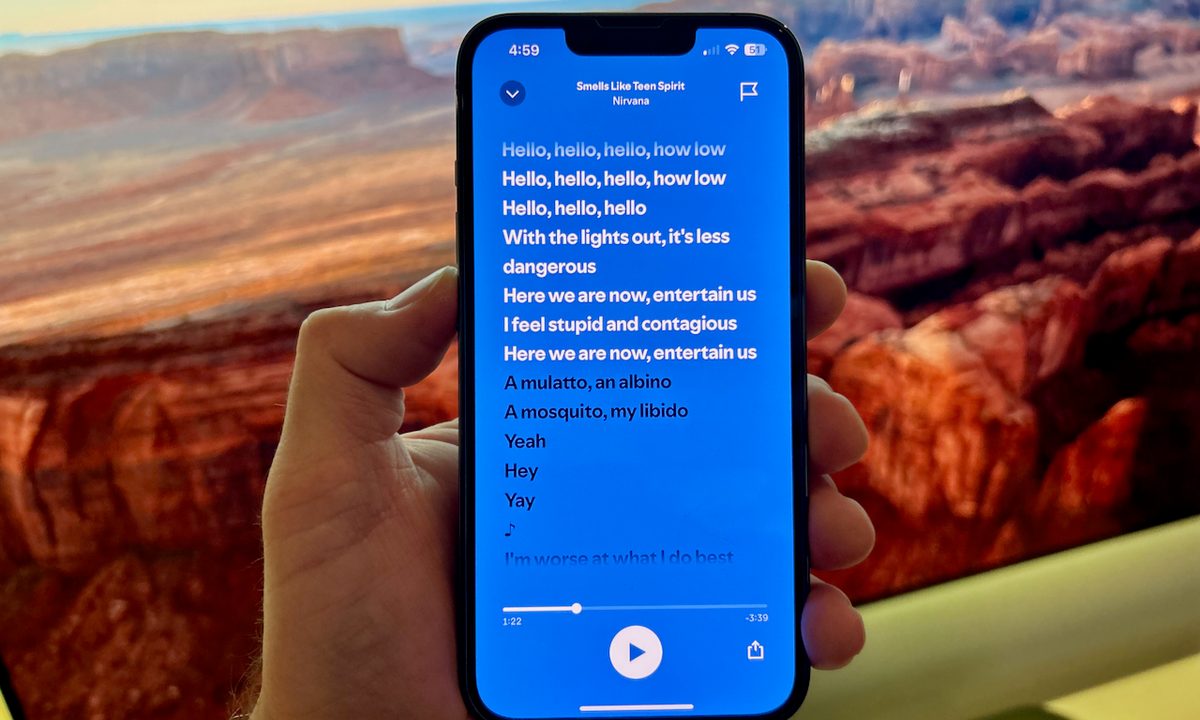
The lyrics to Smells Like Teen Spirit on the Spotify app on an iPhone.
Derek Malcolm / Digital Trends

Song lyrics: confusing music lovers since the beginning of time. Whether you're among the hordes of lyrically challenged susceptible to such doozies as “I’m a lion, I’m a vinyl, I’m a skittle, I’m a beetle,” in the chorus of Smells Like Teen Spirit, and want to get it right (it's “A mulatto, an albino, a mosquito, my libido,” people), or you like to read while you listen or sing along, then you'll be happy to hear that Spotify's lyrics feature can help you do both.

Accessing the lyrics to your favorite songs on Spotify can be done on your mobile devices and on the Spotify desktop app, and it couldn't be easier to do. We're going to show you how.

Recommended Videos

Difficulty

Easy

Duration

5 minutes

What You Need

  • Smartphone or computer

  • Spotify mobile or desktop app

How to see Spotify lyrics on a mobile device (iOS and Android)

Accessing the lyrics to songs you're playing on Spotify can be easily done in the Spotify app on an iOS or Android device.

Step 1: Choose a song, and when it starts playing, tap the Now Playing where the song appears at the bottom of the app's screen.

Step 2: Here, you can either tap the lyrics at the bottom of the screen (note: not all songs have lyrics) or swipe to bring them up.

Step 3: By tapping the lyrics tab, the lyrics will expand to its fullscreen mode. As the song plays, the lyrics will highlight as they are being sung.

How to see Spotify lyrics on the desktop app

Accessing the lyrics to songs on Spotify's desktop app (Mac and Windows) is just as easy, making it possible for you to see the words much larger on your computer screen, which could come in handy for group singalongs or karaoke. Here's how.

Step 1: With the desktop app open select a song. It will appear in the Now Playing queue.

Howe to see lyrics in the Spotify desktop app.
Derek Malcolm / Digital Trends

Step 2: In the bottom right corner, select the Lyrics icon — it looks like a tiny microphone.

Howe to see lyrics in the Spotify desktop app.
Derek Malcolm / Digital Trends

Step 3: The lyrics to your selected song will appear on screen in all their glory. Like the mobile app, the words are synced up with the playing song so you can belt out Livin' on a Prayer correctly, for once. It's "It doesn’t make a difference if we make it or not,” NOT “It doesn’t make a difference if we’re naked or not.”

Derek Malcolm
Former Contributing Editor, A/V
Derek Malcolm is a contributing editor and evergreen lead for the A/V and Home Theater section of Digital Trends. Derek…
Samsung’s Freestyle+ AI Smart Projector turns any wall into your next movie screen
This $1,200 Samsung projector uses AI to fix your picture automatically.
samsung-Freestyle-AI-Smart-Projector

Movie night no longer needs a blank white wall or a complicated projector setup. Samsung has launched the Freestyle+ AI Smart Projector for $1,200 in the US, and its biggest trick is making almost any surface work as your screen.

Whether you're projecting onto patterned wallpaper, a colored wall, or even a space with shelves and picture frames, the projector uses AI to automatically adjust the image so you can start watching with minimal effort. The portable projector can create a Full HD picture up to 100 inches, making it an easy companion for everything from backyard movies to bedroom binge sessions.

Read more
Apple Music just got pricier
The subscription fee has climbed for student, family, and individual plans in the US, UK, and the rest of Europe.
Apple Music App

Apple just raised the subscription fee for its eponymous music streaming service. For individual plans, the price has climbed by a dollar, and so has the affordable student tier. The fee for the family plan has gone up by $3, and it now costs $19.99 in the US. The benefits associated with each plan remain unchanged.

How much do I pay now?

Read more
Sonos owners are finally getting a less frustrating app, but the rollout comes with a catch
Improved navigation, speaker sorting, and new iOS volume controls are arriving gradually and must initially be enabled manually
Furniture, Electronics, Speaker

The Sonos app is getting a substantial usability overhaul. Familiar bottom tabs should make it easier to move around, while customizable speaker ordering could take some friction out of managing a multiroom system.

Sonos community manager ShaunFromSonos announced that the release may take up to two weeks to reach everyone. Once it arrives, users must switch on Enable Improved Navigation in the app’s settings to unlock the new layout and sorting tools.

Read more

