
Microsoft-owned messaging platform Skype has largely been content to let its Web-based client obsolesce since its introduction last year — the browser-based Skype interface has long lacked many of the features that its smartphone apps sport standard. But today, that’s finally changing: Skype has launched an overhauled Web app with support for calls to landline and mobile phones, conversation notifications, YouTube video embedding, and a bevy of other additions.
Calling to landlines and mobile phones is perhaps the most significant new feature. If you’re familiar with how outbound domestic and international calling works on Skype’s smartphone and desktop apps, it won’t take much getting used to. You click on the new Call Phones tab, select your destination, and dial the number you wish to call. As on Skype’s smartphone and desktop apps, outbound calling isn’t free: you’ll need Skype credit or a subscription.
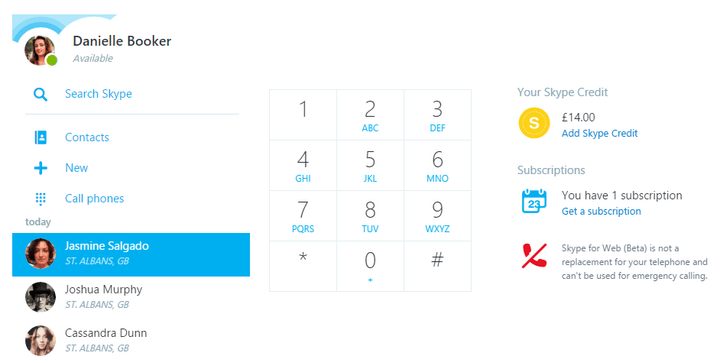
Text chat has been improved in subtle ways. Paste a URL to an image and it’ll be appended inline, and share a YouTube link and you’ll be able to play it from within the Skype interface. (Even better: The new Skype relies on YouTube’s player for video embeds, meaning you get all the same full-screen and volume controls for videos that you do on YouTube.) Adding partners to ongoing chats has been made easier, too, with the addition of new options: press the +New button and “Share conversation” to get a URL you can use to invite folks outside of your contact list even if they aren’t Skype users.
Finally, Skype has added Web-based notifications for incoming calls and text messages. When you’re signed into Skype for Web, you’ll get pop-up messages indicating any new activity.
The improved Skype for Web rolls out today.

Somewhat conspicuously, the new browser client’s debuting shortly after Skype announced plans to abdicate support for its smart TV clients. This comes on the heels of significant updates earlier in the year, too — in February, Skype on iOS gained Microsoft Office document integration, and in January the company added the ability to schedule Skype calls from its Outlook email app for Android and iOS.
Increased competition’s likely to thank for Skype’s accelerated development. Slack, the popular workplace messaging service for which Microsoft nearly made a bid, has more than 2.3 million active users and a valuation of $340 million. Microsoft executives in November revealed that Skype had 300 million registered users.
The company has made acquisitions in recent months to beef up its messaging offerings. It bought chat app Talko in December of 2015, and earlier this year bought mobile keyboard app maker SwiftKey.


