  1. Home
  2. Mobile
  3. Android
  4. Wearables
  5. News

New Google Fit app reminds you to finish that 3-mile jog you skipped yesterday

Add as a preferred source on Google

There are no two buts about it: sticking to a workout routine is hard work. You’ve not only got to motivate yourself to get off the couch in the evening (an hour-long round on the treadmill isn’t always appealing after a long day at the office), but you’ve got to track your progress, too, if you hope to make any headway.

Luckily, tools like Google’s activity-recording Fit app make both of those tasks easier, and today, the aforementioned service is getting interface and usability improvements that should make adhering to a balance of diet and exercise a snap.

Recommended Videos

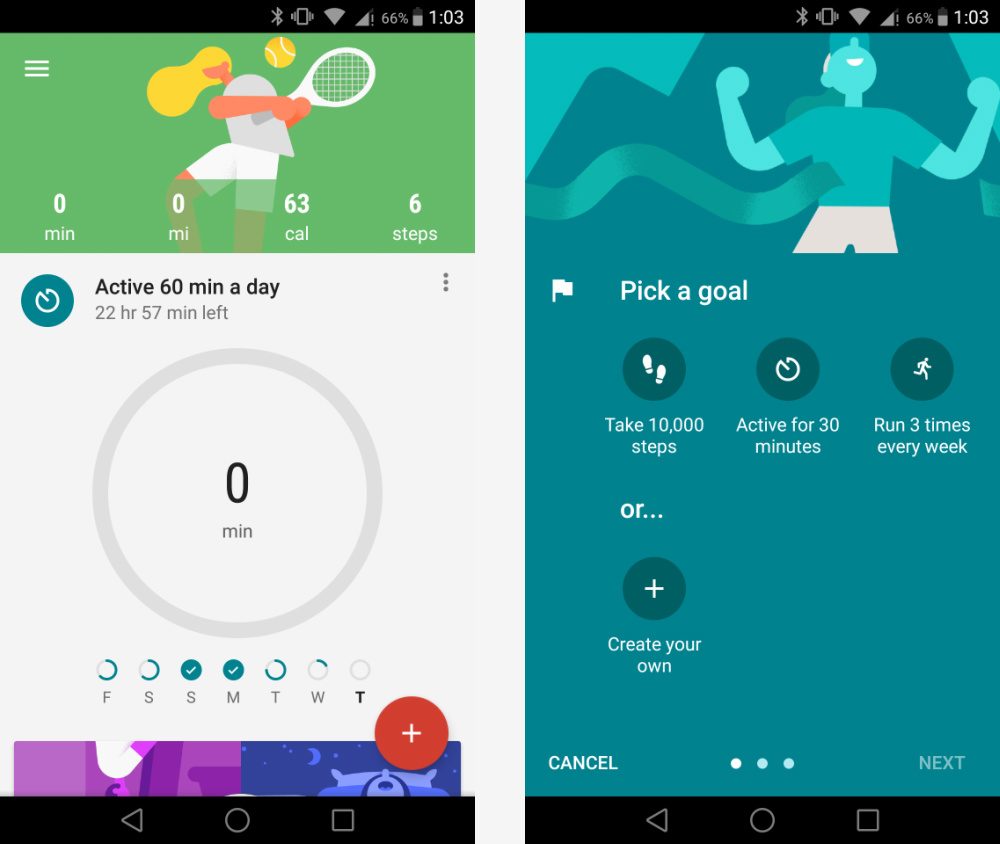
The newest Google Fit app, version 5.7, introduces new colors, charts, and highly visible stats. There is a playful new graphic on the home page — an abstract sketch of a jogger against a purple background. And the thick, circular bar in the outmoded app, which indicated how far in minutes, calories, steps, and miles you were from your daily activity goals, has been replaced by a slimmer, smaller indicator in the same purple color as the app’s new background, offering miniature, historical progress indicators from the past days of the week beneath it.

Finally, the day’s fitness metrics are now collated in a single line near the app’s welcome screen — an improvement over the old app’s behavior, which hid them behind a few swipes to the left and right of the progress bar.
combine_images4
Image used with permission by copyright holder

The home page isn’t the only thing that has gotten a fresh coat of paint. Google Fit’s new “goal” interface lets you configure multiple, specific fitness objectives at once, and set a duration for each. Want a reminder to complete ten push-ups this evening, a pilate set at the end of the week, and a 3-mile jog every couple of days? Fit’s now happy to oblige. You can define goals by duration, calorie expenditure, or another metric of your choosing, and schedule them to recur as often and for as long as you’d like. Active fitness objectives — and their associated progress indicators — appear on the home screen.

The new Google Fit packs enhancements in other, minor areas. It has a new Android Wear watch face, Google Fit Today, that shows your daily fitness stats, and an improved Wear app, that shows a summary of fitness stats and a shortcut to workout routines like walking, biking, running, and sit-ups. And there’s an improved home-screen widget for your phone that shows your daily progress.

The new app is available on the Google Play Store. It rolls out to existing Fit users today.

The update is the first Google Fit has seen since November, when Google rolled out real-time stats, integration with third-party nutrition apps such as MyFitnessPal and LoseIt, sleep-tracking fitness bands like the Xiaomi Band, and automatic activity detection and fitness challenges. At the company’s developer conference in June, it announced that Android Wear 2.0, the forthcoming update for its smartwatch operating system, would sport Google Fit’s automatic activity recognition “built in.”

Kyle Wiggers
Kyle Wiggers is a writer, Web designer, and podcaster with an acute interest in all things tech. When not reviewing gadgets…
The best phones in 2026: our 14 favorite smartphones right now
We tested phones across all price brackets so that you can make the best pick based on your needs and budget.
Google Pixel 10 Pro Fold vs Galaxy Z Fold 7 cameras

Choosing the right smartphone in 2026 is no easy task. Apple and Android manufacturers now have strong options at almost every price, while better cameras, longer battery life, improved software support, new AI features, and more refined foldable designs have made the market more competitive than ever. But picking one is not easy, especially if your budget is tight, or you are just legitimately concerned about getting the best value for your money and need a reliable daily driver for long-term usage.

We have tested and compared the leading smartphones available today, looking beyond the spec sheet to see how they actually perform in daily use. Camera quality, battery life, performance, display quality, software, design, and long-term value all play a part in our recommendations. Whether you are looking for a powerful flagship, a dependable budget phone, a compact device, or a foldable, this guide should help narrow down your choices.

Read more
Snapchat Planets Meaning: Order, Rankings, and How Friend Solar System Works
Snapchat Planets turns your best friends list into a solar system, and yes, your orbit says a lot
Snapchat Planets being shown on the Snapchat app on iPhone.

Snapchat+ includes several exclusive features, but few have generated as much curiosity as Snapchat Planets. Part of the app's Friend Solar System, it transforms your Best Friends list into a planetary ranking, assigning each of your top eight friends a planet based on how often you interact.

From Mercury, which represents your closest friend, to Neptune, which represents your eighth closest, the system offers a quick visual snapshot of your interactions. But what do the different planets actually mean, and how does Snapchat decide who gets which one?

Read more
How to use WhatsApp Web
We'll show you how to use WhatsApp on your desktop or laptop
WhatsApp Web

As one of the most popular messaging services, you’ve already heard of WhatsApp. From its humble beginnings in 2009—two years before Apple introduced iMessage—to its acquisition by Facebook (now Meta) in 2014, WhatsApp has become the dominant messaging platform around the globe.

In recent years, it's grown even more potent with new features like video messages, self-destructing voice messages, the ability to edit sent messages, and more. We even finally got an WhatsApp iPad app in May 2025.

Read more