
  1. Home
  2. Computing
  3. Legacy Archives

Acer Aspire Z3 all-in-one debuts with 23-inch touchscreen, Harman Kardon speakers

Add as a preferred source on Google

Acer-Z3-AIO_dtCheck out our review of the Acer Aspire Z3-605 all-in-one PC.

Tablets and Ultrabooks aren’t the only items on Acer’s Computex menu. The company introduced a 23-inch all-in-one, the Acer Aspire Z3, today, too. The 1920 x 1080 full HD touchscreen display is large enough to rock for gaming while doubling as a small TV. More traditional than the recently released Aspire R7, it’s meant to be a family computer that excels at multimedia as well as Skyping and multitasking. 

Recommended Videos

The Aspire Z3 is the first Acer all-in-one to feature Harman Kardon speakers for better sound reproduction to match the high resolution display. The speakers are coupled with Dolby Home Theater v4 technology for adjusting the sound profile to fit the medium – whether it’s a quiet movie or an action-packed role-playing game. 

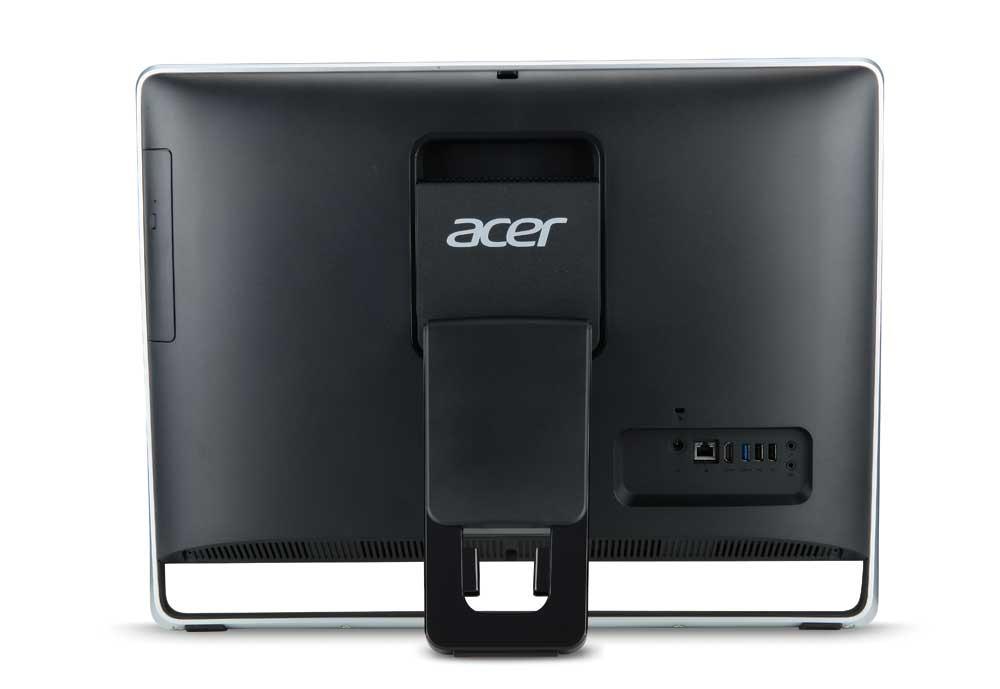
One of the most unique features of the Aspire Z3 is its adjustable HD webcam that can move up to 20 degrees so that kids and parents can be seen by Grandma without having to climb on chairs or slouch uncomfortably. It also eliminates the need to tilt the massive display, which won’t need much tilting otherwise thanks to the LED-backlit LCD display’s viewing angles of up to 178 degrees.
Acer-Z3-605_back_dt
Image used with permission by copyright holder

On the inside, the Aspire Z3 is powered by an Intel Core processor with integrated Intel HD graphics. The front of the Aspire Z3 includes a USB 3.0 port, an SD card reader, a 2-in-1 audio jack, and a display power button. The rear of the machine is packed with with a second USB 3.0 port, two USB 2.0 ports, HDMI, Ethernet, audio, and mic jacks. Acer sweetens the storage expansion ante by including AcerCloud, a file sharing and media management solution. 

While Acer hasn’t given us any more information in terms of specs, we can assume the Aspire Z3 will be powered by Intel’s new Haswell line of processors, which will officially be announced by Intel this month. The company also hasn’t tipped its hand as to configurations or pricing, but those will be revealed later this month when the Aspire Z3 becomes available.

Meghan McDonough
Former Contributor
Meghan J. McDonough is a Chicago-based purveyor of consumer technology and music. She previously wrote for LAPTOP Magazine…
HP has a new $799 mini PC for fans of the Mac mini form factor
The OmniDesk Mini puts Wildcat Lake inside a tiny desktop that starts at $799
HP OmniDesk Mini Desktop

HP has a new mini PC on sale in the U.S., and it is difficult to look at the machine without thinking of Apple's Mac mini. The OmniDesk Mini has a similarly compact footprint and starts at $799.99, making it $100 cheaper than the recently announced M6 Mac mini.

The similarities mostly stop there. The base OmniDesk Mini is powered by Intel's Core 3 304, a five-core, five-thread Wildcat Lake processor. It comes with 8GB of LPDDR5X memory and a 256GB SSD. HP also offers Core 5 320 configurations with up to 16GB of memory. So, despite the Mac mini-like dimensions, this is better viewed as a compact Windows PC than a direct rival to Apple's latest desktop.

Read more
Exclusive: Microsoft explains why RTX Spark’s Prism emulation is about more than higher FPS
Because an erratic 80 FPS will always feel worse than a silky-smooth 60.
ARC Raiders with Anti-Cheat Support running on NVIDIA RTX Spark Laptop

NVIDIA’s RTX Spark may pack a powerful Blackwell GPU, but its ability to run the massive library of existing PC games on Arm depends on a quieter piece of technology: Microsoft’s Prism emulator. Prism allows x64 Windows games and applications to run on RTX Spark’s Arm-based CPU without requiring developers to immediately rewrite them for ARM64.

During an exclusive conversation at NVIDIA’s private IFA 2026 demo, Microsoft’s Peter Dawoud explained that the latest Prism work isn't just about pushing emulated workloads to higher FPS. Microsoft is also focused on performance consistency, particularly in GPU-heavy games where the CPU still has to coordinate frames, physics, and rendering. Because a higher average FPS doesn't always mean a smoother experience, that could prove to be one of Prism’s most important improvements yet.

Read more
The best screenshot app for Mac just became a screen recording powerhouse
CleanShot X already made screenshots easy. Now it wants to make screen recording and editing just as painless.
CleanShot-X-version-5-running-on-Mac

CleanShot X is the best screenshot app for Mac. It's one of my favorite Mac apps, and I've already covered all its features in a previous article. The app just received its 5.0 update, and it's such a massive release that I had to write about it.

CleanShot X already had a built-in screen recording feature, but it was pretty bare-bones. With this update, the app has grown into a proper screen recording studio. You can now record your Mac's screen, edit that recording, add zooms and backgrounds, and do a whole lot more without ever leaving the app.

Read more