

Adobe has formally announced it will be shipping Adobe Flash Player 11 and Adobe Air 3 in early October. Adobe touts the new versions as a “game console for the Web,” with graphics performance up to 1,000 times faster than Flash Player 10 and Adobe Air 2, thanks to full hardware-accelerated rendering for both 2D and 3D graphics and 64-bit support on Windows, Mac OS X, and Linux. However, while Adobe Flash remains common on PCs, Apple has famously eschewed Flash on its iOS mobile platform, and even stopped shipping it on Macs (although Mac users are free to install it themselves). This week, Microsoft announced the version of Internet Explorer for its Windows 8 Metro environment won’t support browser plug-ins — and that means no Flash in the browser.
Is Adobe Flash going to fade away in the face of HTML5 and online video delivered in formats like H.264 and Google’s WebM? Or will Adobe’s advances to the platform let it remain a major player in Internet development even as it starts to disappear from people’s browsers?
What Adobe’s Bringing to Flash 11 and Air 3
The flagship development in Flash Player 11 and Air 3 is Stage 3D, a new hardware-accelerated graphics architecture for 2D and 3D rendering performance. Adobe is touting Stage 3D as capable of delivering console-quality games, animating millions of onscreen objects smoothly at 60 frames per second, even on older computers that lack modern video hardware — like “Mom’s old PC with Windows XP.” The technology doesn’t just apply to games: Stage 3D and Adobe’s hardware-accelerated architecture will also deliver improvements to video conferencing and playback of high-definition video (complete with 7.1 surround sound support).
These improvements aren’t just aimed at desktop computers, but also to Internet-savvy televisions and, of course, mobile devices including Android, BlackBerry, and—yes, Apple’s iPhone, iPad, and iPod touch. Video of what some developers are doing with Stage 3D shows the technology’s potential, especially compared to current “state of the art” Flash games.
To further enhance Flash’s appeal to game developers and content producers, Flash Player 11 and Air 3 will also support content subscriptions and rentals via Adobe Flash Access and Adobe Pass. The feature is aimed more at Internet-connected TVs so operators and content providers (say, perhaps a Netflix competitor) can offer pay-per-view and rental content, but the technology also scales to desktop and mobile platforms.
What about Apple’s iOS and Windows Metro?
So how is Adobe getting its technology onto iOS devices, where Apple has famously banned Flash? That’s where Adobe Air comes in: Adobe Air enables Flash developers to package their Flash-based projects as native applications for a variety of platforms, including Windows and Mac OS X, but also Android, BlackBerry (including the PlayBook), and Apple’s iOS. In broad terms, Adobe Air gives Flash developers a “Save as App” command.
The ability to roll up Flash projects as apps is important. The Adobe Flash plug-in might be banned from iOS’s Safari Web browser —and, apparently, from Internet Explorer in Windows 8 Metro — but developers can build for those platforms by using Adobe Air to save out their projects as standard apps. On platforms where Air is built in, like RIM’s BlackBerry PlayBook, those apps can be comparatively svelte and quick to download. Adobe says it expects Adobe Air will enable developers to build Flash-based apps for Windows 8 Metro, just like they currently can for iOS. As Web-browsing platforms drop support for Adobe’s Flash plug-in, Adobe Air is an increasingly important part of the company’s claim that its Flash technology can reach a billion people.
Apps built using Adobe Air have often looked gorgeous — many of Adobe’s primary customers are designers and media professionals, after all — and the platform has had some early successes, including mainstream apps like TweetDeck (which got acquired by Twitter), and the current top iPad game on the iTunes App Store: Machinarium. However, Adobe Air apps have also been roundly criticized for poor performance and hogging system resources. For instance, Machinarium is limited to the more-powerful iPad 2 and sticks with 2D (rather than 3D) graphics.
Flash’s value proposition
Adobe is touting Flash Player 11 (and Air 3) as the “next-generation for the Web.” The company argues more than two thirds of all Web-based games are currently powered by Flash, and Flash games have an audience more than 11 times larger than the Nintendo Wii. But this doesn’t change the fact that Flash is beginning to disappear from Web browsers: iOS doesn’t support it, Windows Metro won’t support it, and Macs don’t ship with it. Where Adobe Flash used to be a near-ubiquitous technology, the ability to deploy Flash content to Web users is increasingly shaky, and several high-profile security gaffes involving Flash haven’t helped the technology’s reputation in consumers’ eyes. In fact, yet another security patch for a Flash vulnerability in Windows, Android, Mac OS X, and Linux is due today, and it’s already being exploited on the Internet.
Nonetheless, Flash has a strong appeal to developers creating interactive content because Flash projects look the same and — kinda — act the same everywhere, regardless of platform. Although HTML5, JavaScript, and even WebGL have made significant strides in the last few years, those technologies cannot yet make the same claim: Wide variations in browsers, performance, and technology support make developing something like 3D games using open Web technologies difficult to near-impossible. Flash developers do face many platform-specific challenges—developing a game designed to work with a mouse is not the same as making a game that works with touchscreens and gestures, but Flash offers a far more uniform platform for interactive content than today’s open Web technologies. Flash dangles the possibility of — dare we say it? — a write-once, run-anywhere solution for interactive content.
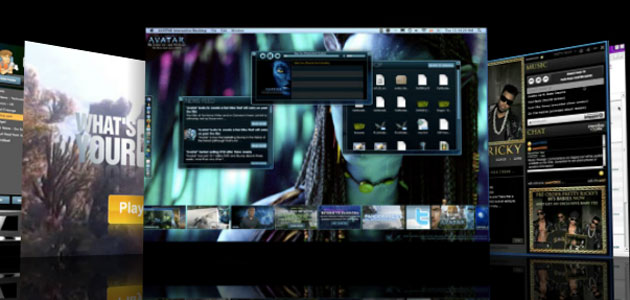
Flash’s future almost certainly lies in interactive content like games, not the simple delivery of video and audio. Where Flash used to be the de facto platform for pushing video to Internet users, a study earlier this year found nearly two thirds of Web video had stepped away from Flash—that’s mostly due to the market pressure of Apple’s iOS platform, and the numbers are probably higher now.
Flash’s value contradiction
Adobe says Flash 11 is the “next-generation console for the Web,” but the simple fact is that Flash is slowly vanishing from the Web, or at least from Web browsers. It doesn’t matter if Adobe can crank up graphics performance. As a growing number of Internet users access the Web in browsers that don’t support Flash, Flash content aimed at Web browsers might as well be moldering in a cardboard box in the basement of some county courthouse. Or, perhaps worse, it might as well have been written with Java.
Native apps sidestep a ban on the Flash browser plug-in because they don’t require a plug-in, and don’t run in a browser. However, they also can’t appear embedded in Web sites, so Adobe Air isn’t a solution for Web publishers looking to embed audio, video, and (most importantly) interactive elements in their Web pages. Developing a Web site and developing an app — let alone an app targeting multiple mobile and desktop platforms — are very different things.
Despite Adobe’s focus on Web-based gaming with Flash 11 and Air 3, it seems clear Flash’s value to Web publishers is declining, even as its value to app developers might be on the rise. The question then becomes whether Flash and Adobe Air can compete with native app development tools. To date, with Flash Player 10 and Adobe Air 2, the answer is no. Perhaps Adobe can change that with Flash Player 11 and Adobe Air 3.


