  1. Home
  2. Computing
  3. News

Make a working laptop with just a Raspberry Pi Zero and a Lapdock

Add as a preferred source on Google

In recent years, devices like the Raspberry Pi and Arduino have dramatically expanded the scope of what hobbyists can achieve with DIY computing projects. Because of their size and their price, these single-board computers have been used in the creation of everything from home media centers to a space-ready X-Wing.

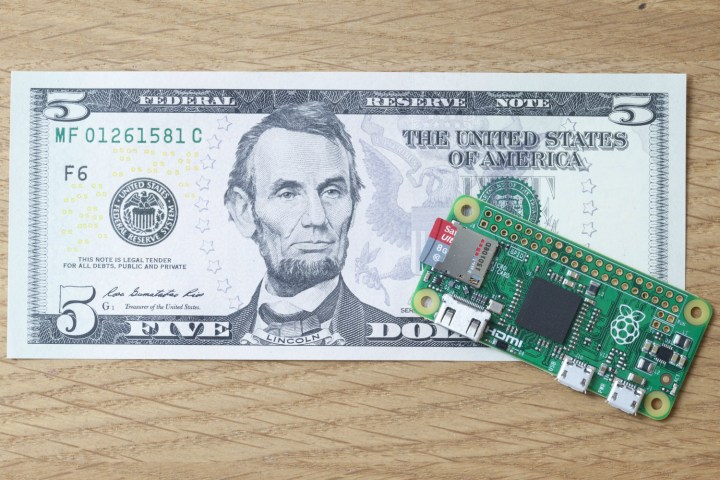
Now, one creative Raspberry Pi Zero owner has used the $5 device as the foundation of a fully fledged laptop. Combined with the little-known (and discontinued) Motorola Lapdock, it makes for a finished product that’s definitely ingenious — even if it’s not the easiest method of gaining access to a basic laptop.

Recommended Videos

The Lapdock was originally conceived as a smartphone-compatible shell intended to deliver a laptop-like experience. The product never took off in the way that Motorola hoped it would, but it’s since found an audience among tinkerers thanks to its compatibility with devices like the Raspberry Pi, according to a report from Liliputing.

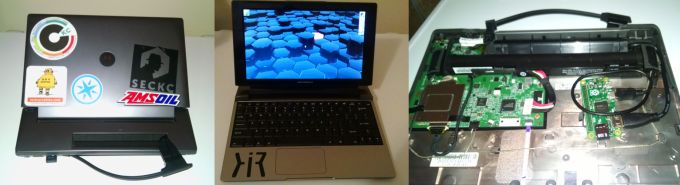
Previous iterations of the Raspberry Pi and similar computers from other manufacturers worked well with the Lapdock, but the wiring used to connect the two devices could make things messy. Thanks to the tiny form factor of the Raspberry Pi Zero, it can be neatly placed within the Lapdock with these wires hidden away.
Raspberry Pi Zero Lapdock
Ax0n
Images posted by the project’s creator, Ax0n.

However, this project is only really cost-effective if you already have all the necessary elements to hand, even given the bargain price tag on the Zero. The Lapdock range only survived for about a year after launching in 2011, and the devices tend to go for more than their original retail price on services like eBay.

Still, if you happen to have an old Lapdock gathering dust and $5 to spare, it might be worth trying out this build for yourself. It might not be a PC capable of running the latest video games, but it’s certainly an interesting project.

Brad Jones
Brad is an English-born writer currently splitting his time between Edinburgh and Pennsylvania. You can find him on Twitter…
Everything Apple announced at its September event: iPhone Duo, iPhone 18 Pro, new Apple Watches, and AirPods 5
Apple packed its biggest September event in years with a foldable iPhone, new watches, and smarter AirPods.
Computer, Electronics, Tablet Computer

The "Surprise and Shine" September launch event was one of Apple's crispest, most elaborate, and most loaded launch events in a while. Instead of leaving the minute details in the spec sheet or fine print, Apple actually included them in its keynote presentation, not just for its big reveal but for all the devices it unveiled on September 9, 2026. 

While the 'Surprise' bit was covered by the new iPhone Duo, 'Shine' probably refers to the new colors in the iPhone 18 Pro lineup. Beyond these, Apple also announced two new Apple Watches and a refresh for the regular AirPods (not the Pro ones). Given that there's a lot of ground to cover, here's everything Apple announced at its September 2026 event. 

Read more
Before You Pay More for DDR5, Think About How Much Memory You Need
The MSI Cubi 5 1MA makes a strong case for looking beyond the newest specs
MSI Cubi 5 1MA compact mini PC with Intel Core processor

There is an easy trap to fall into when buying a new PC. The newer specification usually sounds like the better one, so choosing DDR5 memory over DDR4 can seem like an obvious upgrade. But with memory prices climbing to unusually high levels, it is worth asking whether you will actually benefit from paying more for that extra speed.

For many people buying a PC primarily for work, the answer comes down to how they use it. Everyday tasks such as browsing, email, spreadsheets, presentations, and video calls generally do not need the extremely high memory bandwidth DDR5 offers. Having enough RAM to keep several of those tasks running comfortably can be far more relevant.

Read more
Adobe Acrobat’s latest update could make working with PDFs considerably easier
New Acrobat features make it easier to understand, refine and present information in PDFs
Page, Text, Clapperboard

This post is brought to you in paid partnership with Adobe

PDFs remain one of those unavoidable parts of working life. Reports, research papers, presentations, proposals, financial documents and client material still tend to arrive as PDFs, and the real problem is rarely opening or reading them. It is dealing with everything that comes after: finding the useful information in a lengthy document, understanding it quickly and eventually turning it into something presentable.

Read more