
  1. Home
  2. Computing
  3. Mobile
  4. Legacy Archives

OpenPeak’s OpenTablet 7 Wonders Who Needs an iPad?

Add as a preferred source on Google

Coinciding with this week’s Mobile World Congress in Barcelona, OpenPeak has formally announced its OpenTablet 7, a 7-inch touch-screen device that’s designed to handle both user’s multimedia, Internet communications and social media, but also operate as a functional telephone. And the device measures just 9 inches by 5 inches, and is just 0.6 inches thick so it can cleverly disguise itself as a photoframe.

OpenPeak OpenTablet 7
Image used with permission by copyright holder

“The OpenTablet is the ultimate control panel, delivering the most commonly accessed multi-media services right to your fingertips anywhere,” said OpenPeak CEO Dan Gittleman, in a statement. “The all-in-one device allows you to sync schedules, check movie times, listen to music, watch videos, get weather updates, and even monitor energy usage and home security, all from a single, easy-to-use device.”

Recommended Videos

The OpenTablet 7 sports that 7-inch touchscreen display with LED backlighting and is powered by Intel’s Moorestown platform—yes, that’s an Atom inside. The OpenTablet 7 sports integrated Wi-Fi and Bluetooth wireless networking, two cameras (one for stills and another for high-definition video), cellular connectivity options, and HDMI output for pushing media to a big screen. The tablet also sports USB 2.0 connectivity and microSD storage.

The OpenTablet 7 doesn’t exactly run Windows or an embedded Linux, though: instead, developers make apps using Adobe Flash CS4, and OpenPeak has rolled out what it’s describing as an end-to-end deployment solution so applications developers can sell apps to customers, update customer devices, and provide the latest content.

OpenPeak hasn’t announced any pricing for the OpenTablet, but expects the device will be adopted by “branded customers” and service operators, with consumers starting to see products in the second half of 2010.
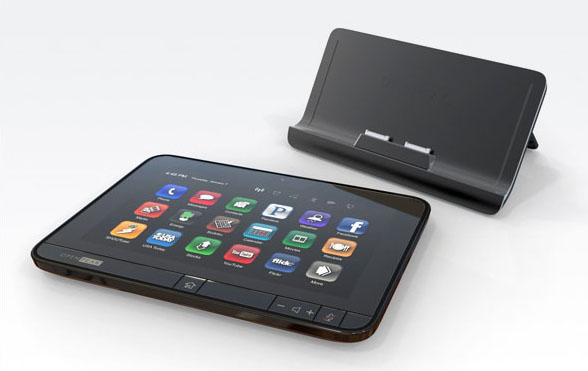
OpenPeak OpenTablet 7
Image used with permission by copyright holder
Geoff Duncan
Former Contributor
Geoff Duncan writes, programs, edits, plays music, and delights in making software misbehave. He's probably the only member…
Amazon unveils Echo Show 16 with Fire TV, Alexa+ and an anti-glare display
A bigger screen, smarter Alexa, and a wallet-sized dilemma.
Amazon Echo Show 16 featured image.

Smart displays have promised to run my entire house for years. However, I mostly end up using them as fancy kitchen timers or home security monitors. Amazon’s newest one wants to change my mind, and it comes with a serious price tag.

The company just unveiled the Echo Show 16. It is a 16-inch smart display that isn’t just a kitchen timer but a small TV, thanks to built-in Fire TV. The baseline version costs $499.99, and the anti-glare version costs $569.99. Pre-orders get $100 off; the device ships late this year.

Read more
M6 iMac vs. M4 iMac: Skipping the M5 made a bigger difference than I expected
Same pretty aluminum shell. Much stronger M6 heart.
M6 iMac vs. M4 imac featured image.

After five years with Apple silicon, from the original M1 MacBook Air to the M5 MacBook Air released earlier this year, I've watched these chips mature not just on the spec sheet, but in real-world workflows and overall efficiency.

The new M6 chip might sound like a routine generational upgrade, but it's the company's first chip built on a 2nm manufacturing process, which brings meaningful improvements over previous Apple chips.

Read more
Gemini Notebook can now record lectures and meetings without the upload shuffle
The mobile app lets you capture up to an hour of live audio and immediately use it as a notebook source
Gemini Notebook update for students

Gemini Notebook’s mobile app now has a built-in recorder for capturing lectures and meetings as sources. You can record directly where you’ll use the material, skipping the separate recording app and the file upload afterward.

Google announced the feature on X, highlighting classroom lectures and team meetings as potential uses. It also works for capturing your own thoughts, so you can talk through an idea and bring that explanation into your notebook while it’s still fresh.

Read more