  1. Home
  2. Computing
  3. Web
  4. News

Opera Software's latest browser predicts and loads websites users want to visit

Add as a preferred source on Google

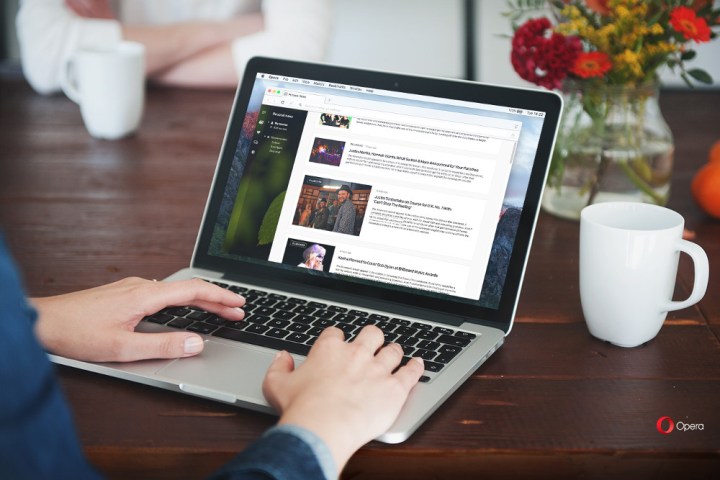
Opera Software has released the latest version of its popular web browser, Opera 43. Opera’s executive vice president, Krystian Kolondra, said on Tuesday that this release is the fastest version thus far, and packs a new feature called instant page loading. It incorporates predictive technology that begins to load a website in the background before the user finishes typing its full web address.

According to Kolondra, Opera 43 will become “smarter” over time as it learns what websites are attached to URL inputs. For example, let’s say a user may frequent the New York Times website, entering the URL into the address bar at least once a day. If so, Opera will associate the website with the address and begin loading the site in the background before the URL is fully entered into the address bar.

Recommended Videos

“In addition, when you search for something in the address bar, it will load the results likely to be clicked in the background,” Kolomdra said. “Opera can predict what page a user is going to load not only from its behavior, but also when the current page uses the < link rel=prerender … > tag.”

In addition to the new instant page loading feature, Opera now includes Profile Guided Optimization (PGO). It’s a technique used to convert instructions into a language that can be understood by the computer. This technique learns what the best usage scenarios are so that Opera performs tasks faster, reducing its use of the local processor.

Kolondra said that Profile Guided Optimization enables Opera to load up to 13 percent faster on a PC based on Intel’s Core i7-4600 processor (2,1GHz) and a 32-bit copy of Windows 7. That’s because the new feature optimizes “the most important parts” of Opera, including the browser engine. Compared to Opera 42, this latest version saw speed improvements of 60.3 percent in Speedometer, 7.7 percent in JetStream, and 3.35 percent in Octane.

Finally, Opera 43 includes what the company calls “classic link selection.” This allows users to select text within a link without causing the link to activate. By clicking and dragging horizontally, users can now select the text without problems. To drag the link, users simply use a vertical click-and-drag method.

Opera 43’s release follows news of the Opera Neon concept browser in late January. It’s a new approach to browsing the internet that sports a sidebar which bundles a download manager, an image gallery, and a video player. Opera Neon also includes a vertical tab bar located to the right, so that tabs are more visually separated. Other features include a start page that integrates the user’s desktop wallpaper, and an intelligent tab management system.

As for the mainstream version of Opera, the company spent the last year speeding up the browser with page-load optimizations, a better start-up process, and native ad-blocking. Other installed features included a built-in VPN client, video pop out, a battery save mode, and more. Web surfers wanting to download Opera 43 can grab the file right here.


Kevin Parrish
Kevin started taking PCs apart in the 90s when Quake was on the way and his PC lacked the required components. Since then…
Lenovo’s new gaming laptop is the first to feature a 240Hz inkjet-printed OLED display
TCL’s inkjet-printed OLED technology finally reaches a commercial laptop through Lenovo
Computer, Electronics, Laptop

TCL has spent years saying inkjet-printed OLED could improve image quality, efficiency, lifespan, and manufacturing costs. Back in 2024, the company was still showing prototype laptop panels and promising a “comprehensive breakthrough” once the technology was ready for commercial products.

Two years later, it has finally arrived in a gaming laptop. Lenovo’s new Legion R9000P uses a 16-inch panel that TCL CSOT describes as the world’s first inkjet-printed OLED display integrated into a laptop.

Read more
This new Mac malware won’t let you use your computer until you surrender your password
This Mac malware turns your own computer against you
AI Generated Image

A newly discovered strain of macOS malware is taking social engineering to an unsettling new level. Instead of exploiting a software vulnerability or silently stealing information in the background, it simply refuses to let you use your Mac until you type in your login password.

Dubbed ClickLock, the malware repeatedly shuts down key macOS processes, disables notifications, displays convincing Apple password prompts, and effectively traps users in a loop that only ends when the correct password is entered. Once that happens, it doesn't just steal the password. It goes after browser data, cryptocurrency wallets, saved credentials, password managers, and much more.

Read more
1Password lets Claude inside your accounts without handing over the keys
Claude can now sign in on your behalf while your password stays hidden, though trusting it after login is a separate decision
1Password official

1Password is giving Claude a way into your online accounts without making your passwords part of the bargain. The new 1Password for Claude integration can fill login details while keeping the credentials hidden from Anthropic’s AI agent.

Available now on Mac, the feature kicks in when Claude reaches a sign-in page during a task. Claude requests a saved login, then you approve or deny it. If approved, 1Password submits the credentials through a separate encrypted channel. Passwords and one-time codes never enter Claude’s context or Anthropic’s systems.

Read more