Discord is a great way to interact through voice and text chat with your gaming pals for free, but there will occasionally be times when someone says something in the chat that violates the guidelines. Depending on the severity of the message, you may decide to report the user directly to Discord so disciplinary action can be taken. However, it’s not as simple as it may appear at first glance.
In this guide, we’ll walk you through how to report someone on Discord.
How to report users and servers on Discord
There are steps you need to take to successfully report someone who is harassing, spamming, threatening, or simply being abusive in chat. You might find an entire server is participating in harmful activity that violates community guidelines.
On the other hand, you might be having a bad day. It's smarter to appear offline on Discord than engage in combative discourse.
Here’s what you can do to alert the moderators at Discord.
Check if the message violates Discord’s guidelines
You don’t want to report someone unless their message actually violates Discord’s community guidelines. Activities and messages that are not tolerated on Discord include:
- Harassment
- Spam messages
- Violating IP rights
- Sharing child pornography
- Glorifying or promoting suicide and self-harm
- Distributing viruses (make sure you're aware of the best free antivirus tools)
- Threatening another user
- Sharing images of gore or animal cruelty
If their message doesn’t fall into one of these categories, you likely shouldn’t report them directly to Discord. Instead, if possible, talk with the other members of the channel about their conduct. If you’re the owner or a moderator on the server, you can even kick them out and/or ban them yourself, and if things get too bad, you could opt to delete the Discord server. You can also block or mute the user to avoid seeing their content while continuing to see what everyone else is saying in the server.
Please note: If the message is deleted after you send the report, disciplinary action can still be taken. However, there is no way to report a message that has already been deleted.
Report a Discord user on desktop
Take the following steps to make a report on Discord:
Step 1: Open the offending message thread.
Step 2: Hover your mouse pointer over the message to reveal the ellipses menu ("...").
Step 3: Select More then Report Message.
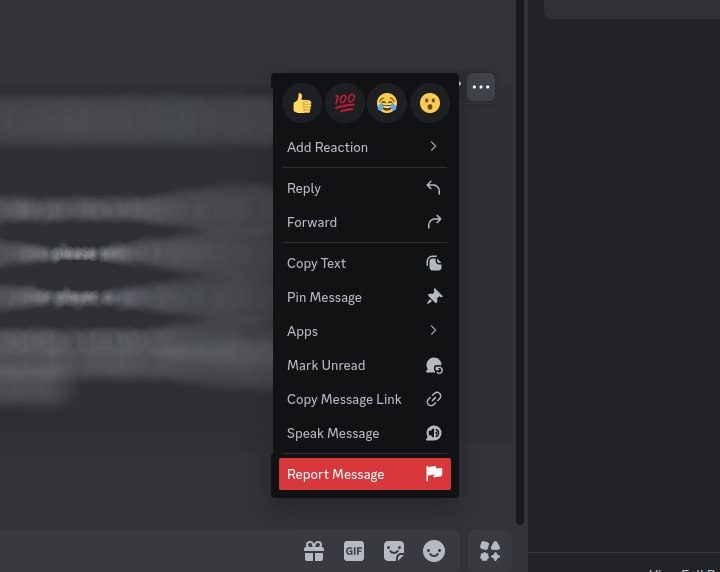
Step 4: Confirm the selected message is correct, then choose the appropriate classification for the report.
Step 5: Further information may be required. You also have the option to Block or Mute the sender.
Select Done when you're finished.

Raise a complaint via the Discord website
You can also send a report to Discord via its Trust & Safety request center. Enter your email address, select your report type based on the option in the drop-down box that most closely applies to your situation, enter a subject, and finally describe the incident and provide all three ID codes in the Description box. You may also want to consider sending screenshots of the messages to Discord as well, which you can submit in the Attachments section of the form. Send the report along, and you’re ready to let Discord take care of the rest.

How to report on mobile
Reporting a Discord user on Android and iOS is just as simple as doing it on a desktop.
All you need to do is use your finger to press down, hold the desired message, and hit Report. Discord’s support team declares that it does view these reports as with all the others. If an event is time-sensitive and needs urgent attention, but you don’t have access to a computer, you can also send an email to abuse@discordapp.com. Simply type out the details of your specific situation, click send, and that’s it. Just beware that you may not get a reply. Be sure to link to the message within your email. To get this link, just click Copy Message Link from the same menu as above.
How to clear a report from Discord
If you run into a situation where you need to cancel a prior report, we recommend sending a direct message to the Discord Twitter page. Send your situation’s details and ask that a team member erases your report. Also, to make it easier for the Discord team, you should make sure to give them the email address you use for your account. A few reasons why someone might retract a report could be that they mistakenly reported someone or reported them before realizing that the message did not violate Discord’s community rules.
We want to point out that filing false reports goes directly against Discord’s terms of service. Only report someone if you’re absolutely sure they are violating the guidelines, or you could face some negative consequences. Remember, you have the option of leaving the Discord server if it isn't one that you are particularly enjoying.
Discord’s help team strives to work as efficiently as possible in replying to reports they receive. They often resolve issues in a matter of minutes.
Don't forget, Discord is supposed to be fun, so liven things up again. Learn how to stream Netflix on Discord and have a watch party with friends.