  1. Home
  2. Entertainment
  3. Audio / Video
  4. Evergreens

How to change the language in Netflix

Add as a preferred source on Google

Netflix doesn’t quite dominate the streaming space as much as it used to, but it’s the world’s largest streaming platform, with more than 73 million subscribers in the U.S. and more than 193 million worldwide.

It’s no surprise, considering the platform offers immediate access to thousands of movies and TV shows, with new content added every month. Netflix also creates some of the most engaging, exciting, and binge-worthy original shows around — from Stranger Things to Tiger King — furthering its appeal beyond pure volume.

Recommended Videos

See more

To help cater to such a robust and varied user base, Netflix allows for more than 20 languages, including Spanish, French, Portuguese, Arabic, Korean, and Simplified Chinese. Thankfully, it’s easy to switch them if you accidentally select the wrong language or wish to experience a title in something other than your native tongue. Just follow the steps below.

How to change the primary language on desktop

Step 1: Sign in to your account on Netflix and click the profile you want to change the language settings.

Step 2: Click the drop-down menu located next to your profile in the upper-right corner of the homepage. Then, select Account.

Step 3: Scroll to Profile and Parental Controls and select Language to access the language settings pane. You can also bypass these two steps by navigating here in your browser.

Step 4: On the language settings page, click the small circle that corresponds to your desired language.

Step 5: After selecting your language, scroll to the bottom of the page and click the Save button.
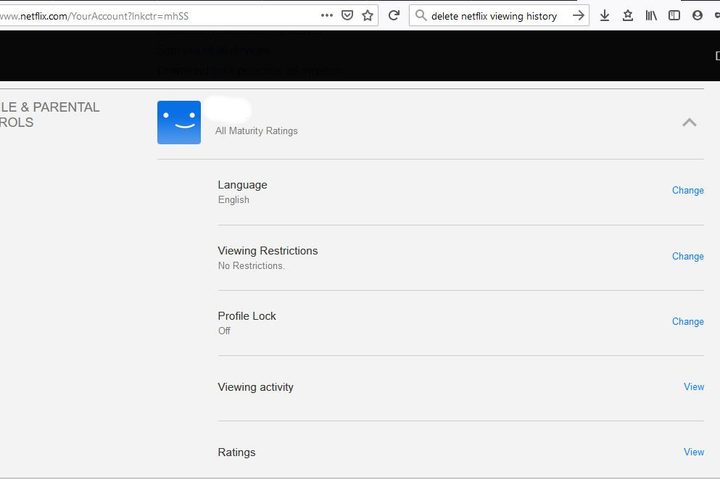
Image of Netflix Profile & Parental Controls Section
Daniel Martin/Screenshot

How to change the primary language on mobile

Step 1: Sign in to your account on Netflix using your phone or tablet’s web browser. Once signed in, select the profile you want to change the language for.

Step 2: Navigate directly to the language settings page by entering https://www.netflix.com/LanguagePreferences in your selected browser.

Step 3: Go to the Shows & Movies Languages page and find the small square that lists your preferred language.

Step 4: After choosing your language option, click the Save button at the bottom of the page.

Step 5: Open the Netflix app on your phone or tablet. If your new language appears, then you’re all set. If it doesn’t display, sign out of the app and log back in to ensure the changes go through.
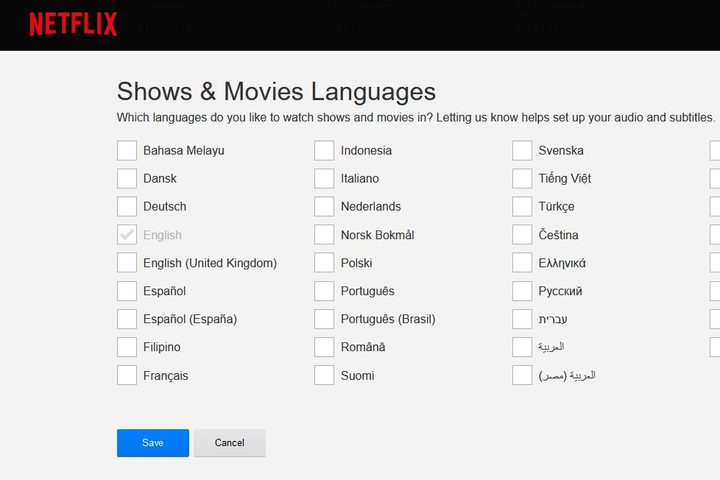
Image of Netflix Shows & Movies Language Page
Daniel Martin/Screenshot

How to change the language during a show

If you’re watching a show and want to change the audio and the subtitles’ language, you can do it while you watch. Not all shows offer every language option. To change languages, select the Audio and Subtitles option at the bottom of the screen while playing a video. Then, select the audio and subtitle language of your choice. Note: Changes should take effect immediately.

Nick Perry
Nick Perry is a freelance writer who bounced from Hollywood to Silicon Beach to pajama pants. His work has been featured on…
Netflix is worried people aren’t watching enough so its next move could change the app forever
Netflix's next big update could look a lot more like cable TV
Netflix on TV couple watching

Netflix has spent years telling the entertainment industry that binge-worthy originals and a simple user experience were enough to stay ahead. That strategy helped make it the world's biggest streaming service. But according to a Wall Street Journal report, the company is increasingly concerned about a different metric: engagement.

While Netflix continues to post healthy profits and retains one of the lowest subscriber cancellation rates in the industry, executives are reportedly seeing early signs that people are spending less time watching content. That matters because engagement - not just subscriber numbers - has become one of the biggest indicators of whether customers will stick around, watch ads, and continue paying for the service.

Read more
EXCLUSIVE: The Mandela Catalogue producer shares new details about the upcoming horror adaptation
Producer Aaron B. Koontz discusses adapting The Mandela Catalogue with Alex Kister and Steven Spielberg
A man with a scary face in The Mandela Catalogue Vol.4.

Following the box-office success of A24's Backrooms, Hollywood has turned its attention to another analog horror phenomenon. On July 2, Deadline announced that producers Aaron B. Koontz (Shelby Oaks) and Steven Spielberg are developing a film adaptation of the viral YouTube horror series, The Mandela Catalogue.

Series creator Alex Kister will direct the film with a screenplay written by Tyler Clifton. According to Kister, the film follows a group of high school graduates "struggling to maintain their grip on reality after the disappearance of a local student sparks a chain of unexplainable, unsettling events."

Read more
Microdramas are booming, and Character.AI is turning it into a two-way obsession
Watch an AI microdrama, then interrogate the characters yourself
Character.AI AI Microdramas Featured

Microdramas have already conquered the tiny vertical screen. Character.AI wants to make the experience even more immersive. The chatbot platform has launched c.ai Series, a collection of original, mobile-first microdramas created by its in-house studio. Each show consists of bite-sized vertical episodes, although watching is only half the experience. Viewers can also chat directly with the characters afterwards, revisit moments from the story, explore relationships, or begin entirely new storylines.

It is the latest attempt to blend streaming with audience participation. Netflix recently took another route with Unhinged, a horror game that turns a viewer’s phone into a controller and allows them to call during gameplay. Meanwhile, Character.AI is bringing interactivity into the fiction itself by keeping its characters available long after an episode ends.

Read more