
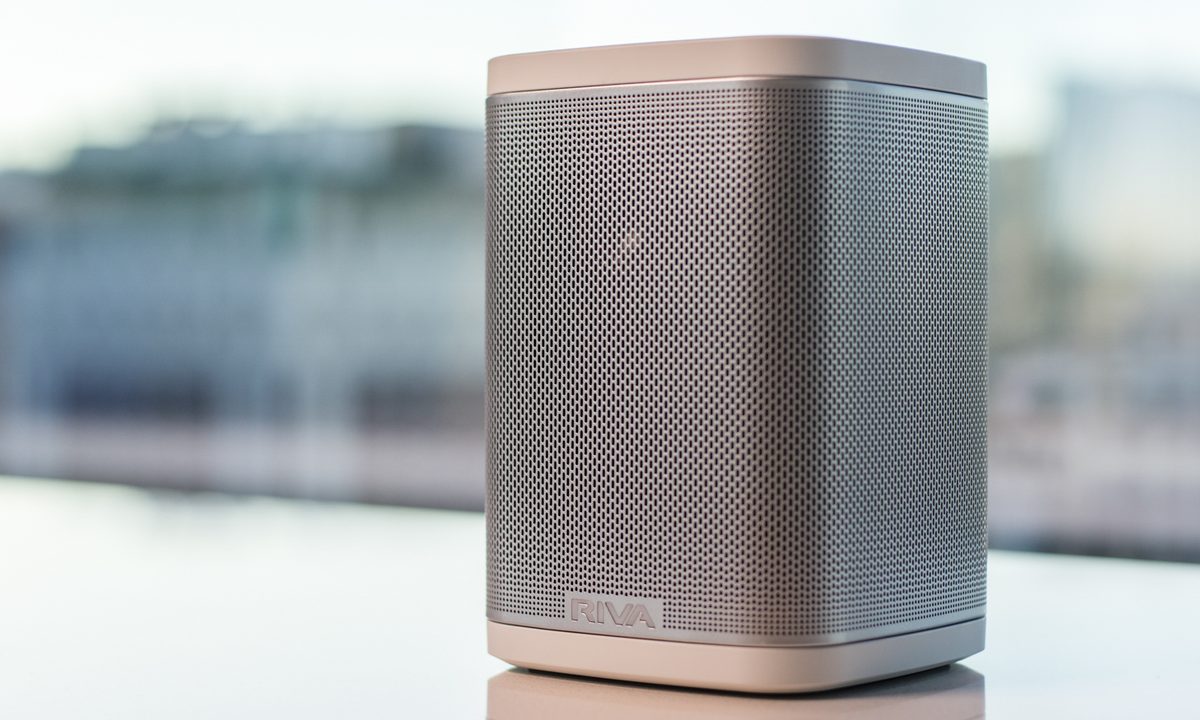

“The Riva Concert Series is the best compact smart speaker you can buy”
- Bold, stereophonic sound
- Great Alexa integration
- AirPlay and Spotify Connect integration
- Water resistant
- No Google Home support
“Why you can trust Digital Trends – We have a 20-year history of testing, reviewing, and rating products, services and apps to help you make a sound buying decision. Find out more about how we test and score products.“
Most of us don’t want to find a home for a bulky stereo system to listen to our favorite music, let alone dealing with cables and various components. We want to press play on our phones, and have our kitchen, bedroom, or living room fill with sound. Better still: We just want to tell the speaker what we want to hear, no buttons at all.
Riva’s Concert series speaker makes that possible, and in a wide variety of ways. With Amazon Alexa built in, Spotify Connect, Apple AirPlay, and Bluetooth support, there is virtually nothing this speaker can’t play on-demand. Add in true stereophonic sound and the ability to pop on an optional battery and take it with you on the go, and the Concert bests even the Sonos: One on our list of the best smart speakers you can buy, ranking as our favorite speaker of 2018.
The Riva Concert won our award for the best products of the year. Make sure and check out all our other selections for Best Products of 2018.
Out of the box
The marshmallow-shaped Riva Concert comes in a small box with the speaker, an instruction manual, and a power cable. It doesn’t get much simpler than this. All you’ve got to do is decide where you want your Concert to live.


Those who are familiar with Riva’s previous model, the Arena, won’t find much new in the design of the Concert, but that’s actually a good thing, as both speakers are quite nice to look at. A rounded rectangle that’s surrounded by a solid metal grille, the Concert comes in black or white, allowing you to match the theme of your room’s decor. Our review unit came in white, blending seamlessly with our white-trimmed living room.
A ring around the middle of the speaker’s top mirrors other Alexa-enabled devices, lighting up when you call on the smart assistant — but Riva has also made it so that the Riva logo on the front of the speaker lights up blue when Alexa is working, a nice touch that means you’ll always know Alexa is listening.
Virtually every aspect of the Riva speaker is controllable via the Riva app or from AirPlay or Spotify connect
Physical buttons are less necessary than ever for smart speakers thanks to Alexa and its app integrations (more on this later), but they are still there on the top of the speaker, inside the LED ring. There are keys for volume, song skip (which double as source and pairing buttons), and a mute button in the middle.
Setup
Setting up the Riva Concert is quick and painless. Plug in the speaker, download the Riva app, and follow the on-screen instructions to get it connected to your wireless network.
Once connected, it will become available as a Spotify Connect or AirPlay speaker for any device on the same network. Unlike the Sonos One, the Concert also has Bluetooth, along with an AUX input should you want to plug in directly.

A threaded mounting screw on the rear allows you to mount the speaker to the wall via a number of aftermarket mounts should you want to save shelf or desk space. As mentioned, there’s also an optional battery pack that lasts for over 15 hours ($50 at time of publication), meaning it can easily transform into a fantastic portable speaker if you’re headed to a barbecue or pool party. To attach the battery pack (sold separately) simply click it onto the bottom of the speaker, and you’re good to go.
Ease of use
In the past several years, the top multiroom speakers have gotten insanely easy to use, thanks largely to Sonos’ pioneering, app-controlled design and the numerous well-coded copycats that have followed.
If there’s one area where the Riva truly bests its many opponents, it’s in sound quality.
As expected, virtually every aspect of the Riva speaker is controllable via the Riva app or from AirPlay or Spotify connect, and the addition of Alexa makes things even easier.
Even with music playing loudly, the speaker is able to discern commands like pause, skip, and stop, and every other Alexa command you love is also instantly available.
These two methods of controlling the Concert make it one of the best speakers we’ve ever used, easily holding its own alongside the best on the market. That said, some part of us does wish that the new Concert model also had the Google Home support offered by the company’s last generation of multiroom speakers, for integration’s sake. It’s no mystery as to why the Alexa-integrated version doesn’t have it, though: Google and Amazon are big rivals in the smart home space.
Sound quality
If there’s one place where the compact Riva speaker truly bests its many opponents, it’s in sound quality. The Concert offers true stereophonic sound using what the company calls “Trillium audio” tech, which in layman’s terms means there are audio drivers on three sides of the device. This allows the Concert to provide an extremely wide soundstage and true left and right channels, where competitors like the Sonos One have only single channel mono.


As such, the Riva has a significantly more vibrant overall sound than the industry leader, easily filling small and mid-sized rooms with rich and dynamic audio. We were particularly impressed with the low-end power offered by such a small speaker, which played pop and hip-hop favorites from Michael Jackson to Outkast with ease.
When listening to more dynamic jazz and acoustic performances from Ahmad Jamal and Ryan Adams, we appreciated the speaker’s ability to showcase the high-end shimmer of cymbals and the top guitar strings without becoming harsh or tinny, as well as to retain clarity throughout the mid-range — a place where many other speakers often struggle to stay clean.
This little small speaker isn’t going to replace your high-end stereo when it comes to reproducing every subtle breath or nuance, but the design team at Riva clearly put a lot of thought into offering listeners the best possible sound from this footprint, and it shows. When it comes to compact smart speakers, there’s nothing we’ve heard that sounds this good.
Warranty information
Every Riva product comes with a two-year warranty that covers defects in materials and manufacturing — excluding the optional battery pack.
Our Take
The Riva Concert is a small, intuitive smart speaker with every bit of the functionality we desire. And with optional extras like a battery pack and travel case, the Concert can serve as a fantastic one-size-fits-all listening solution.
Is there a better alternative?
For the past decade, Sonos has been the biggest name in the multiroom audio game for good reason. The Riva Concert goes head to head with the company’s smart Sonos One model, and does so quite well. For the same price as the Sonos speaker, you get the addition of Bluetooth, true stereophonic sound, and the ability to go mobile if you’re willing to cough up a bit more cash. All this, plus similar ease of use, actually makes the Riva Concert the better speaker in our eyes.
How long will it last?
Riva speakers are built to be durable, and the two-year warranty means you’ll get some good use out of it before you even have to worry about replacing it. We’ve been using the company’s previous models for over a year and have had no issues so far. We don’t expect you will need to consider a new smart speaker for a long time.
Should you buy it?
Yes. If you are looking to get a smart speaker with great sound and the possibility of future expansion, the Riva Concert is absolutely worth purchasing. That said, if you are already locked into the Sonos ecosystem with one or more of that company’s speakers, you might consider staying put for integration’s sake — though Alexa, AirPlay, and Spotify Connect make it fairly easy to use multiple speakers from multiple brands.


