

Everything old is new again. Vinyl records are back in style; everybody is thrift shopping for their grandad’s clothes, so why not send off some snail mail, just for old time’s sake? When’s the last time you received a meaningful piece of physical mail that didn’t include a deadline for you to pay by? The post office still exists, so you might as well get some use out of it. Lettrs, a Web-based service turned iOS app that lets you send physical versions of letters you write on your mobile phone or tablet.
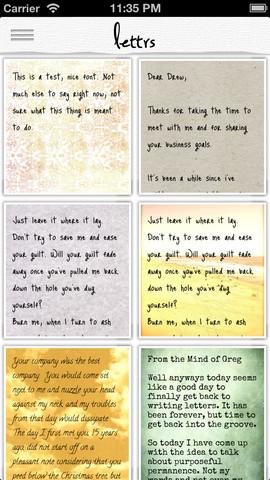 Lettrs is the intersection of old and new, allowing you to create a correspondence on your phone that is eventually delivered via snail mail. The creation of your letter includes picking out the style of stationary and font, which are packaged as themes that can give your letter a distinct feel. (What was lacking was a good ransom note theme, with cut-out magazine letters – a shame, really. Crazed lunatics will have to make their demands the old-fashioned way.) Once you have your style picked out, you can type out the message that you want to send off. It’s no different than typing up an email, though knowing your email will be printed and delivered encourages you to put a little more effort into your letters. No one wants a printed out version of that almost funny joke your aunt sent you with 18 FWDs in the title.
The envelope that houses your letter is hand-addressed, scented, and sealed with wax. This all takes place in the Lettrs postal center in Collinsville, CT, the same place that your letter is printed out on to linen paper. While this may seem like overkill, the entire process is beyond anything we’ve experienced in some time when it comes to snail mail. None of it necessary, but it wouldn’t be very fun to just receive a letter in Times New Roman font on a standard white people of paper in a plain old envelope. Seeing the final product arrive in the mailbox and opening it up is a far more satisfying feeling than seeing it on the screen of your mobile device. We often talk about how good screens on phones look and the pixel count and whatnot, but it doesn’t compare to holding linen-printed paper in your hand.
We usually think of apps for our mobile devices as tools that eliminate the need for any sort of physical alternative. Your GPS wipes out the need for a map; contact lists and search tools do away with phone books; Angry Birds removes the need to throw avians at pigs, etc. While Lettrs does the opposite, and really for no purpose other than novelty, it is a lot of fun.
There is a sizable portion of people who may use this app that have never actually sent a typed or hand-written letter. It’s a weird world we live in. For those of us who have, it’s a chance to relive a simpler time with a modern twist. For those who have not, welcome to a world where correspondence was not always immediate. Crazy, right? Lettrs claims that it is leading a movement that focuses on “a more thoughtful mode of personal communication.” And you know what? We’re buying it.
If you’re thinking about giving Lettrs a try, now is a good time. You get five free USPS-delivered letters between now and Mother’s Day on May 12, 2013.


