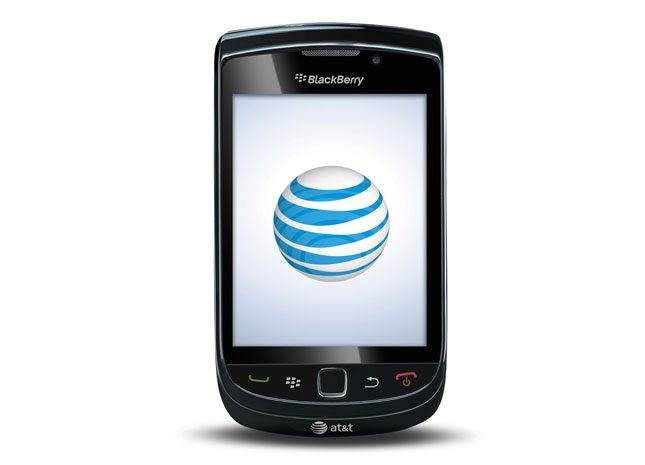
“The Torch outshines its brethren as the best BlackBerry yet, but still looks dim beside the iPhone and most Android offerings.”
- Bright, colorful, 3.2-inch LCD touchscreen
- BlackBerry 6 OS
- Vertical slide QWERTY
- 5-megapixel camera with LED flash
- 4GB built-in memory; 4GB card pre-installed
- Functionality not completely compatible with touch
- Slow Web surfing
- Flat physical QWERTY keys
- Poor network connectivity
- Smaller screen than smartphone competitors
“Why you can trust Digital Trends – We have a 20-year history of testing, reviewing, and rating products, services and apps to help you make a sound buying decision. Find out more about how we test and score products.“
 Introduction
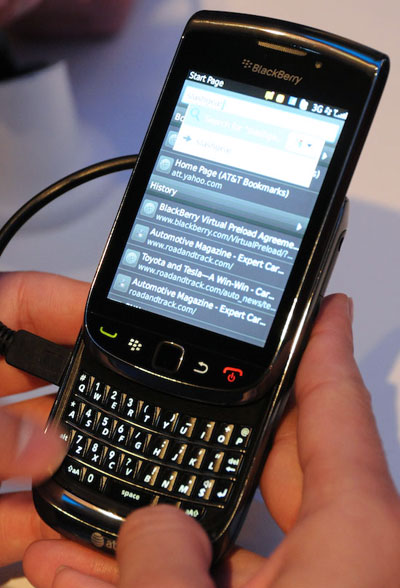
Whether or not you believe the new BlackBerry Torch 9800 from AT&T is as revolutionary as RIM’s TV ads imply, depends on what side of the smartphone divide you’re on. If you’re a current BlackBerry user, you’ll find the Torch a quantum improvement over RIM’s last touch-screen attempt, the Storm, and an amusing alternative to BlackBerry’s suddenly quaint non-touch interface. If you’re an iPhone or Android user, however, a few minutes touching Torch will make you chuckle patronizingly before returning it to its chastened owner. In other words, BlackBerry users will find it a huge step up, but it still won’t staunch the bleeding RIM continues to suffer from defections to the iPhone and Android phones.
Features and Design
Even though RIM touts the Torch as revolutionary, it’s a doppelganger of the Storm, only with the addition of a vertical slide-out keyboard – same size screen, same basic design and layout.
The Torch would have been revolutionary – or at least competitive – even a year ago, but now suffers badly in comparison with the latest wave of iPhone and Android superphones. It has just a 3.2-inch screen, the same size on the Storm, but now suddenly considered small, considering the iPhone has had a 3.5-inch display since for more than three years and the 4-plus inch screens available on the Samsung Galaxy S, Motorola Droid X and HTC EVO. A 600 MHz processor compared to the 1GHz engines on all recent superphones. VGA rather than HD video recording. The Torch does offer a modern 5-megapixel still camera and 3G tethering – nice, but hardly comparable to the mobile hotspot capabilities of the Droid X from Verizon, or 4G hotspotting on the EVO and the upcoming Galaxy S Epic from Sprint.
BlackBerry is building its own App World app store, but the Torch also includes AT&T’s own AppCenter app store, which is slightly confusing.
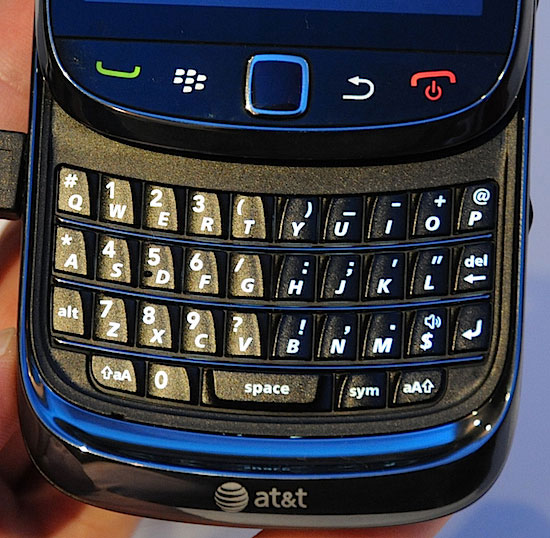 BlackBerry’s biggest attraction has and always will be its highly responsive, sculpted physical QWERTY, but the Torch compromises this prime feature. To slide comfortably under the Torch’s top screen half, RIM flattened the keyboard, and as a result, the keys are nearly flush and don’t have Blackberry’s deep, firm response. Even though the keyboard is around the same approximate size as on previous BlackBerry slab phones, you’ll find now trying to hit ALT and the adjacent 7 key nearly impossible.
Multimedia
As compared to the iPhone and the current crop of Android phones, the BlackBerry’s Torch’s knack for dealing with music, photos and video is limited.
While smaller than current superphones, the Torch’s screen is nonetheless big and bright enough for casual video viewing. But MobiTV offerings are pixelated, and instead of a dedicated YouTube app, the YouTube icon instead simply takes you to the YouTube Web site, and I could find no way to watch videos in high quality, as you can on Android or iPhone. AT&T’s own video service doesn’t seem to be pre-loaded on the Torch, but you do get PrimeTime2Go.
Sound Quality
Like previous BlackBerrys, the Torch gives excellent, crisp voice conversation with plenty of volume. For speakerphone and media playback, it also delivers plenty of volume, albeit thinner aural quality.
Phone Functionality

Torch maintains BlackBerry’s excellent functionality, in some ways thanks to, and in other cases in spite of, BlackBerry OS 6. App icons are laid out across swappable vertical screens – All, Favorites, Media and Downloads, Frequent – that can be pulled up like Android’s vertical app and notification screen. Icons can be moved within a screen or from one screen to another – but not all. It seems each app has its own set of user customization options. Even with some of these built-in restrictions, the Torch offers can more customization than the Storm or previous BlackBerrys.
With pages filled with app icons, it looks as if the Torch comes pre-loaded with lots of functions. But many of these apps are pointers only; you still have to download the full apps. And some of the icons aren’t actually apps. The CNN and ESPN icons are merely pointers to those Web sites.
But the Torch is filled with anachronisms left from the days of scroll wheel, jog dial and trackpad control. For instance, options have to be highlighted before activated with a second touch, and some menu items remain too small and too tightly bunched to ensure consistent clean and correct taps, hence the continued need for an optical trackpad.
BlackBerry 6 also isn’t as intuitive as its competitors; keyboards on both the iPhone or Android phones adapt depending on the app. The Torch’s landscape and portrait touch keypads, however, remain static, which is annoying since the “@” key is always on a secondary screen, even when used in an e-mail app.
RIM will eventually figure out what Microsoft discovered: You can’t take an OS designed for a physical button or stylus-based interface and map it to a touch. If you have a touchscreen, you shouldn’t need a separate optical track pad. RIM should just take an ax to its current OS and start all over to create a completely new OS founded completely on touch, as Microsoft finally did with Windows Mobile 7 after realizing adapting Windows Mobile 6 and 6.5 to full touch wasn’t working. Unlike Microsoft, (initial looks as Windows Mobile 7 on the Kins isn’t encouraging), RIM has enough goodwill and a large enough installed base to be successful.
Web
With just a 600MHz processor, Web surfing on the Torch is surprisingly – no, shockingly – sluggish. Web-optimized sites can take up to 10 seconds to load, three times longer than on the iPhone, while non-optimized sites can take nearly 30 seconds to completely load.
Signal Strength
In additional, signal retention is far less consistent than on the iPhone. While riding on an elevated train in New York City, the iPhone retained 3G connectivity while the Torch slipped to EDGE; and while coming into an underground station, the iPhone retained 3G connectivity longer and restored connectivity sooner than the Torch.
Camera

The Torch’s 5-megapixel camera may be its best feature. It snaps colorful, crisp pictures, geo-tagged outdoors, with little of the spotty off-center blurriness found on many cell cam images. Torch’s torch – er, flash – does a great job of illuminating subjects without overwhelming them, and most indoor shots are crisper than from other recent cameras.
VGA videos are bit a disappointing. The Torch shoots at 24 instead of 30 frames per second, with too much smudgy pixilation, even without blowing up the image.
Battery Life
RIM rates the Torch at 5.5 hours of talk time, but we always had plenty of life left after a full day of real-life usage.
Conclusion
The Blackberry Torch’s kludgy touch interface will not attract a single defector back to BlackBerry, and current BlackBerry users will not like the less responsive flush Torch keyboard. As such, it really doesn’t matter how advanced the new BB OS 6 is compared to previous BlackBerry touch attempts, or how good the camera is. RIM’s ads are correct: The Torch is the most advanced BlackBerry yet. It’s just not necessarily a better BlackBerry, or a competitor to phones running more sophisticated touch operating systems like Apple iOS and Google Android.
Highs:
- Bright, colorful, 3.2-inch LCD touchscreen
- BlackBerry 6 OS
- Vertical slide QWERTY
- 5-megapixel camera with LED flash
- 4GB built-in memory; 4GB card pre-installed
Lows:
- Functionality not completely compatible with touch
- Slow Web surfing
- Flat physical QWERTY keys
- Poor network connectivity
- Smaller screen than smartphone competitors