
“Offering convenience, affordability, and plenty of punch, JLab’s House Party speaker is locked and loaded for portable multiroom sound.”
- Impressive bass response
- Easy to set up and connect
- Solid battery life for its class
- Powerful sound
- No included wall charger
- Midrange sounds restrained
“Why you can trust Digital Trends – We have a 20-year history of testing, reviewing, and rating products, services and apps to help you make a sound buying decision. Find out more about how we test and score products.“
Wireless multiroom speaker systems are seriously cool, but they do have their drawbacks. For one thing, they can be pricey — often running hundreds of dollars for each speaker. For another, they can be difficult to use. Multiroom systems usually require connection to your home network and a complicated app to operate, and even finding compatible streaming applications can sometimes be difficult. They’re Finally, they’re rarely portable, requiring power and internet connection to spin their home-filling sound.
JLab tackles many of these issues with its new portable multiroom speakers, the House Party and Block Party. The pair ditch network-based multiroom setup in favor of good old fashioned Bluetooth, along with a self-contained 5.8Ghz wireless network to communicate with one another. That means they can travel with you to far-off places, free from the bonds of Wi-Fi.
The House Party is the smaller of the two, and while it serves as a relatively impressive micro-footprint option, with especially solid bass response for its size its small soundstage make it best suited to bathrooms, bedrooms, or backpacks. With its big brother offering some of the best sound in its class, we’d be more inclined to pick up a House Party as part of a Block Party-anchored setup — or even as an affordable portable option – rather than a foundational speaker for a multiroom sound system.
Out of the Box
The House Party comes in a simple rectangular box with almost nothing in the way of accessories. You’ll find a user guide, and a bright blue micro USB cable, but no wall adapter. Most of us have a USB wall adapter on hand these days, but it’s a bit of an oversight for a speaker that could occupy its own permanent spot in a multiroom setup.
Features and Design
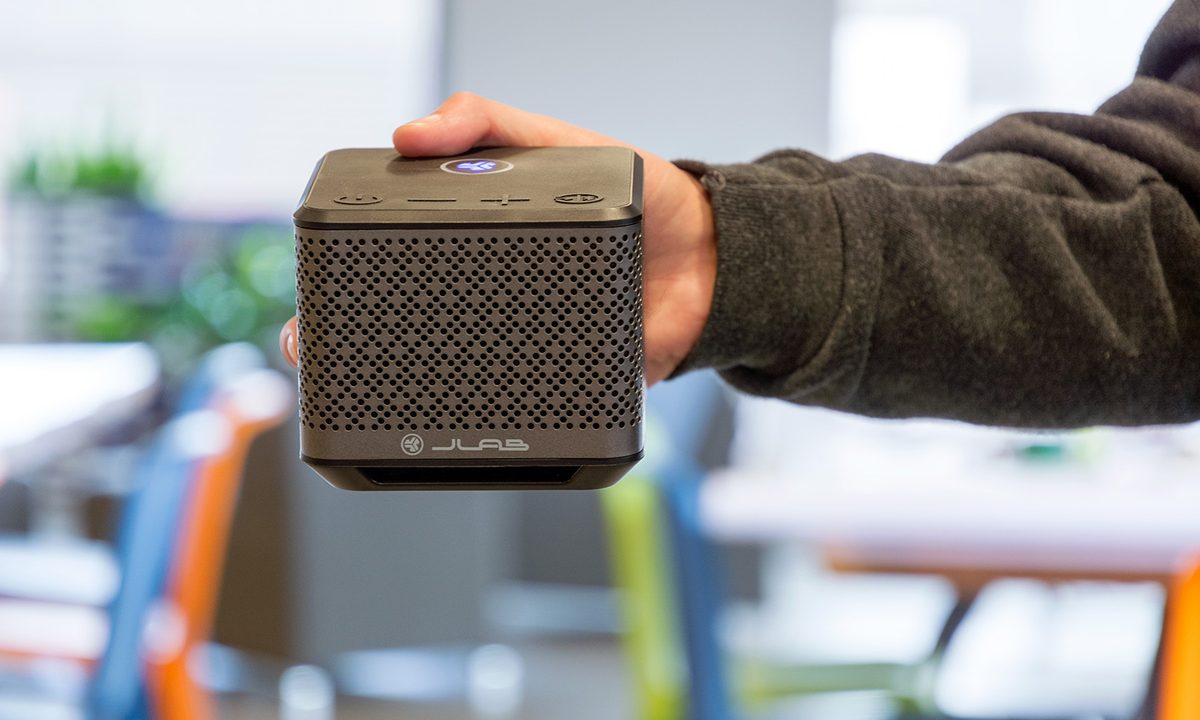
If the Block Party looks like a scale model of the Borg base from Star Trek NG, the House Party looks more like a smaller version of the cube from the Portal video game. A 2.5-inch x 4-inch x 4-inch rectangle with metal mesh on three sides and rubberized black plastic on the remainder, the House Party’s design is simple and petite enough to blend in well with its surroundings. The only standout design traits are a thin JLab logo on the bottom front and a LED-backlit multifunction button on the top. Unlike the Block Party, there’s no handle for carrying the speaker around.

A rubber seal at the back covers a 3.5 mm aux input, a USB port, and the charging port; the House Party has an IPX4 water resistance rating, making it splash proof, but not suitable for actual dunks in the water.
The House Party’s attractive design is simple enough to blend in well with its surroundings.
Along with the multifunction button, the top of the speaker boasts raised rubber buttons for power, volume, and Bluetooth pairing. Each of them are easy to find by sight or touch, but blend in easily with the background. As with the Block Party, one of our favorite design cues is the inclusion of step-by-step setup and pairing instructions on the bottom side for easy access.
Pressing the two volume buttons together for a short period indicates battery life. Pressing and holding the volume keys for three seconds allows you to change EQ settings between Indoor and Outdoor, invoking a blue LED flash for indoor listening, and a green flash for outdoor.
Audio playback is accomplished via Bluetooth or the 3.5 mm input when using single-speaker playback, while JLab’s built-in 5.8Ghz wireless connection comes into play when connecting another House Party or Block Party speaker. Battery life is nine hours, which is pretty solid for a device this size and price – especially one that gets this loud.
Bluetooth setup
As with most speakers, pairing the House Party to your phone via Bluetooth is easy. After hitting the power button, the multifunction button will pulse blue for Bluetooth connection or white for “Share” mode. If the speaker is in Bluetooth mode, simply locate it on your device’s Bluetooth menu and connect. If it is in Share mode, press and hold the Bluetooth button on the top of the device for three seconds to switch to Bluetooth mode.
Multiroom Setup
To set up two or more speakers in multiroom mode for the first time, Bluetooth pair with the speaker you intend to keep within 33 feet of your device (the master), then press and hold the multifunction button on the top of the speaker until it blinks blue, indicating you’re sharing to other speakers.

Once your master speaker is sharing, make sure the slave speaker(s) is in Share mode, and hold the multifunction button until it blinks white. The speakers (up to eight) will auto-connect, and the multifunction buttons will become solid white or blue, depending on which are in Share mode and which is in Bluetooth as your master. Once connected, you can move your slave speakers wherever you like within a 100-foot radius, while keeping your master speaker (and its Blue LED) within 33 feet of your phone or other Bluetooth playback device.
Putting the speakers in standby mode, accomplished by holding the power button on the master speaker for two seconds until red, retains your setup settings. Holding the button again takes the system out of standby, at which point the speakers will immediately reconnect and continue broadcasting.
Multiroom performance
When placing synced speakers around our home, office, and even outdoors, everything within the network’s 100-foot range worked just as advertised. The most impressive feature when connecting the House Party and Block Party speakers in tandem was the absolute lack of audible latency. Every sound we played between the two devices was in sync, even when stacking the speakers on top of each other. We’d be interested to see how the system performs when more speakers are added to the mix, but we can’t imagine performance will be much different given the dedicated streaming signal.
The 33-foot range restriction between source device and of your master speaker is a limitation, but there are ways around it. For instance, we Bluetooth paired our master JLab speaker to a desktop computer in the main area of our home, and then used the Spotify App on our phone to select the computer as a playback device, allowing us to change the music remotely in other rooms. Of course you can also take a speaker out of Shared mode and stream Bluetooth at any time.
Audio Performance
Especially when considering its tiny footprint and affordable price point, the House Party offers some pretty solid sound performance. A pair of 2-inch, 10-watt drivers push the audio on the left and right sides of the device, providing a good amount of stereo imaging, with dual 2-inch bass radiators spreading the low end love. As with the Block Party, we highly recommend listening only in Outdoor mode, as the sound with the Indoor EQ engaged is boxy and somewhat lifeless.
Battery life is solid for a device this size and price – especially one that gets this loud.
The House Party’s volume level is significantly less than that of the larger Block Party, but still remarkable for its size. The speaker was able to fill medium sized bedrooms with loud versions of folk classics like Dylan’s Like A Rolling Stone, which can be a struggle for smaller speakers.
Still, while we would recommend a single Block Party for even larger rooms, we’d recommend keeping the House Party contained to smaller environments, like a bathroom or bedroom. The max volume just isn’t powerful enough to fuel an impromptu living room dance-off like the Block Party.
The House Party’s sound is full and balanced, but the soundstage is fairly concise. On songs like Run The Jewel’s Oh My Darling Don’t Cry, the House Party shows off ample bass response, providing an enjoyable rumble for smaller spaces, but we didn’t get the wide stereo image we enjoyed from the Block Party.

The 2-inch drivers do well to highlight the upper register, but sometimes struggle with midrange frequencies, providing a scooped sound at the center. This was especially evident when listening to Whitney’s No Woman, which came off sounding more sterile than usual. That said, these audio gripes are not deal killers for an affordable and extremely small Bluetooth speaker, especially when used as part of a larger multiroom system with Block Party speakers in play.
In fact, in terms of overall sound, the House Party competes well with many other speakers its size, and is only all the more formidable when its multiroom functionality is taken into account.
Our Take
The House Party is a solid portable Bluetooth speaker, and would do well to supplement the larger Block Party in a multiroom setup, but at just $50 more, we’d prefer the Block Party when pressed.
Is there a better alternative?
If your budget can’t handle the pricier Block Party, there are many excellent Bluetooth alternatives hovering around $100, including the Sony SRS X5 and JBL Flip 3, but this is one of the very few speakers at this price with multiroom functionality, making the House Party an intriguing new option.
How long will it last?
The build quality of JLab’s speakers appears to be quite high, and with the IPX4 rating, we imagine the speaker will last for several years of moderate-to heavy use — provided you don’t drop it in the tub.
Should you buy it?
Yes, with some caveats. The JLab House Party has relatively impressive sound and a whole lot of functionality for a very low price. That said, given that the larger Block Party is only $50 more, we’d use the House Party to supplement the sound of Block Party speakers in smaller rooms, rather than as the foundational speaker in a multiroom setup.