1. Home
  2. Phones
  3. Mobile
  4. News

Your Gmail app will soon help protect you from scams

Add as a preferred source on Google
Moto G 5G (2024) in Sage Green showing Gmail.
Christine Romero-Chan / Digital Trends

Email scams are nothing new. The old Nigerian prince con has been around long enough that it’s become a meme, but more modern scams can be a lot harder to pick out. According to statistics, nearly 3.4 billion phishing emails are sent per day. Gmail will soon implement a feature on its mobile platform that puts a checkmark beside verified senders to help users tell what’s legit — and what possibly isn’t — at a glance.

The feature already exists on the Gmail desktop website, but with over half of all users accessing their Gmail accounts from a mobile app, it’s a welcome addition. It utilizes a standard called Brand Indicators for Message Identification (BIMI) and a Verified Mark Certificate (VMC). If an email contains these marks, it’s highly unlikely they come from a malicious source.

Recommended Videos

In order to qualify for BIMI and VMC, the sender has to have their brand logo and domain verified by an independent third party. It’s incredibly difficult for bad actors to qualify for these certificates, so any email that has both can reasonably be trusted.
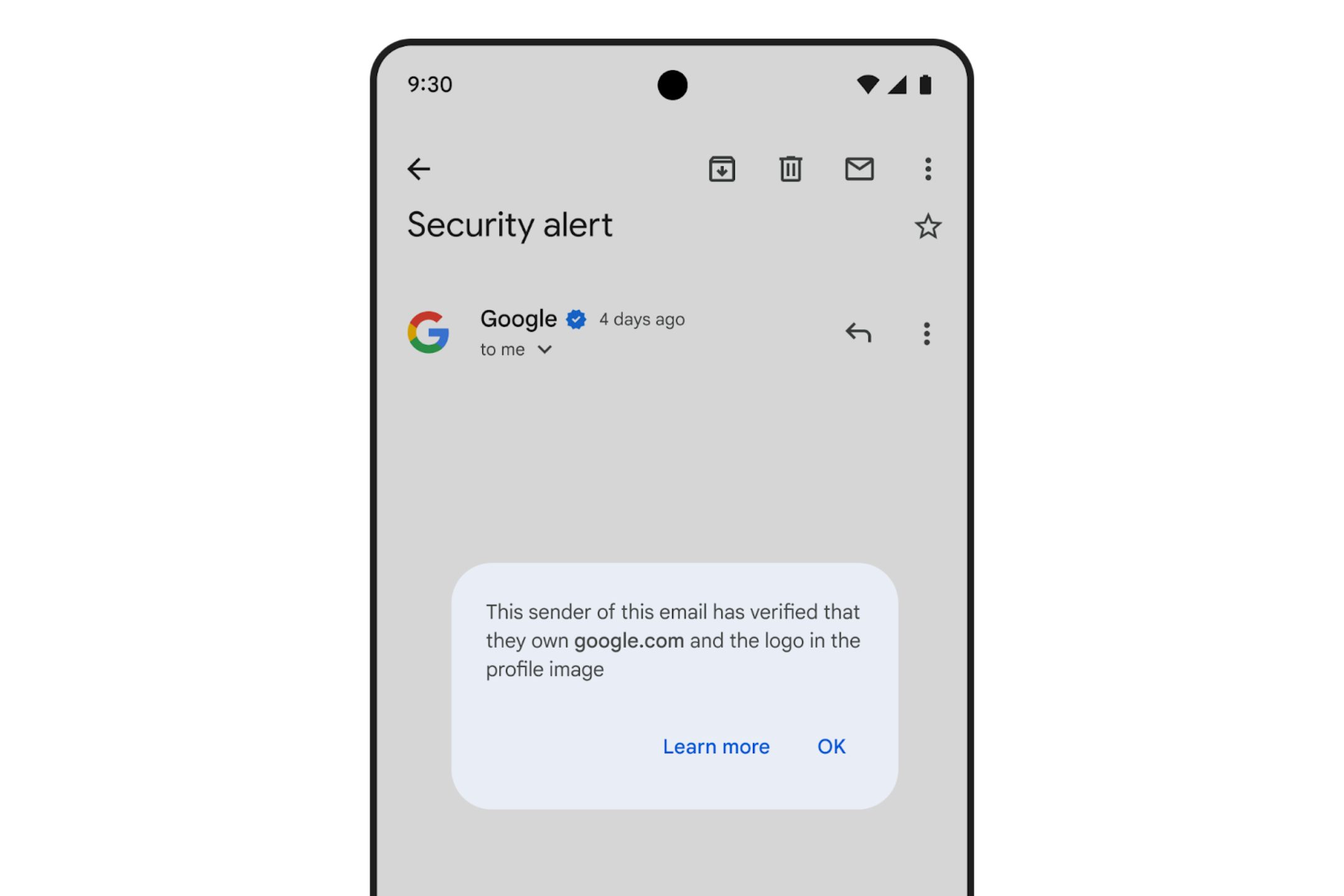
The Gmail app with a checkmark next to the email sender's name.
Google

Gmail is also launching support for Common Mark Certificates, or CMC. If a sender doesn’t have a trademark, they can’t receive the VMC, but they can still qualify for BIMI. In these instances, the brand avatar will appear without the verified checkmark.

Over the coming weeks, users will start to see these verification icons on the official Gmail app. If you use a third-party email platform like Apple Mail or Outlook, you won’t see the avatars or the checkmarks.

The change is coming to both iOS and Android platforms. If you can’t see the update yet, make sure you’re running the most recent version of the Gmail app. If that still doesn’t work, just give the rollout a bit more time to reach you.

Patrick Hearn
Former Technology Writer
Patrick has written about tech for more than 15 years and isn't slowing down anytime soon. With previous clients ranging from…
The EU says TikTok still isn’t doing enough to protect kids
Regulators say the platform's privacy settings don't go far enough under the Digital Services Act.
TikTok Creative Featured

The European Commission has accused TikTok of falling short on protecting minors, saying the platform's current account settings don't meet the child safety standards required under the Digital Services Act (DSA). The findings are preliminary, but if upheld, TikTok could face a fine of up to 6% of its global annual revenue.

Why the EU thinks TikTok isn't doing enough

Read more
Qualcomm is set to ratchet up chip prices in September, and your next gadget upgrade could bear the brunt
The price hike could touch every Snapdragon-powered device category.
The new Qualcomm Snadragon 8 Elite Gen 5

I want you to sit with this for a second. Qualcomm, the company whose Snapdragon chips sit inside your Android phone and tablet, your Windows laptop, your Meta smart glasses, your Galaxy Watch, and your wireless earbuds, reportedly sent a letter to every major customer telling them prices are going up by double digits. 

The price hike will be in effect from September 1, 2026, a recent Bloomberg report claims. Essentially, all the companies placing their chip orders after that will pay a higher price. 

Read more
Enter the wrong PIN 13 times and your Galaxy phone is locked for good
New Galaxy phones will require a factory reset after 13 failed unlock attempts
Samsung Galaxy S26 Ultra smartphone in blue color.

Samsung is making the lock screen much harder to break on Galaxy devices launching with Android 17-based One UI 9. Enter the wrong PIN, pattern, or password 13 times, and the phone will stop accepting attempts. A full factory reset will then be the only way to use it again.

The change is designed to stop brute-force attacks, where someone repeatedly guesses different passwords until one works. It is a major shift from older One UI versions, which mainly relied on temporary waiting periods rather than a mandatory final lockout.

Read more