
We’ve recently tackled the beauty of data in music discovery and how most of the apps we use to make playlists run on algorithms that build off of what we are currently listening to. Of course, there’s plenty of value in the human touch when it comes to something as subjective as music. Well, Serendip is stepping up to the plate to try and unite math with personal preference to perfect your playlist-making.
Instead of running on an algorithm that matches songs in terms of attributes like key and tempo the way MixShape does, Serendip completely abandons technical data and goes for the tried-and-tested: music recommended by people who share your preferences. How is it any different from popular music apps like Spotify or Pandora? “Serendip is a lean-back experience, so it just plays great music for you, without the need to know what you want to listen to or actively selecting an album or channel,” Serendip Founder and CEO Sagee Ben-Zedeff says.
Currently, Serendip is available for iOS devices, but there’s also a Web version.
How it works

Users are free to choose between their Facebook and Twitter accounts to sign into Serendip. After granting the necessary permissions to access your feed, you’re required to specify a username for the service.
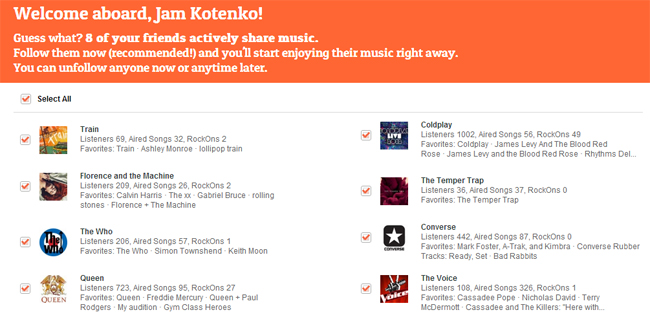
The system detects musical acts you follow right off the bat and auto-follows them, an option you can modify later on.

Since Serendip runs primarily on personal music curation, it requires you to add artists that you like. To make sure the service provides relevant music, it also encourages you to remove artists you’re not that into anymore.
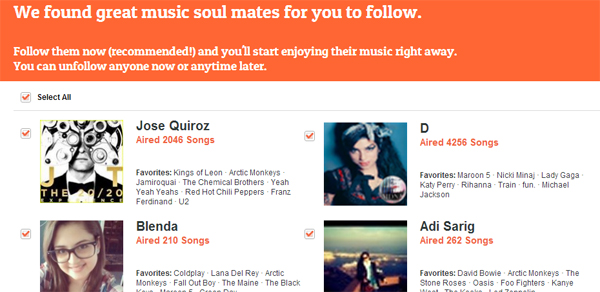
And then, much like an online dating website, Serendip suggests “music soul mates” for you to follow to enhance your overall experience. Don’t worry about all of this verging on creepy – the list of people brought to you simply like the same music you do – you can always unfollow people later on.

What’s good

You are led to a pretty organized dashboard that features videos sourced from the pages you follow on Facebook. Every video that plays offers you three options: Re-Air to share the video with everyone you know, Rock On to tell the page who posted the video how much you love the song, and Block to never listen to the song on Serendip again. You can also get the song on iTunes via the download link.
Beside the song video, you are given information regarding the page of its origin as well as other users who’ve “aired” the same song. The first few songs you get to listen to are from your own Facebook News Feed – some of them you may have unintentionally missed in the past – as well as from acts you manually added in Serendip. It gets interesting once you get to the songs sourced from your new music soul mates; chances are, you’ve never heard a lot of them before, and that’s where the discovery starts.
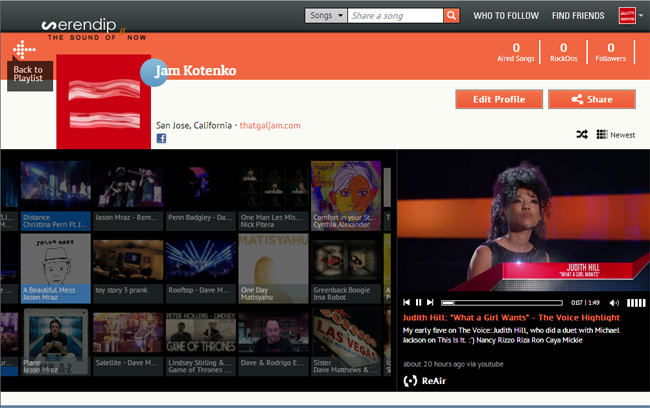
Want an easy way to access all the YouTube videos you’ve ever shared on Facebook? You can do that, through your very own DJ page on Serendip. You can peruse and re-live all the good vibes you felt when you first listened to the songs you shared – you can even make a playlist out of it and shuffle the songs.

Not satisfied with the music content you’re getting? Finding more music soul mates is the name of the game. By clicking on Who To Follow, you can fine-tune your Serendip playlist further, where you can connect with more like-minded music lovers. During initial sign up you are only given nine artist slots to fill; through the DJ Recommendations page, you can also add more artists you like and follow people who share your music taste. You can also follow more Facebook pages.
There’s another way to enrich your Serendip experience – if you’ve chosen a particular account to connect to the service, you can also add the other. Connecting via Twitter will give you a recommended option to add all the people you follow on Twitter as DJs, which you can modify and prune later on through Settings.
What needs more work
It seems like the only way available right now to share tunes from Bandcamp or SoundCloud is by sharing it on Facebook or Twitter first. Though it’s not a big deal since you can set up Serendip to automatically add content from your social networking accounts as they become available, it would be nice if you had the option to import songs into Serendip directly. In fact, we could use an option to add more music-related accounts like LastFM, Spotify, Pandora, Rdio, and other sites that allow music video sharing like Tumblr.
Other than that, we’ve got no complaints. Serendip is a fun, easy way to avoid the over-metricized methods of finding new music.