
“...this is a truly awesome player, even without WiFi, thanks to top-notch sound, attractive styling, and an effective touchscreen.”
- Great audio and video quality; flexible sound enhancements; responsive touchscreen
- Poor battery life with Bluetooth enabled; supports only Windows OS; lacks integrated WiFi
“Why you can trust Digital Trends – We have a 20-year history of testing, reviewing, and rating products, services and apps to help you make a sound buying decision. Find out more about how we test and score products.“
Summary
Samsung’s new flagship portable media player, the P2, is sleek and svelte enough to catch the eye of potential iPhone or iPod Touch buyers. Sammy’s touchscreen interface isn’t nearly as sophisticated and fluid as Apple’s, and the player’s lack of WiFi may be a dealbreaker for some, but the built-in Bluetooth is handy for wireless listening and even for taking calls. We took our P2 for a spin and found it a worthy competitor to heavyweights like the iPod touch and the Microsoft Zune.
Features and Design
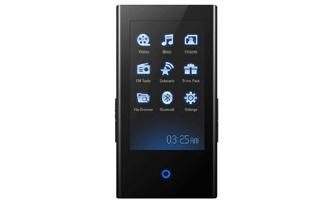
The Samsung P2 looks like a less-polished version of the iPod touch, with a 3-inch touchscreen that’s oriented vertically in a 16:9 aspect ratio (480 by 272 pixels). The LED just below the screen looks like it should be a dedicated Home/Menu button, but it’s actually nothing more than a status indicator light.
A hold switch and power/play/pause button grace the left edge, while the right side has a pair of volume controls — an advantage over the iPod touch’s on-screen volume slider. The charge/sync connector on the bottom between the headphone jack and pinhole mic is proprietary, so don’t lose that cable!
The black plastic-bodied unit measures 3.4 by 2.05 by .39 inches and weighs a hair over 3 ounces. Overall, the P2 feels good in our hand; though we wish the buttons on the sides were placed closer to the top of the device for better comfort. The screen picks up fingerprints easily but is scuff-resistant, though we have a tendency to take good care of our electronics.

The Samsung P2 fits perfectly in your hand
You can pick up the P2 in two flash memory configurations: 4GB ($200 USD) or 8GB ($250 USD). Given that Samsung manufactures its own flash memory – as well as the fact that there’s a 16GB iPod touch — we’re surprised no 16GB P2 exists yet.
Wireless Goodies
Samsung included Bluetooth but no Wi-Fi, so if you have to surf the Web or watch YouTube clips on your player, try the Archos 605 Wi-Fi or iPod touch. Sadly, that means no wireless sync, streaming, or downloads, and no Internet radio (though there’s an FM tuner). The P2 supports AVRCP and A2DP profiles, so you can listen to music wirelessly in stereo on up to two headsets simultaneously.
The real kicker is that you can pair the P2 with a headset and a cell phone; when a call comes in, the P2 switches the headset audio to the incoming call, and you can talk via the pinhole mic on the bottom of the player. It sounds klunky, but pairing our Jabra BT8030 headset and Motorola RAZR Maxx Ve was smooth in our testing, and although call quality wasn’t great, it was passable. Of course, to have all your devices’ Bluetooth features turned on all the time will drain their batteries more quickly.
Speaking of battery life, Samsung claims 30 hours of audio playback time, trumping the iPod touch’s 22 hours, as well as 5 hours of video per charge. Note that you’ll get far less battery life with features like Street mode, sound enhancement, Bluetooth, and shuffle enabled. The screen is bright by default, but for music listening you can squeeze those extra few hours out by dimming it.
Setup and Use
Syncing the P2 with Windows Media Player in Win XP Pro and Vista is no problem. WMP converts your videos into P2-friendly WMV format, though the player also supports MPEG-4 in Samsung’s SVI format and WMV9 (DRMed movies), as well as JPEG for photos. Audio support includes WMA (including protected), OGG (in mass storage mode) and MP3 out of the box, however the latest firmware update adds AAC audio support and Bluetooth file transfers. So make sure you visit the Samsung website to make sure your P2 is up-to-date.
The touchscreen is responsive and the interface speed is fine. Navigation is simple but may take some time to learn if you’re used to the iPhone or iPod touch, partly because you have to double-tap the screen sometimes to select an item. The screen doesn’t do multi-touch, but it does support swiping for some actions (notably the adjustable interval skipping). The menus are customizable with several different skins and fonts that add to the player’s attractiveness. We also like that holding down the virtual Back button on the Now Playing screen takes you directly to the main menu.

The Apple iPod Touch (left) and Samsung P2 (right)
Content is King
We had no problems syncing and viewing movies from CinemaNow and Vongo to the P2, and it worked fine with Rhapsody To Go. Samsung’s Media Studio software gives you access to Datacasts, which are basically RSS feeds that you can download to your player. While this is an interesting idea, we’re not particularly impressed with the feature since you can’t update the feeds wirelessly. Samsung has its own content portal through which you can purchase movies and music – but like many of our favorite Korean products; it’s not available in the U.S.
Sights and Sounds
Videos and photos look sharp and clear on the 3-inch touchscreen, and playback is smooth with well-synced audio. When Windows Media Player crushed our high-res AVI files down to a WMV format that the P2 can read, the resulting files had compression artifacts, but the P2 rendered everything in the file very accurately, including color.
Despite excellent video performance, Samsung’s main goal with the P2 was clearly to build a better music box. The P2 has stellar sound quality, as well as an excellent set of sound enhancement tools.
The included earbuds are good for what they are, but the P2 was made to drive higher-end cans. Our Etymotic ER4 in-ear headphones simply sang, especially when we tweaked Samsung’s versatile and effective DNSe settings (we liked the Studio preset the most, though you can also set the EQ manually), beefed up the output volume with Street mode, and set the Clarity enhancer to medium.
Extras
Oddly, most of the P2’s extra features are under the heading of “Prime Pack”. They include a text reader, alarm clock (which would be more useful with a built-in speaker, read-only calendar, and a world clock. From the main menu, you can also access the file browser and FM tuner. Radio reception in New York City was about average; fringe stations like 88.3 (WBGO in New Jersey) were static, but bigger stations were crystal clear. We were told that Samsung would be adding FM recording capabilities in a January ’08 firmware update, so stay-tuned. Since the player doesn’t have Wi-Fi, it makes sense that Samsung left out features like contacts sync and song sharing (à la Zune), but an editable calendar would still be nice.
Conclusion
At $200 USD for the 4GB model and $250 USD for 8GB, the P2 isn’t the most aggressively priced player out there, though the 8GB version is still cheaper than the 8GB iPod touch. The convenience of built-in Bluetooth is hard to overlook, and using the P2 as a surrogate handset may intrigue gadget-aholics. We wish Samsung would include Mac OS support or at least a USB disk mode for the Mac, not to mention broader file format support. But for Windows users this is a truly awesome player, even without Wi-Fi, thanks to top-notch sound, attractive styling, and an effective touch screen.
Pros:
• Excellent sound quality
• Flexible and effective sound enhancement options
• Built-in Bluetooth supports multiple headsets and call taking
touchscreen is sharp, bright, and responsive
Cons:
• Sound enhancement and Bluetooth eat away at battery life
• No Mac OS support or USB disk mode
• Limited audio and video file format support
• No Wi-Fi